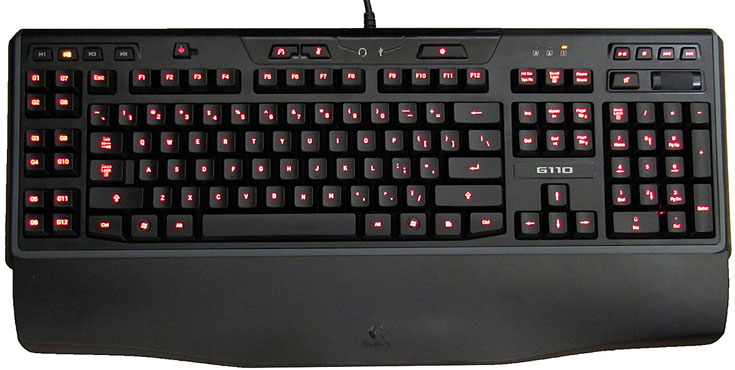
It was back in 2003 that Auravision released their backlit EluminX keyboard, single-handedly defining the very concept of a gaming keyboard. Now, almost seven years later, the standard gaming keyboard armament has been expanded upon this to include macros and multimedia functionality. Logitech’s latest entry in their G-Series keyboard lineup takes this formula and runs with it. Enter the Logitech G110, the successor to G11 from 2006. Equipped with user-configurable backlighting, USB audio, and a complement of 12 macro keys, how does this new contender stand up against the competition? Feast your eyeballs on our in-depth review and find out!
Size Does Matter
If there was one glaring fault to the otherwise brilliant G11 and G15 keyboards released in 2005, it was their immense footprint. Measuring in at 21.5″ wide and 10.25″ tall with the wrist rests attached, the keyboards consumed more than their fair share of desk space and often had trouble fitting into LAN gamers’ travel bags. Logitech tried to address this issue in 2007 with the smaller G15 revision 2, though this new model was widely criticized as being an inferior due to its unsightly amber backlighting, reduced screen legibility, and reduction to only a third of the original’s macro keys.
Logitech thankfully spared the screen-less G11 the same “upgrade” treatment, but the fact remained that it was still too big for most gamers’ desks and needed to be scaled down somehow without repeating the mistakes from the G15v2. In 2009, Logitech again tried to address the size issue with the release of their G19 and G110 keyboards, and this time they actually succeeded.
At 20″ wide by 9.25″ tall, the G110 is roughly 16% smaller than the original and is actually able to fit into most small duffel bags as well as Dust-Off’s “Keyboard Quiver” LAN bag. Even better, the keyboard’s image has undergone a dramatic redesign. The chilling black and gray motif combined with the keyboard’s svelte profile present a much more refined look, giving the G110 the appearance of a professional tool whilst retroactively making the G11 look like a Playskool toy. The G110 is, in a word, ninja.
As a ninja, the keyboard employs dome-switched keys that are relatively quiet and highly responsive. The space bar is well balanced and each key has a pleasantly crisp feel to it, well suited for touch typists and gamers alike. Though I personally would prefer to have Cherry mechanically switched keys à la the Deck Keyboard, this would undoubtedly serve to raise the G110’s cost so I can see why Logitech has yet to make the jump.

Of course, ninjas were never skilled in the art of cable management, and the G110 isn’t an exception to this fact I just made up. Like all the G-Series keyboards before it, the G110 has cable trenches on the backside meant for mice and headphone cables, but the frustration in keeping the cables in place is hardly worth any aesthetic benefit. Since Logitech didn’t think to implement any sliding clips or other gizmos to keep these cables secured in place, you’ll find that they’ll quickly fall out as soon as the keyboard is flipped over or propped up on the two kickstands.
Extra USB Port Convenience
Unlike the rest of Logitech’s G-series keyboards that each feature 2 USB ports, the G110 is limited to a single USB port, though to be honest I can’t recall ever needing more than one USB port on my keyboard anyway. This single port has been upgraded to USB 2.0 spec, an improvement over the G11 and both of the G15s. It supplies ample power for most flash drives including Corsair’s 128GB monstrosity, gamepads, headsets, and my Windows Mobile phone that managed to draw just over 900mAh. The G110 would not power my Logitech V20 speakers, however, and it’s possible that some portable hard drives may also run into power issues.

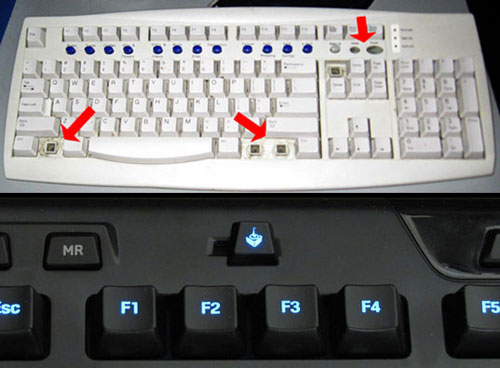
One other feature of interest is the Gaming Mode switch used to disable the Windows key. Though similar toggles and switches are now available on competing boards from Microsoft, Saitek and Razer, you have to give credit where credit is due and recognize Logitech as the original innovator here. Well, almost. I know one gamer in the SoCal LAN party scene who realized a “gaming mode” long before Logitech did with this awesome beige alternative. ^_^
Last but not least, at the top right of the keyboard is an array of four media playback controls along with a decidedly large mute button and volume roller for the default audio device in Windows. I cannot emphasize enough just how much I like the volume controls here; it’s impossible to miss the mute button when you need to mash it quickly, and the roller is the smoothest if not most precise volume control I’ve ever seen implemented on a keyboard.

Execution by Macro
 Though intricate control schemes and space combat sims may be all but dead thanks to the proliferation of mainstream gaming and consoles, MMO and strategy games are still as complex as ever, driving the need for macros to help simplify things. On the left hand side of the keyboard we’re treated to two columns of macro “G-Keys” arranged into three clusters of four keys each, an even compromise between the G11/G15’s 18 keys and the G15v2’s paltry 6. Just above these clusters are the three M-keys used to switch between macro sets for a total of 36 different macros per profile, along with the MR key used to record Quick Macros while in-game.
Profiles can be created for individual applications and games, which are automatically activated as soon as the program is brought into the foreground. A default profile also exists for applications not specifically tied to any one profile. If you’re truly hungry for macros then it’s possible to create more than one profile for an application, again with up to 36 macros each, and then bind a hotkey to cycle between said profiles. As best as I can tell, there’s no limit to the number of profiles created, but I’d be amazed if there was actually a need for any more than two.

The macros themselves can be delectably complex thanks to the G-Series Key Profiler’s macro manager, offering fine precision over the order in which keys are pressed and released, as well as the time delay in between keys if necessary. Through this utility it’s also possible to add simple mouse events such as mouse clicks and scrolling, though mouse movements are notably absent unless you want to dive into the Profiler’s robust LUA scripting interface. Most importantly, there doesn’t seem to be any arbitrary limits to the number of keystrokes contained in any single macro.

I should point out that a few websites including Logitech.com incorrectly list the Logitech G110 as having onboard memory to store game profiles directly on the keyboard for use with multiple computers. This is undoubtedly a misprint, as the G110 does not have a Game-Settings-To-Go button in the Profiler utility nor is this feature mentioned anywhere on the keyboard’s packaging. Only the G19 and G13 gameboard have this feature, though frankly I doubt most people would care since it would still require the Logitech software to be installed on each machine.
Backlighting
The G110 keyboard’s backlighting represents a significant improvement over the older G11’s monochromatic blue aura. Each of the 128 keys is painted black with a wear-resistant finish, and then laser etched to allow the backlighting to shine through. While this finish is immune to persistent scratching with my thumbnail, it’s still vulnerable to harder materials so you’ll want to take extra care when transporting the keyboard to LAN parties so you don’t ruin the effect. As you can see below, the key lettering is clearly legible in the dark and the backlighting doesn’t bleed in-between keys.

 Underneath the keys is an array of blue and red LEDs that can be mixed to create different hues and brightness levels – mostly variations of red, blue, purple and fuchsia. Indicator lights glow a separate amber or red and cannot be changed. The red color preset looks remarkable even in well lit rooms, and though the blue preset is somewhat washed out by other light sources, it’s still noticeably brighter than the G11. What stinks is that by the exclusion of the green backlighting channel otherwise found in Logitech’s G19, G13, and Dellienware TactX keyboards, the Logitech G110 misses out on a large spectrum of color. Say goodbye to green, orange, yellow, cyan and white!
The only other flaw with the keyboard’s backlighting is a small hole located towards the bottom of the numpad, creating a “hot zone” that’s visible if you’re sitting in a straight upright position or just walking past the keyboard. It’s not a terrible eyesore, but it’s annoying in the same sense that a small car dent would be. My recommendation? Use some black electrical tape to plug the hole.

Backlighting color is directly tied into game profiles with one color defined for each M-key setting, potentially useful for quickly making the distinction between macro sets used for different play styles such as red for killing and blue for healing. It’s also possible to configure the backlight color through the built-in LUA scripting engine, allowing for the creation of groovy color changing scripts.
USB Audio – Hear and Be Heard
One key advantage the G110 holds over its big brother is the onboard USB audio chipset, allowing gamers to experience crackle-free audio with traditional analog headsets. Unlike other keyboards that merely act as extension cables to existing sound cards, the use of USB surround sound removes the small whines and pops commonly experienced with onboard sound or even a case’s front panel headers hooked into a discrete sound card. It also reduces the number of cables from three to one.

The USB audio also acts as a second audio device in Windows, opening the means for directing in-game audio to the main speakers and VoIP communications to the headset. Leveraging this second audio device are two buttons to mute the headset’s input and output independently of whichever audio device is set as the default in Windows. Logitech also smartly chose to implement jack auto-sensing on the keyboard, meaning that if you plug in the keyboard without a headset, no new audio device will be created and your computer’s audio settings won’t be touched.
Audio output quality is more than acceptable for VoIP and casual gaming on the G110 thanks to a 16-bit depth and 48kHz sampling rate, though as a driver-free USB audio device there aren’t any equalizer settings or environmental effects to play with outside of the “enhancements” already offered by Windows. Virtual surround sound is also MIA since it would likely eat into Logitech’s G35 headset sales. The monaural microphone input is remarkably clear again at 48kHz, provided that you take the crucial step to disable AGC in the microphone properties. In an apples-to-apples comparison pitting the G110 against an Asus Xonar DX sound card also set to 48kHz 16-bit, the two are on par with each other in terms of clarity and volume.
Recap
When all is said and done, the Logitech G110 may not be the perfect keyboard for everyone. Depending on your personal preferences, you may gravitate towards one that’s slightly cheaper with less frills, or perhaps one that has a feature the G110 is lacking such as mechanical keys or green backlighting. But with second-to-none macro and quick-macro creation, configurable backlighting, a gaming switch, media controls, USB audio and a USB 2.0 port, the G110’s feature set is unmatched by any competitor at its street price of $70. Better still, each of these features is executed admirably well and the keys themselves type like a champ. If you love macros, you’ll love this keyboard.