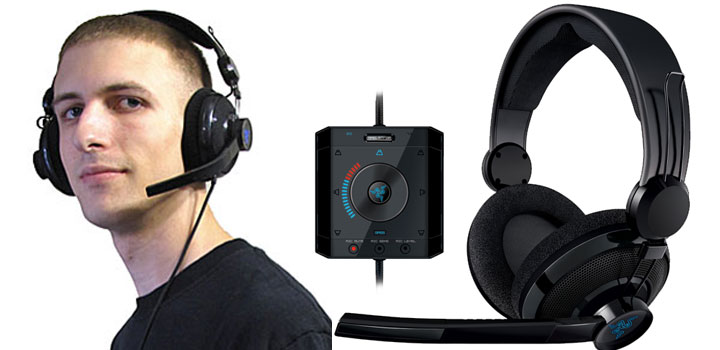
It’s been a long wait, but Razer Megalodon is finally here. While physically composed of only two 40mm drivers, the headset is capable of simulating immersive 7.1 surround sound without the need for any software installation – ensuring true USB plug and play operation across platforms. We at Everything USB have put the headset’s quality, compatibility, and LAN party readiness to the test in a wide variety of applications for both Windows XP and Vista. Curious to see how the headset stacked up? Read all about it after the jump.
Contents
Lightweight Design
After getting over my giddy anxiety from opening a felt-lined box that smells like a new pair of sneakers, the first thing that struck me about the Razer Megalodon is just how incredibly lightweight it is for gaming headsets. The lightweight design can be attributed to the use of lightweight plastic and foam materials, along with the substitution of typical solid-core headband slides for a set of wireframe rails. To anyone who follows Razer products closely, this should come as no surprise; the Megalodon is practically the same as Razer’s other headset to be named after a shark, the Carcharias, which was met with near-universal acclaim for its quality and comfort.
What the Razer Megalodon lacks in its disdain for heavier, more durable materials is easily made up for in its simplicity; there’s very little that can go wrong with this headset structurally. Because there aren’t any hinges or ball joints that could easily be broken, the conformity of the cans is instead derived solely from the flexibility of the wireframe rails, and these prove to be quite flexible indeed.
The exposed wires between the earcups and headband are sheathed in a slick braided fabric for protection and have plenty of slack to prevent shorts from occurring. Also, the circumaural earcups are easily serviced for cleaning with a twist on/off design and aren’t prone to having the padding slip off. Best of all, a hard shell carrying case is enclosed in the box for LAN party gamers and tournament players, thus ensuring the headset won’t be crushed in a stuff sack during the 10-hour drive to Quakecon.
Aesthetically speaking, the Megalodon follows Razer’s usual mantra of keeping everything as black as black can be, augmented only by glossy black and an electrifying blue. Though there’s little eye-catching about the design apart from the dimly lighted Razer logos on each earcup, the headset maintains a professional appearance that speaks nothing but serious business.
 The Razer Megalodon’s comfort is paramount. I have yet to review any headset that’s been more comfortable than this one, and that includes Logitech’s premium gaming headset. The circumaural pads are covered in breathable fabric so my ears don’t overheat as quickly as they would with leatherette, while the lightweight and well-balanced design ensures my neck won’t develop a cramp after hours of gaming. Topping things off is the ultra-wide headband with thick foam padding, helping to alleviate the vice-like pressure exerted on my ears with other headsets. On the day that video games are regulated for their addictive properties, the Megalodon will most certainly be classified as gaming paraphernalia and regulated by the DEA.
Sound Controls
The headset’s controls lie in a desk-mounted unit approximately 50 inches down the Megalodon’s 130″ braided cord, again keeping with the classic black and blue attire but this time more easily smudged by fingerprints. This is in stark contrast to most other headsets that keep the controls mounted in a smaller pod to be clipped to a shirt. Though the unconventional control arrangement effectively restricts my movement to a 50″ radius surrounding the desk, it offers two key benefits: my daily caffeine intake has dropped now that I’m no longer able to reach the minifridge, and it ensures constant visibility of the controls for quick adjustments to various levels while in-game.

The top of the control pod features a toggle button to switch between 2.0 and 7.1 audio modes, while the center button and wheel offer adjustment for the master volume level in addition to fine-grained control over all 5 groups of channels – Center, Front, Side, Rear, and Bass/LFE. This is great for adding additional emphasis to the rear channels in games that don’t already have a clear distinction between front and back. Treble adjustment is notably missing from the Megalodon, but the headset honestly doesn’t require it; it seems to already have its equalization in check. And though the volume is capped at a moderately safe level by default, this can be pushed past 11 by raising the levels of the individual channel groups before cranking the master volume.
As best as I’m able to tell, the Razer Megalodon is the first virtual surround sound headset that works without the need to install any driver software on the host operating system. Instead, all the HRTF effects processing is handled by the headset’s Maelstrom audio engine embedded in the headset’s firmware. As far as Windows is concerned, the headset is simply a standard 8-channel USB audio device that uses the stock USB audio driver. This holds true for Mac OS X and presumably Linux as well. Though application compatibility is at the whim of the operating system as a result, the benefits are twofold: no additional CPU or memory resources are consumed by the headset, plus the Megalodon can be used in an eSports environment where software installation is normally prohibited.
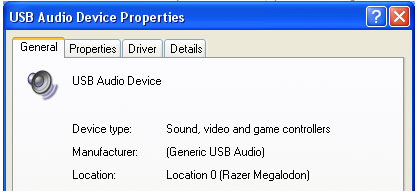
It’s also interesting to note that the Razer Megalodon is the first USB audio device we’ve encountered that prevents adjusting the volume through the operating system’s controls, rather the volume may only be controlled by the headset itself. In Windows XP and Mac OS X the volume controls are completely disabled, and as a result the volume icon is also removed from the Windows taskbar whenever the Megalodon is set as the default audio device. Windows Vista manages to keep the volume controls intact, but only allows for limiting the volume levels outputted to the headset, much like how iTunes is able to limit its own volume.

Recording Controls and Quality
Other controls on the Razer Megalodon’s control pod include microphone mute, microphone sensitivity (noise filtering), and microphone level (volume). When activated, the latter two controls will mute the computer’s output then enable microphone loopback so that you may hear yourself as hear you, a rather nifty feature in my opinion. Sadly, microphone loopback can’t be enabled during normal operation.
Sitting next to two computers with fans at a moderate speed and an AC unit in the background blowing air, the Mic sensitivity control seemingly did nothing to reduce background noise; recording back-to-back samples at 0, 70% and 100% sensitivity had no audible difference. Still, the recording quality was still above average compared to onboard audio. Friends reported that my was voice was loud and clear throughout Skype calling sessions, plus my teammates had no problems understanding me during the heat of a Team Fortress 2 match using the game’s built-in VoIP.
Stereo Sound Quality
The Megalodon’s 40mm drivers did a fantastic job of handling stereo audio in all of my listening tests, and I was thoroughly impressed by how hauntingly well all the subtleties were preserved in my collection of Nine Inch Nails tracks. Mids and highs are especially clear, allowing for well-defined vocals that relay every bit of emotion the recording artist felt. The clean bass was deep and powerful, yet lacked the extra “kick” that I was looking for in trance music unless I held the earcups tight to my head – a tradeoff of reducing the vice-like pincer effect, it seems. Despite this, I still feel as though the Megalodon has captured the essence of reproducing quality stereo music and as such has raised the bar for what 2-channel audio should sound like in a gamer’s headset.
 What the Razer Megalodon doesn’t do, however, is upmix stereo sound into surround sound as can be done with Creative’s CMSS-3D technology and Dolby Pro Logic IIx – two technologies found in many discrete sound cards along with the Logitech G35 headset. Though it’s still possible to enable the Maelstrom 7.1 engine when listening to stereo content, I strongly discourage anyone from doing so; It’s as if you’re being submerged in an underwater echo chamber. To be fair, Razer also recommends against using the Maelstrom engine for stereo sources, but there are still many including myself who find spatialized audio to be easier on the ears for extended listening sessions and simply miss having it when it’s not there.
Surround Sound Quality
In the still-emerging market of surround sound headsets, there exist two different camps with opposing trains of thought. In the first camp we have multiple physical drivers in each earcup, typically limited to 5.1 audio with 40mm drivers for the front channels and 30mm drivers for the surround channels. While this produces an easily distinguishable sound field and can be even be used with your existing sound card in some cases (Tritton AX51, Razer Barracuda HP-1), the surround effects usually suffer from being limited to the smaller 30mm drivers and will produce a more tinny sound.
In the second camp we have more traditional headsets with only 2 physical channels, but by applying special algorithms to the various input channels they’re able to create truly immersive virtual sound fields. Because software algorithms don’t take up physical space, these headsets are usually able to handle more expansive 7.1 audio for better positioning. Also, processing all sounds through the same 40mm drivers also means the headsets are immune from the tinny sound issue that plagues the first camp. I personally see this second camp as the future of surround sound headphones, and the Megalodon just happens to be a part of it.

The headset’s Maelstrom audio engine does a spectacular job of creating a virtual 7.1 field, and is much more natural-sounding than my Asus Xonar’s implementation of Dolby Headphone could ever hope to achieve. Though I didn’t find the Megalodon’s surround quite as convincing as the Logitech G35, after putting it through its paces in the THX Jungle Sounds demonstration (Google it!) and a number of other DVDs, I could still appreciate the chilling flyovers and various HRTF effects to my great satisfaction. Dolby Digital and DTS tracks were handled A-OK, although any of the DVDs that I’d ripped in Handbrake using default settings were stuck with mere stereo sound. This is because the Razer Megalodon can’t decode Dolby Pro Logic II tracks, but alas this is only a small selection of my video library.
Surround Sound Gaming
Because I’ve given up on Mac gaming nearly 5 years ago and no longer have an Apple machine with a dedicated graphics card, all my game compatibility testing was limited to Windows XP and Windows Vista, the two most common operating systems in use today for gaming. If anyone would like to test the Megalodon in Mac OS X and email me the findings, I’ll be more than happy to post them here in the review with full credit given.
Here are the full results of my video game testing using a variety of DirectSound and OpenAL titles. Pass/Fail was determined by whether or not the surround sound was working properly and if the sound quality was good enough for Joe Sixpack.
Megalodon Compatibility (Windows Vista x64)
All these tests done on the Megalodon were carried out on a Windows Vista x64 PC.| Game | Result | Remark |
|---|---|---|
| Battlefield 2 | Fail | All combinations of settings result in stereo sound. |
| Battlefield 2142 | Fail | All combinations of settings result in stereo sound. |
| Call of Duty 4: Modern Warfare | Pass | 5.1 works great! Surround audio actually comes through rear speakers instead of side when configured as 7.1 in Windows Vista. This configuration is preferable and helps with better distinction between front and back. |
| Call of Duty 5: World at War | Pass | 7.1 works great! |
| Counter-Strike: Source | Pass | Effective 5.1 only; 7.1 mode does not utilize side channels. |
| Crysis Warhead | Pass | 7.1 works great! |
| Enemy Territory: Quake Wars | Pass | 7.1 works great! |
| Fallout 3 | Pass | 7.1 works great! |
| Half-Life 2 (no episodes) | Fail | Reverts to stereo sound settings in-game. Not surprising since in Vista this game seems to only output surround sound on cards that have DirectSound wrappers (Creative ALchemy, Asus DS3D GX 2.5, Realtek SoundBack 0.1 beta) |
| Left 4 Dead | Pass | Effective 5.1 only; 7.1 mode does not utilize side channels. |
| Mirror's Edge | Pass | 5.1 works great! Surround audio actually comes through rear speakers instead of side when configured as 7.1 in Windows Vista. This configuration is preferable and helps with better distinction between front and back. |
| Portal | Pass | Effective 5.1 only; 7.1 mode does not utilize side channels. Audio positioning is no longer rotated 90 degrees as it was with Windows XP. |
| Prey | Fail | Unable initialize surround sound, even when configured as 5.1 in Windows. |
| Quake 4 | Fail | Unable to initialize surround sound, even when configured as 5.1 in Windows. OpenAL is a selectable sound output device in-game as an alternative to "Windows Default", although there was no sub-menu for surround sound and selecting this option seemed to have no tangible effect. |
| Team Fortress 2 | Pass | Effective 5.1 only; 7.1 mode does not utilize side channels. |
| Unreal Tournament 2004 | Pass | 7.1 works great! |
| Unreal Tournament 3 | Pass | 7.1 works great! |
| Game | Result | Remark |
Megalodon Compatibility (Windows XP 32-bit)
All these tests done on the Megalodon were carried out on a Windows XP 32-bit PC.| Game | Result | Remark |
|---|---|---|
| Battlefield 2 | Fail | All combinations of settings result in stereo sound. |
| Battlefield 2142 | Fail | All combinations of settings result in stereo sound. |
| Call of Duty 4: Modern Warfare | Pass | 5.1 works okay. L/R surround audio comes through the side channels, an unfortunate trait of Windows XP that somewhat hurts front/back distinction. |
| Call of Duty 5: World at War | Fail | Unable to initialize surround sound. |
| Counter-Strike: Source | Fail | Center channel only works in 7.1, and front/back is indistinguishable. Muting all channels except rear then throwing a grenade sounds the same whether you're looking forward or backward. Curiously it's the side channels, not the rear channels that are dead in XP with this game. |
| Crysis Warhead | Pass | 7.1 works great! |
| Enemy Territory: Quake Wars | Pass | 7.1 works great! |
| Fallout 3 | Fail | All combinations of settings result in stereo sound. |
| Half-Life 2 (no episodes) | Fail | Although I'm able to select either 5.1 or 7.1 in-game, neither have working positional audio. It seems as if everything is muxed into the same stereo feed that's played back by all groups of channels; I can still hear everything clearly regardless of where Gordon Freeman is looking or what channels are muted. |
| Left 4 Dead | Barely pass | 5.1 only; 7.1 mode does not utilize rear channels. L/R surround audio comes through the side channels, an unfortunate trait of Windows XP that somewhat hurts front/back distinction. If all 8 channels were working properly, this wouldn't be an issue. |
| Mirror's Edge | Pass | 5.1 works okay. L/R surround audio comes through side channels, an unfortunate trait of Windows XP that somewhat hurts front/back distinction. |
| Portal | Fail | Game uses only front two channels and the sound field is rotated 90 degrees. Example: looking at or to the right of the FM radio will produce clear sound, looking behind or to the left will muffle it. Fails in both 5.1 and 7.1. |
| Prey | Pass | 5.1 works great! Must configure sound card as 5.1 in Windows to initialize surround sound. Despite the L/R surround audio coming through the side channels, front/back separation is still clear thanks to a prominent use of the center channel. |
| Quake 4 | Pass | 5.1 works great! Must configure sound card as 5.1 in Windows to initialize surround sound, and the game states that OpenAL hardware is not supported. Despite the L/R surround audio coming through the side channels, front/back separation is still clear thanks to a prominent use of the center channel. |
| Team Fortress 2 | Barely pass | 5.1 only; 7.1 mode does not utilize rear channels. L/R surround audio comes through side channels, an unfortunate trait of Windows XP that somewhat hurts front/back distinction. If all 8 channels were working properly, this wouldn't be an issue. |
| Unreal Tournament 2004 | Fail | All combinations of settings result in stereo sound. |
| Unreal Tournament 3 | Fail | All combinations of settings result in stereo sound. |
| Game | Result | Remark |
As mentioned previously, game compatibility proved to be largely dependent on which operating system was used. In Windows XP, the Razer headset was roughly on-par with the Logitech G35, matching the compatibility list title-for-title except for Fallout 3, which would only produce stereo sound for the Megalodon versus 7.1 for the Logitech G35. With only 50% of the 20 titles I tested able to meet basic expectations, it can be said that the headset’s application compatibility in Windows XP is downright pathetic, but since Razer is just using the standard USBAudio.sys driver we only have Microsoft to blame for this.
In Windows Vista with its newer audio stack, the headset’s video game compatibility leapt to a hearty 75% compatibility, surpassing the G35’s estimated 60% compatibility by supporting a few extra titles including Call of Duty: World at War and even Unreal Tournament 2004! The 5 remaining games that the Megalodon didn’t care for were also unsupported by the G35, so no ground was lost there in this virtual headset race of sorts. For what it’s worth, Razer readily admits on the packaging that OpenAL compatibility may not be 100%, so having a few games reduced to stereo isn’t as shocking a blow as it was for the G35 which gave no such warning.
 Aside from basic application compatibility there exists one other major difference between how XP and Vista process surround sound with the Megalodon headset, and that’s how they play with 5.1 audio. In Windows XP, the effects meant for Left Surround and Right Surround are handled by the side channels instead of the rear channels. Though this adheres to both Dolby and Microsoft’s guidelines for 5.1 positioning, personally I’m preferential to having the surround channels placed further back in order to aid front/back distinction while gaming. In Vista, the surround effects are processed by the rear channels just the way I like them, therefore furthering the ironic yet convincing argument for me to starting using Vista as my primary OS.
One thing I found odd in both Windows XP and Vista is that games using the Source engine (Team Fortress 2, Left 4 Dead, etc) only utilized 5.1 audio even though the games themselves supported 7.1. This peeved me to some extent in Windows XP because if all 8 channels were working in the first place, I wouldn’t have to deal with the side/surround issue detailed above. In any case, positioning still worked okay and no audio was lost despite the two dead channels.
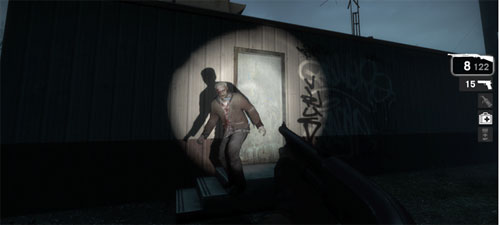
Alright, enough about compatibility. Did the Razer Megalodon’s surround sound actually help my performance in-game? In a word, yes. In two words, hell yes. Though there were plenty of instances where I quickly reacted to enemy gunfire from behind and was able to neutralize my would-be assailants, there’s one match in particular that really stood out in my head as a shining example of why surround sound in multiplayer games is goooooooood. If ever you find yourself playing Rambo in a desolate Team Fortress 2 server pitted against a masterful Spy with the infinite cloak ability, know that the only way you’ll ever catch him is by the sound of his footsteps. Being able to hear exactly where the spy was relative to my position allowed me to fill the joker full of lead quickly and efficiently – a must when there’s a sniper on the other team that’s got an 85% penchant for headshots.
Update: Megalodon owners experiencing intermittent audio dropouts in games should update the firmware to v2.7.
Recap
Razer has a winner on their hands with the Razer Megalodon 7.1 gaming headset, covering just about everything I could possibly want as a hardcore gamer. Lightweight as they are comfortable, the cans have superb audio quality that’s well-suited for listening to music. The 7.1 virtual sound field is second only to the Megalodon’s direct competitor from Logitech, and easily beats out the virtual surround sound offered by many discrete sound cards. Though the lack of Dolby Pro Logic IIx upmixing can be seen as a setback for DVD rippers, the headset manages to stand its ground for video game compatibility so long as Vista or Windows 7 is being used. As a final tip of the hat for us LAN party-goers and eSports competitors, not only did Razer do away with the need to install drivers, but they directly acknowledged our needs by including a quality travel case to secure this captial investment. Expensive as it may be, the Razer Megalodon is highly recommended.
[ico type=”icon-shopping-cart”] Latest Gaming Headset Deals




Pricing is last updated by Amazon on 2026-07-10 at 04:05. When you buy through Amazon affiliate links on our site, we may earn an affiliate commission.