
LaCie Rikiki USB 3.0 Review
The portable drive still posts some pretty decent numbers despite of its 5400-rpm drive. It is for those who are looking for something wrapped up in a small package that is both sexy and speedy.
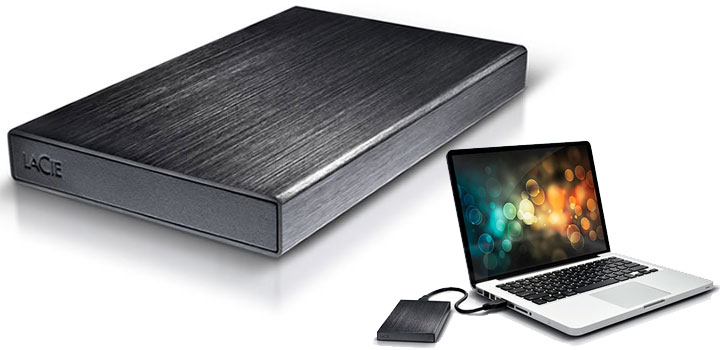
February 2011 Anthony Garland
Contents
Brushed Aluminum Style
LaCie really makes some drop dead gorgeous peripherals and the Rikiki is no exception. With that being said, unlike the 2Big RAID I reviewed awhile back, LaCie went a very subtle and understated approach to the design of the Rikiki. This really looks on first glance like nothing more than a small “black box”. It is only when you actually take a closer look do you notice the little things that make a LaCie a LaCie product.
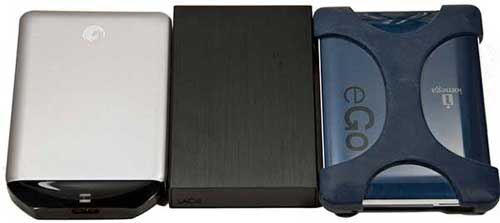
The biggest of these “little things” is the fact that the Rikiki’s skin is not cheap plastic; rather it is made from brushed aluminum. This gives a very nice texture to the drive that really needs to be felt to be full understood. The other thing which separates this external drive from most is the fact that it is smaller than most. Where it has a 12.5mm, 2.5″ hard drive in there, it is going to be taller than some of the smaller 2.5″ based external storage solutions that I have looked at, namely the Seagate GoFlex Portable. However others are actually larger than this. In either case, the Rikiki is shorter than basically any hard drive enclosure I have ever seen. It may not be much but every little bit helps but it does make this a very portable drive.
Of course with that being said, the square edges of Rikiki will have a tendency to stick into you if you try carrying it in a pocket. On the positive side, this combination of small stature, with deep black color does mean this drive will blend into near any environment. No matter how minimalist, no matter how high tech, no matter if it’s a PC workstation or a home theater environment; the LaCie Rikiki will fit right in as if it the area was designed around it.
The only real nit worth picking with the Rikiki is the fact that LaCie opted to use security torx bolts. These little bolts are a royal nuisance to remove so if the hard drive inside it dies after the warranty has expired (if it dies before… get LaCie to replace it for you), it is going to be slow going getting it out. Though, the secret with these smaller security torx bolts is the center post is extremely fragile and malleable in most cases. If you get a torx screwdriver of the right size, simply put it in the head and give a good sharp bang to it and the screwdriver will force the center post down enough to give the torx head a “bite”. This is how I do it as I refuse to spend 10 bucks for a “specialty” screwdriver when you can use near any properly sized torx driver and do this ‘trick’.
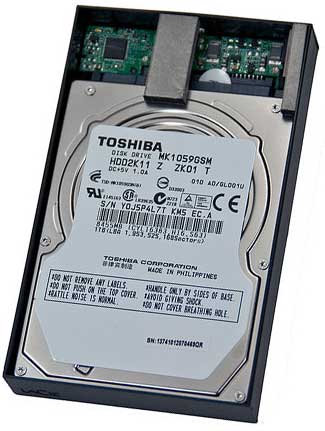 The internal hard drive LaCie opted for their 1TB is a 5400-rpm Toshiba MK1059GSM. As expected, this is a 12.5mm form factor 2.5″ hard drive and thus explains the added height of this model. It also explains the need for the 120V power adapter. In a nutshell, the Toshiba requires 900mA to spin up (4.5W of power). So, if you try to use the included single-port USB 3.0 cable on a USB 2.0 enabled system, you probably are not going to get it to work. This will vary from system to system as while USB 2.0 ports are only “supposed” to deliver 500mA, not all manufacturers follow it and allow for higher power draws. Since a wall adapter is not included and neither is a two port cable, you really are going to have to phone LaCie up and ask for one. If you do that, they will send you a proper two port cable for free. To be honest, this is very good customer service, but by the same token, it should never need to happen as LaCie should have included the proper cable in the first place.
On the truly positive side, LaCie Rikiki opted to go with the very good ASMedia ASM1051 controller chip. I really like seeing these in a drive as they are simply better than the JMicron chip that some other companies opt for.
Software
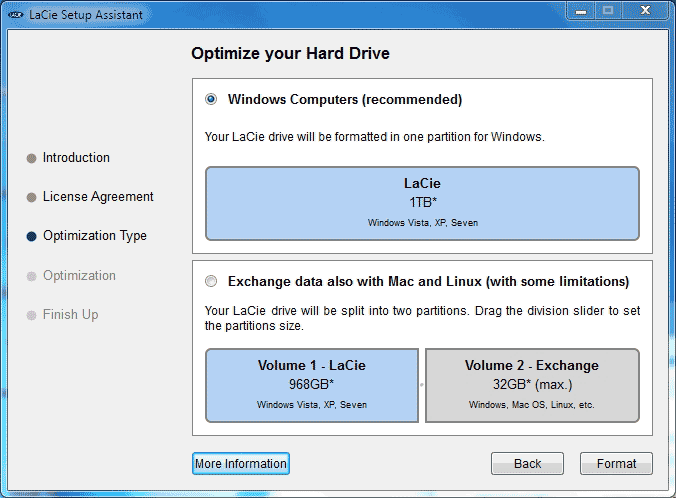
Assuming you have auto run enabled, the first time you attach the Rikiki to any system, you will be greeted by a pop-up window prompting you to setup your drive and then setup the software which is included. The first part is very simple as it basically boils down to how you want the 1TB of space partitioned. If you plan on using it only on MS Windows systems you can use the entire drive as one large NFTS volume. If you plan on using it on Apple or Linux operating systems you have the option of doing things differently and not setting it up as a NTFS drive.
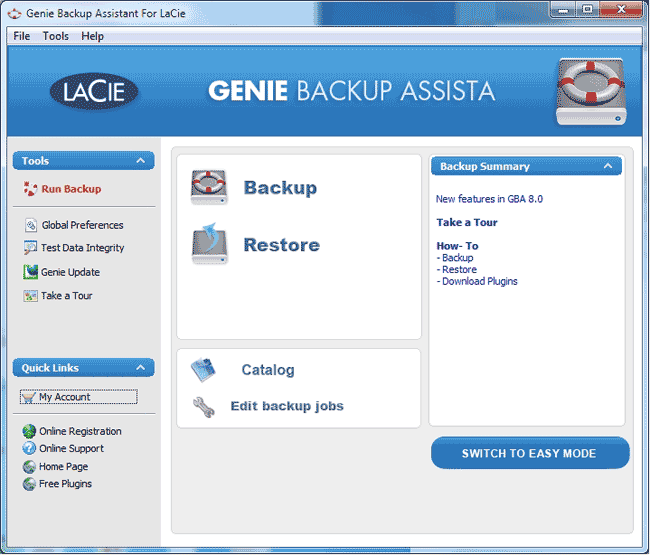
Once the formatting is complete, the software which is also installed on to the drive’s partition will prompt you to install it. In the case of the Rikiki, it is Genie Backup Assistant, which is basically a cut down version of the software which accompanied my 2Big RAID I reviewed awhile back. Basically, it is a fairly powerful piece of backup software, while you will not be able to do as many advanced things with as you would the Genie Professional software it does get the job done; and more importantly is very intuitive and very easy to use. You can do manual backup of data or schedule backups, it really is all up to you and while it will not replace Acronis as my backup software of choice it still is pretty good considering it is a “free” or “value added” piece of software.
Crystal DiskMark Benchmarks
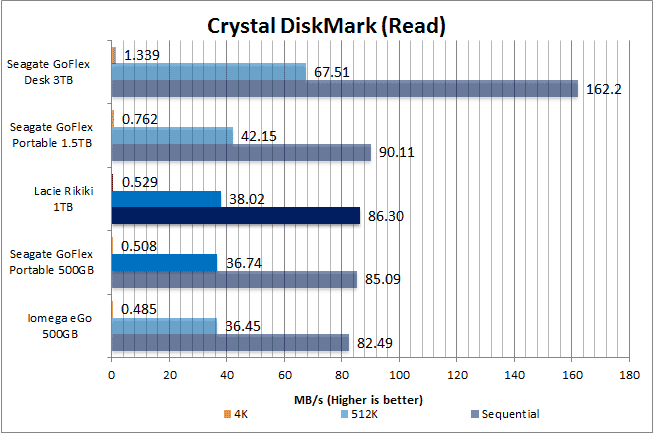
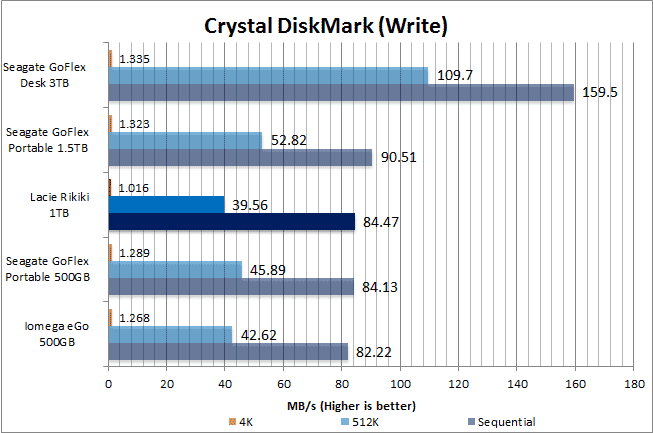
While the small file performance numbers of the Rikiki USB 3.0 are on the low side of adequate, they are still pretty decent for a 1TB external drive.
Real World Performance
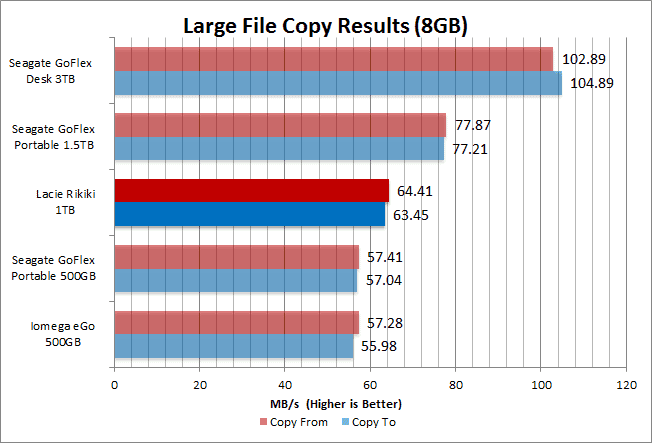
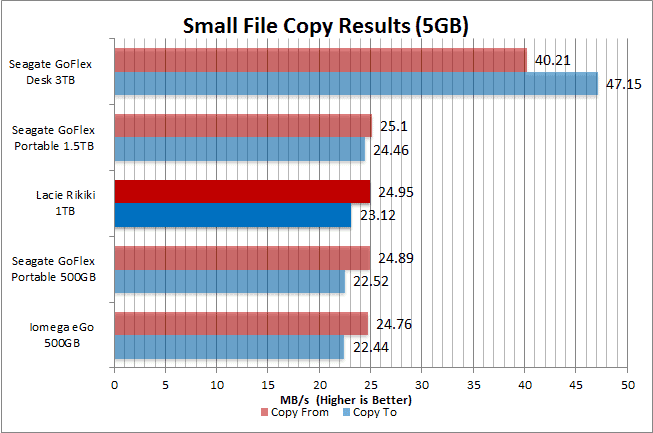
With all the synthetic benchmarks agreeing on the mid-line performance of the Rikiki, it really was not surprising in the least to see the real world numbers back this up. To be blunt, while it is pretty fast for a 5400-rpm drive, I really would have preferred to have seen LaCie use a more high performance 7200-rpm drive inside this little black box. After all, unless you are going for massive capacity if you are going to spec 12.5mm high 2.5″ form factor drives you might as well spec the high performance models.
Recap
In the end, there is a lot to like about the LaCie Rikiki USB 3.0 and some things that I dislike about it. The performance of this portable drive certainly will appeal to people on a budget who simply can not afford (or justify) the cost of going for a 1.5TB beast; yet want more performance than a 500GB model can provide. For anyone looking for an external drive that is both small and yet elegant, the Rikiki really is the epitome of style and grace and would be a very good choice.
With all that said, LaCie really should have gone with a higher performance hard drive for the Rikiki. It’s not like a 7200-rpm would have consumed more power than this Toshiba as that the latter choice is a frickin’ power hog . If they had done so, the lack of assured backwards USB 2.0 compatibility would have been a lot more justified. As it is, there are many USB 3.0 solutions which are 100% backwards compatible as they ship with dual headed cables. This is the crux of the matter with the Rikiki, as if I knew that I was never ever going to have to use it on a USB 2.0 system then yes it would be a good choice; but USB 3.0 is still far from ubiquitous and until it is, there is going to be times that require biting the bullet and going with the slower standard; and it is here this drive fails.
On almost all my systems, the Rikiki would not even power up when connected to USB 2.0 ports and while LaCie will graciously send you a cable for free which will allow it to work, you shouldn’t have to ask, it should have been included. Until LaCie does include a proper cable, I really do have a tough time justifying its purchase over the competition. Competition which do get the “small things” like backwards compatibility right. If this doesn’t concern to you, then LaCie Rikiki USB 3.0 deserves a long hard look; otherwise there are simply better more forgiving choices out there.

Nexcopy manufactures a variety of PC-based and standalone USB duplicator solutions.
PC based systems support advanced USB functions such as write protection, CD-ROM partition and multi-partition creation, while standalone systems are ultra-fast, high speed USB copiers duplicating gigabytes of data quickly and accurately.
My case is damaged. Is there a site where I can find a replacement? The hard drive works fine however I took it to a computer store and they said that it’s thicker than most hard drives.
This was one of the best reviews of the drive I’ve seen. Here’s a bit of additional information. I probably have a later model of the Lacie Rikiki (well, the one that I got anyway)
* It still comes with the ASMedia chip, except mine had an ASM1053 in it, NOT the ASM1051. Very nice to see.
* I spent an extra $20 to get a secure Torx set just to look inside. I actually like the secure torx idea, it keeps people out of your drive, and looks great. Also, you can use secure torx on regular torx so that was a bit of a no-brainer.
* My drive powered up (and ran for many hours) with no problem on a USB 2.0 port. Instead of a Toshiba drive, mine had a (somewhat predictably) a Seagate (Samsung) ST100LM024 drive. Seagate now owns both Lacie and Samsung’s disk drive business. The drive is very quiet, and was rated at .85A, which is somewhat less than the Toshiba.
* The older USB 2.0 500GB Rikiki is 110mm long. The newer USB 3.0 drive looks to be 118mm, and it’s roomy inside compared to the older 500GB USB 2.0 drive.
* Mine also (thankfully) came with a short little USB 3.0 mini to standard USB cable in the package so I had no trouble plugging it into my Mac.
Hope this was helpful information. In my opinion, this is the best quality enclosure ever made. It’s solid aluminum. What more do you need? I’m not sure it is very fast, but I have no idea why anyone would expect this kind of usb external enclosure to have ultra-fast performance—it’s definitely adequate for video streaming, you’d be crazy to run it in a file server.
Kudos to the Lacie design engineers. Not only did they not screw anything up in later revs, they actually improved on their already massive lead.
the rikki HD has a 3.0 USB port, a LED indicator light and something else which I don’t know if it is a reset button or a power input…? does anybody know what it is or whats the reason of it being there. I run my HD on a brand new Macbook Pro. is it USB 3.0 compatible?
Thx.
Dave.
Yeah right. It bothers me too. https://www.philrent.com
Hi quick question what size torx screw does the lacie rikiki have? cheers.
I think it’s 10 but you can buy a complete set of torx for just about 5€, thats what i did.
I used a Torx TS8. It might be a TS9 actually, but I don’t have one of those, they’re probably rare.