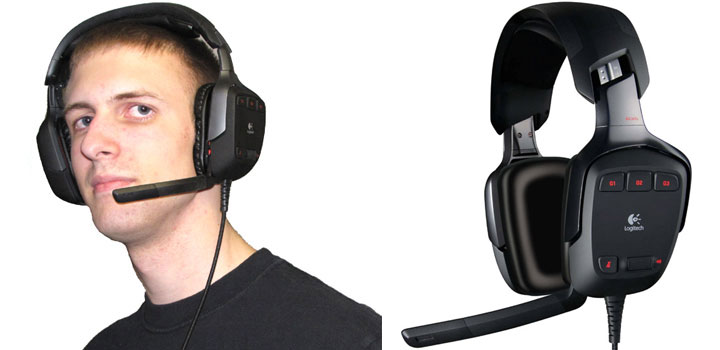
If there’s one thing I love, it’s product reviews that shatter my pre-existing conceptions of how things work. Logitech G35 headset for gamers does just that, offering an immersive 7.1 soundscape over two physical channels that you wouldn’t believe until you’ve actually heard it. I’ve documented to great lengths the strengths and pitfalls of this particular headset and you can read all about them in my review below.
Headset Design & Ergonomics
Developed by Irish firm Design Partners, the G35 takes a two-pronged approach to aesthetics that leaves a lasting impression. On one hand, it’s incredibly boxy and angular, sharp even, that it will no doubt catch more curious looks than my Honda Element could afford. No, you won’t be cutting fingers on it, but one could get lost in the number of 45 and 90 degree angles this thing has to offer.
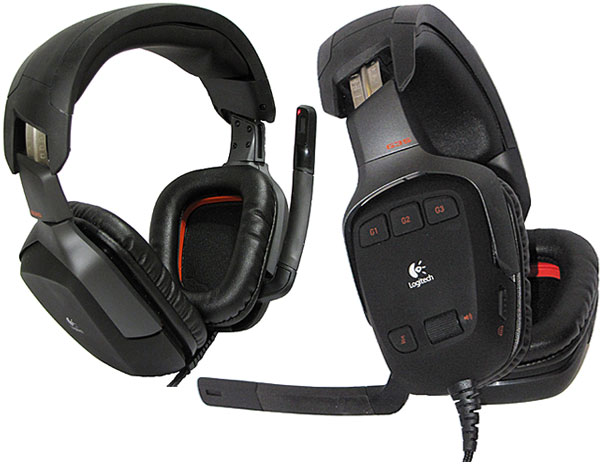
On the other hand, the G35’s overall design really should come as no surprise to anyone who is familiar with Logitech’s post-2007 line of gaming peripherals. The red and matte black color scheme perfectly matches the G-series gaming peripherals and looks well in its own right if you have so much as a black PC tower.
Taking a closer look at the headset, we see that the user-customization aspect featured so prominently in the G-series is no stranger to the G35. The adjustable headband follows a notched metal track that’s labeled so you can quickly set it to just the right position after traveling to a LAN party. Three swappable headband pads of varying thickness and form are also included that change how the headset sits on the head, and also how much pressure is exerted on the sides of your head. The padding is held steadfast by two strips of Velcro hooks that run the course of the headband’s upper trench, but you’ll want to be careful when removing the padding as the Velcro may want to come along with the padding if the adhesive wasn’t properly applied. Forgo your roll of duct tape (sorry, I know…) and just use superglue for this one.
Properly adjusted, the Logitech G35 is one of the most comfortable headsets I have ever worn. The circumaural ear-cups are large enough that my ears don’t feel like they’re being crushed, but there’s still a good seal so bass vibes don’t leak out into the open air. The headset doesn’t have perfect isolation from ambient noises nor does it have any noise-canceling abilities, but it does provide significant dampening so I can focus on my music and gaming – not the loud case fans of the computer sitting next to me. As a LAN party aficionado that likes to hear the cries of his fellow gamers, I wouldn’t have it any other way. The weight of the headset, while not insignificant, is also well balanced so that neither side of the headset feels heavier than the other, and it’s light enough that my neck doesn’t feel fatigued after hours of gameplay.
Like many gaming headsets currently available on the market, the G35 employs a noise-cancelling directional microphone that can be swiveled upright when not in use. It’s not detachable, but the length of the microphone doesn’t extend past the top of the headband either to make you look like a remote-controlled fool. Apart from swiveling up and down, the microphone is also flexible to a degree allowing it to be placed closer to the mouth. The microphone does have two unique qualities though: by stowing the tray table microphone in the upright position it will automatically be muted, and whenever the mic is muted a red LED indicator will light up, just within the bounds of peripheral vision. In the headset software, it’s also possible to configure the LED to always be on or off.
An in-line control pod is nowhere to be found on the headset, instead replaced by rubberized controls located directly on the left ear cup. A simple volume roller, mute button and three G-keys are all present alongside a toggle switch for enabling the Dolby Headphone support, better known as the reason you’re probably looking at this headset in the first place. Though it’s obviously impossible to see the controls when wearing the headset, the button layout is intuitive and proved to be no more difficult to operate while gaming than a normal headset. I actually found this implementation preferable to a traditional control pod since it doesn’t weigh down the cord or require clipping to any article of clothing.
Durability and Travel Precautions
One thing that does concern me about the headset is its overall plastic feel. As a seasoned LAN party veteran, it’s easy to tell what’s not likely to survive being placed in a stuff-sack or luggage to be manhandled by the TSA on the way to Quakecon, and it’s quite evident that the G35 requires extra-special handling care. While the ear-cups do offer a small degree of rotation, unfortunately, Logitech never designed the G35 to lie flat, nixing headset’s ability to be transported in any rigid container smaller than the original packaging. Likewise, the oh-so-comfortable headband is largely inflexible, so you can’t simply put the two ear-cups together and wrap the cord around them. For an asking price of $130 I seriously would have liked to see some sort of protective travel case included in the box.

On the bright side, at least the 10′ cable is rugged enough to stand up to daily abuse. Imagine if you will the braided USB cable on the G5 laser mouse, then double it’s thickness. I wouldn’t think twice about it if I were to inadvertently run over the cable multiple times with my chair or accidentally crush it with my heavy PC chassis. As an added bonus, just over an inch of the cable is protected by a flexible rubber sheath where the cord meets the headset – just the spot where cable shorts would normally occur on any other headset. Bravo, good sirs. Now if you feel that 10 feet of cable is too much (it’s not), take comfort in knowing that Logitech attached a Velcro cable tie emblazoned with the G35 logo.
Drivers & Mic Performance
Though the G35 software is very simple to navigate and use, power users may feel slightly put-off by the lack of fine-grained control found in other audio drivers. The panel is broken up into four quadrants: sound levels, surround sound, G-keys, and voice morphing. The levels offer control over the master volume, bass, treble, and microphone, but are sorely lacking volume control over the individual surround sound channels. A 10-band equalizer is also missing in action, although to be honest I don’t think the headset really needs it; the headset’s bass adjustment is the only control I ever find myself using, and even at stock levels it’s more than sufficient.

Moving on to the surround sound quadrant, here we have a giant Dolby logo that turns red when the Dolby toggle switch is engaged on the left ear-cup, making it all the more apparent that Dolby Headphone and Dolby Pro Logic II effects are in play. The system tray icon will also turn red to indicate this. Underneath the gargantuan logo is a “Surround sound last heard…” readout that does its best to let you know if your game is in fact outputting surround sound. The v1.0.0.17 drivers that are available at press time were unable to detect the working surround sound in a small handful of games throughout my testing, though Logitech has a patch in internal beta testing that should take care of this so there’s no need for concern.
In its current state the G-keys section is rather disappointing, offering nowhere near the programming capability of the G15 and G19 keyboards. Here you can map the three G-keys on the left ear-cup to control the bass, treble and microphone levels, activate the voice morphing technology, or act as playback controls for iTunes/WinAmp/WMP/PowerDVD/WinDVD. There’s still no support from Logitech for open source projects like VLC or Foobar, but my fingers are crossed. Custom commands and Push-to-Talk for Ventrilo are also present, but contrary to the original press release, TeamSpeak support is nowhere to be found at this time. Multiple profiles for the G-keys can be created, although curiously there is no quick way to switch between them, not even in the system tray menu. Logitech has stated on their official blog that they’re looking into expanding the functionality of the G-keys in future upgrades, so we’ll just have to wait and see what the future has in store for this seemingly neglected feature.
Finally, we have the Voice Morphing quadrant, a cut-down version of Screaming Bee’s MorphVOX Pro that allows you to easily mask your voice behind one of six filters. This is probably the best use of the G-keys right here. I’ll let the effects speak for themselves.
Webcam users will be delighted to know that these effects are real-time, and sync up with lips rather nicely. Without the effects turned on, the voice quality is above average, producing a clean sound without picking up the sound of my computer or air conditioner.The only downside there is to the microphone is some electrical crosstalk that can be heard as a soft, high-frequency whine in the right ear-cup whenever an application is making use of the microphone such as Sound Recorder or an active Skype call. This much is easily drowned out with some music or video game action but can prove to be slightly annoying while in a phone call.
Update #1: Logitech has acknowledged the issue as a manufacturing defect, and says that new units should be arriving shortly from the factory to replace the bad stock. As soon as Logitech posts in their forums that the new stock has arrived, G35 owners should be able to contact Logitech Technical Support for a replacement.
Stereo Sound Quality
Throughout my listening tests in various applications, I found the G35’s sound quality to be most impressive. Channel separation was clear, and the large 40mm drivers coupled with the circumaural design allowed for strong, clean bass that has plenty of kick to it. Boosting the bass level much above 75% would sound a bit muddy, however. Powerful as the bass was at the stock 50% setting, I never had the impression of it drowning out the mids and highs in my selection of electronica or rock music. Vocals were crisp and well defined, and old-school chiptune music sounded perkier than ever.
The headset’s volume, though still loud enough to cause hearing damage, is relatively limited compared to your typical analogue headset or even Logitech’s classic eardrum-blasting Premium USB Headset 350 that I reviewed back in 2005. Logitech’s currently working on a patch that should boost the volume levels somewhat for rocking out to music recorded at low levels, but until then we’ll all have to suffice with tweaking the pre-amp in iTunes. UPDATE (July 2009): The 1.0.22 drivers crank the volume to 11. Be careful!
 Flipping the surround sound switch to on radically changes how the G35 processes audio, acting as an all-in-one toggle for the Dolby Headphone and Dolby Pro Logic II effects. With it on, stereo music is up-mixed into a 5.1 surround sound field with subtle reverberations that trick my ears into thinking that I’m listening to music in an open environment. While this mode works great for most of my song library and seems to reduce ear fatigue during extended listening sessions, certain tracks like Machinae Supremacy’s Winterstorm sounded, well, awkward. The edge is taken off as though I’m listening through a length of PVC pipe.
Surround Sound Quality
For the most part the personal surround sound market segment for gamers is mostly saturated with headsets that make use of multiple drivers, typically 40mm for the front L/R channels and 30mm or so drivers for the surround channels. Though these headsets did create a distinct surround sound field as I experienced in my review of Tritton’s AXPC USB headset, the effect was not 100% believable and was hampered by the tinny sound produced from the rear drivers. It also took more effort to perceive the difference between front and back while gaming.
The use of virtual surround sound remedies at least one of these effects; by using the same 40mm drivers to process all sounds, everything sounds equal in tone and not as if people standing behind me sucked down a bag of helium while I wasn’t looking. Virtual surround sound on its own is nothing new; it’s been around for a few years now. Certain USB headsets and soundcards already make use of virtual surround via Dolby Headphone, Creative CMSS or similar technologies, and for the most part they also work. But none of them hold a candle to Logitech’s implementation of 2nd-generation Dolby Headphone in the G35.
The headset’s virtual sound field is absolutely incredible. Separation between front and back is clear as night and day, the center channel is well placed, and even the differences between left-side and left-rear are distinct. Dolby Digital and DTS are both supported by the G35, but I was surprised to find that even my collection of DVDs ripped in Handbrake work with their Dolby Pro Logic II audio tracks.
 After pitting the G35 cans against my AXPC USB headset and my Asus Xonar’s Dolby Headphone support in the Jungle Sounds 5.1 THX Surround EX demo (Google it!), I am now convinced that these are the headphones to buy for DVD watching. The separation of channels, fly-over effects and clarity of the sound were all over-the top, but even that’s an understatement. The experience is simply mind-blowing.
Surround Sound Gaming
In games that were truly meant for surround sound (Left 4 Dead, Fallout 3, Call of Duty 4, etc.) the G35 sounds phenomenal. Other games like the Battlefield series… ehh, not so much, but that franchise sounds pitiful even on a dedicated surround system. It’s ironic then that the one weakness of the headset for gamers is gaming itself. Crazy, huh? Indeed, the G35 is not 100% compatible with videogames; it’s closer to roughly 60% based upon my own testing in a selection of AAA first person shooters.

A number of reasons apply: the headset is not DirectSound Hardware compatible (needed for UT2004), there’s currently no way to set the headset to 5.1 mode in Vista’s Speaker Configuration utility (needed for Quake 4 and Prey), and there’s likely other technical reasons that would explain anomalies that otherwise have me stumped. The good news is that this is a software issue, and can be fixed. The bad news is that this is something that the game developers – not Logitech – need to fix, and classic games no longer in active development are unlikely to receive a patch. Stereo mode is as good as it gets for these titles, I’m afraid.
There is some light at the end of the tunnel though: Logitech *is* working with the developers to deliver guidelines for coding surround sound that would be compatible with the G35 and perhaps other vendors who utilize virtual surround sound. This has already taken place with Valve Software, who have reportedly fixed Team Fortress 2 and Left 4 Dead before this review was started. Logitech is soliciting feedback from gamers on their forums for titles that don’t work, so be a good netizen and POST! I figure that as time moves along and more games are released, we will see the compatibility index rise. Also if your favorite game doesn’t work in Windows XP, test it in Vista or Windows 7. Vista’s audio handling fixed a number of issues for me in Portal, Quake Wars and Unreal Tournament 3, so it’s worth a try at the very least. Also try flipping off and on the surround sound switch – this fixed a few instances where I wasn’t receiving sound in all virtual channels.
Again, for games that did work with the Logitech G35, the results were impressive. Pinpointing the slavering moans of zombies in Left 4 Dead, gunfire in UT3 and NPCs in Fallout 3 is so easy you can literally do it blindfolded. I kid you not; with my eyes covered I cranked up my mouse sensitivity and spun around several times and was able to easily detect where an audio source was coming from. I would have never guessed things would be this easy with “fake” surround sound, but lo and behold it works better than all the other implementations of personal surround sound that I’ve tried. Groovy.

Below are the full results of my video game testing using a variety of DirectSound and OpenAL titles. Pass/Fail was determined by whether or not the surround sound was working properly and if the sound quality was good enough for Joe Sixpack.
G35 Compatibility (Windows Vista x64)
All these tests done on the G35 were carried out on a Windows Vista x64 PC.| Game | Result | Remark |
|---|---|---|
| Battlefield 2 | Fail | A friend says he can hear the difference between front/back, but personally I cannot. I would need to be able to adjust the surround levels individually in order to be certain. |
| Battlefield 2142 | Fail | All combinations of settings result in stereo sound. At least I think so... this really isn't the best franchise to test surround sound with. I would need to be able to adjust the surround levels individually in order to be certain. |
| Call of Duty 4: Modern Warfare | Pass | Works fine. |
| Call of Duty 5: World at War | Fail | Unable to initialize surround sound. |
| Counter-Strike: Source | Pass | Works fine. |
| Crysis Warhead | Pass | Works fine. |
| Enemy Territory: Quake Wars | Pass | Works fine. Gunfire doesn't clip like it did under XP 32-bit. |
| Fallout 3 | Pass | Works fine. |
| Half-Life 2 (no episodes) | Fail | Reverts to stereo sound settings in-game. Not surprising since in Vista this game seems to only output surround sound on cards that have DirectSound wrappers (Creative ALchemy, Asus DS3D GX 2.5, Realtek SoundBack 0.1 beta) |
| Left 4 Dead | Pass | Works fine. |
| Portal | Pass | Works fine. |
| Prey | Fail | Unable to inititialize surround sound. Most likely the game is looking for 5.1 surround sound instead of 7.1, but in Vista I am unable to switch the Windows sound configuration from 7.1 to 5.1 like I could in Windows XP. Only 7.1 is available to choose from in the configuration menu. |
| Quake 4 | Fail | Unable to inititialize surround sound. Most likely the game is looking for 5.1 surround sound instead of 7.1, but in Vista I am unable to switch the Windows sound configuration from 7.1 to 5.1 like I could in Windows XP. Only 7.1 is available to choose from in the configuration menu. OpenAL is a selectable sound ouput device in-game as an alternative to "Windows Default", although there was no sub-menu for surround sound and selecting this option seemed to have no tangible effect. |
| Team Fortress 2 | Pass | Works fine. |
| Unreal Tournament 2004 | Fail | All combinations of settings result in stereo sound. |
| Unreal Tournament 3 | Pass | Works fine. |
| Game | Result | Remark |
G35 Compatibility (Windows XP 32-bit)
All these tests done on the G35 were carried out on a Windows XP 32-bit PC.| Game | Result | Remark |
|---|---|---|
| Battlefield 2 | Fail | All combinations of settings result in stereo sound. |
| Battlefield 2142 | Fail | All combinations of settings result in stereo sound. |
| Call of Duty 4: Modern Warfare | Pass | Must manually set to 5.1 in-game for surround sound. Center channel not very prominent. Rear channels sound noticably higher-pitched than front which makes it very easy to pinpoint sounds such as the chopper in the first level, but pitch-shifting hurts the overall realism. |
| Call of Duty 5: World at War | Fail | Unable to initialize surround sound. |
| Counter-Strike: Source | Pass | 7.1 and 5.1 work fine in practice thanks to center channel, but hard to tell difference between front/back corners in the built-in audio test room for 5.1. |
| Crysis Warhead | Pass | Works fine. |
| Enemy Territory: Quake Wars | Barely pass | Positional cues are subtle in 7.1 and more prominent in 5.1 by pitch-shifting (preferred). Explosions and player's weapons sound badly clipped in both but not as terrible as HL2's clipping. |
| Fallout 3 | Pass | Works fine. |
| Half-Life 2 (no episodes) | Fail | Boomy-sounding samples (eg. Dr. Breen, boxes, falling, ambience in the first level) sound awfully clipped. Can't tell difference between front/back corners, and in the case of Barney in the first level, even left from right. Can only tell front center because of raised volume. Fails same way for both 5.1 and 7.1. |
| Left 4 Dead | Pass | Works fine in both 5.1 and 7.1. |
| Mirror's Edge | Pass | Works fine. |
| Portal | Fail | Surround sound is rotated 90 degrees. Example: looking at or to the right of the FM radio will produce clear sound, looking behind or to the left will muffle it. Fails in both 5.1 and 7.1. |
| Prey | Fail | Works fine. Must configure sound card as 5.1 in Windows to initialize surround sound. |
| Quake 4 | Pass | Works okay, and a prominent use of the center channel helps differentiate between front/back. Quake does not detect OpenAL support. Must configure sound card as 5.1 in Windows to initialize surround sound. |
| Team Fortress 2 | Pass | Works fine in both 5.1 and 7.1. There was one instance however that I can't reproduce where I could not hear sound effects positioned directly behind me. |
| Unreal Tournament 2004 | Fail | All combinations of settings result in stereo sound. |
| Unreal Tournament 3 | Fail | All combinations of settings result in stereo sound. |
| Game | Result | Remark |
Recap
Logitech G35 as the company’s first foray into the gaming headset market has proven itself to be a difficult review to give a definitive verdict. The sound quality is breathtaking and the Dolby Headphone effects are better than I could have ever envisioned for virtual surround sound. That being said, I feel let down by the relatively poor 60% compatibility (as of this writing) with surround sound titles. I’m also a bit miffed at the lack of considerations for LAN party gamers; it’d be nice if the headset had the ability to fold or at least come with a travel case. With a current MSRP of $130, the G35 constitutes a serious investment and thus requires a fair amount of research if at all possible to see if your favorite games are compatible.
[ico type=”icon-shopping-cart”] Latest Gaming Headset Deals




Pricing is last updated by Amazon on 2026-09-30 at 02:55. When you buy through Amazon affiliate links on our site, we may earn an affiliate commission.