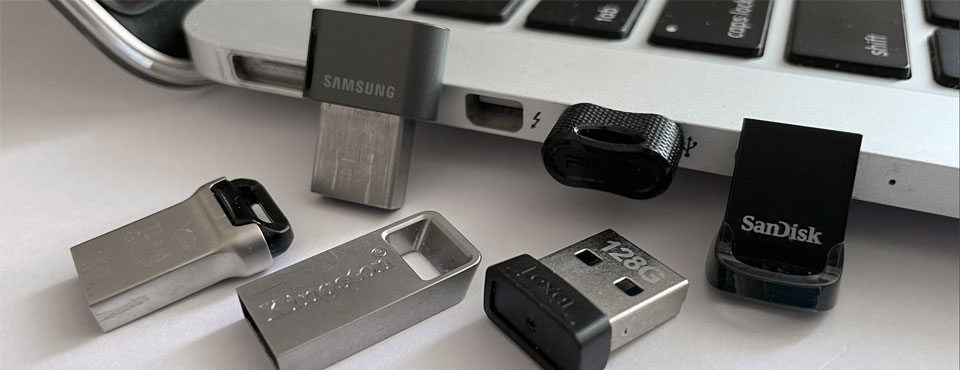
We put four mini USB drives – including a USB-C variant – from PNY, Samsung, and Sandisk to the test. These compact drives are designed to stay plugged in as semi-permanent storage, helping to free up precious space on your laptop. While they aren’t as fast as SSD-grade thumb drives and portable SSDs, they are more than capable of stowing away backups and offloading bulk files.
Our Picks
For most users, the Samsung Fit Plus is the standout choice, offering the most consistent balance between large file transfers and small file write speeds. However, if you regularly move massive files and want the smallest physical footprint possible, the SanDisk Ultra Fit remains a top contender.
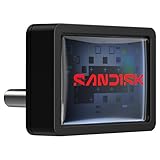
Last but not least is the introduction of the first mini USB-C drive — the SanDisk Extreme Fit — which finally provides a high-performance, flush-mounted storage solution for modern laptops and tablets have dropped legacy USB‑A. This drive with its unique perpendicular design is de facto the only option if USB-C is all you have at your disposal, short of using an adapter.
Who Would Need Such a Small Drive?
Many USB thumb drives protrude noticeably from a port and can be bent if bumped repeatedly, which can cause data loss or damage the USB port. Compact drives, on the other hand, are designed to minimize this risk: they typically protrude only 6 to 8mm and can remain plugged in safely inside a backpack. While the primary appeal of a mini drive remains its “invisible” footprint, the engineering leaps in NAND density and controller efficiency have opened up sophisticated new applications. These low-profile drives are no longer just “emergency storage”; instead, they are now essential, stay-in-place upgrades for the way we work.
Feature Comparison
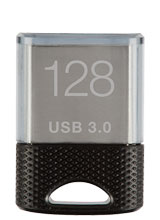 PNY Elite-X FIT $79.99 for 512GB | 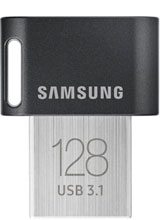 Samsung FIT Plus $73.99 for 512GB | 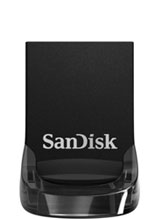 Sandisk Ultra Fit $111.53 for 512GB |  Sandisk Extreme Fit $126.90 for 512GB |
|
| Interface: | USB 3.2 Gen 1 Type-A | USB 3.2 Gen 1 Type-A | USB 3.2 Gen 1 Type-A | USB 3.2 Gen 1 Type-C |
| Read Speed: (10GB video) | 190.56MB/s | 336.49MB/s | 339.31MB/s | 334.95MB/s |
| Write Speed: (10GB video) | 28.47MB/s | 114.65MB/s | 190.46MB/s | 88.89MB/s |
| Read Speed: (5GB photos) | 173.08MB/s | 294.54MB/s | 308.49MB/s | 284.50MB/s |
| Write Speed: (5GB photos) | 16.36MB/s | 92.48MB/s | 25.16MB/s | 69.16MB/s |
| Storage: | 32 - 512GB | 32 - 512GB | 16GB - 1TB | 64GB - 1TB |
| Dimensions: | 20.8 x 15.2 x 6.4mm | 23.6 x 18.8 x 7.8mm | 19.1 x 15.9 x 8.8mm | 18.54 x 13.7 x 16mm |
| Build Material: | Plastic grip, aluminum body | Plastic grip, aluminum body | Plastic body | Plastic body |
| Activity Light? | No | No | No | No |
| End Cap? | Yes | No | No | No |
| Color(s): | Black | Gray | Black | Black |
| Aug 2016 | June 2018 | May 2023 | Dec 2025 | |
| Warranty: | 1 year | 5 years | 5 years | 5 years |
| Country of Origin Label: | Made in Taiwan | Made in Taiwan | Made in Malaysia | Made in Malaysia |
Pricing is last updated by Amazon on 2026-09-18 at 12:38. When you buy through Amazon affiliate links on our site, we may earn an affiliate commission.
Benchmark Analysis
Through Nodesoft’s DiskBench, the SanDisk Ultra Fit emerged as the most well-rounded performer for large file operations. In our 10GB MP4 transfer tests, it led at 339.31 MB/s read speed, closely followed by the Samsung FIT Plus at 336.49 MB/s and SanDisk Extreme FIT at 334.95 MB/s. The Ultra Fit also dominated large file write operations at 190.46 MB/s, nearly double the speed of the Samsung FIT Plus (114.65 MB/s).

However, the drive showed a notable weakness in small file writes at only 25.16 MB/s, barely edging out the PNY Elite-X FIT’s 16.85 MB/s. This was where the Samsung FIT Plus excelled with a speed of 92.48 MB/s, followed by the SanDisk Extreme FIT at 69.16 MB/s. Keep in mind the Samsung Fit Plus offered a more balanced middle ground in both large and small file write performance.
If you are coming from 256GB, it’s worth noting that both the Samsung FIT Plus and SanDisk Ultra Fit demonstrated a considerable speed improvement over the 256GB version. Samsung’s 512GB drive was at least 2.5 times faster than the 256GB. The 512GB SanDisk Ultra Fit also delivered a significant upgrade, with speeds about 2.5 to 8 times faster than its 256GB sibling.
The SanDisk Extreme Fit was a bit of a mixed bag. From our benchmarks, it was faster than the Ultra Fit on small file writes, yet slower on large file writes. The drive boasts UASP support , which improves queuing and reduces latency under heavy I/O. It is also one of the first mini drives to feature USB-C – likely your only option if your laptop does away with all legacy USB-A ports.
The surprise was the PNY Elite-X FIT. Despite its “Elite” moniker, it actually performed the poorest across the board, managing only about 190 MB/s large file read and as low as 16 MB/s in small file writes.
Note these two tests focused primarily on sequential performance, because we felt most people would rely on a mini drive primarily as intermediary or secondary storage for media data. These mini drives, without a decent flash controller, would struggled with applications that require fast random access. For this reason, we didn’t run additional tests.
Design & Build
All four low-profile USB drives are all similarly small, but when placed side-by-side, the SanDisk Ultra Fit’s diminutive size compares favorably to the others — even if only by a fraction. When inserted, the drive protrudes just 6mm from the edge of the laptop. This makes it a no-brainer for semi-permanent storage. The Samsung Fit Plus, in comparison, is noticeably larger, likely to aid in heat dissipation. The SanDisk Extreme Fit — the only USB-C drive in the round-up — sits perpendicular to the port and extends about 8mm from the edge of the laptop. Except for the Extreme Fit, all the other drives come with a keyring loophole should you need one.


In terms of durability, the Sandisk Ultra Fit took a step backward with its squishy plastic connector. This is a concern that is already echoed by a number of user reviews on Amazon. Having said that, if you intend to leave the drive plugged at all times, this shouldn’t be that big of a problem. We would have to say the other drives with their metal USB connectors protecting the flash components could likely survive if being stepped on.
Best Deals Online


Pricing is last updated by Amazon on 2026-09-18 at 12:38. When you buy through Amazon affiliate links on our site, we may earn an affiliate commission.