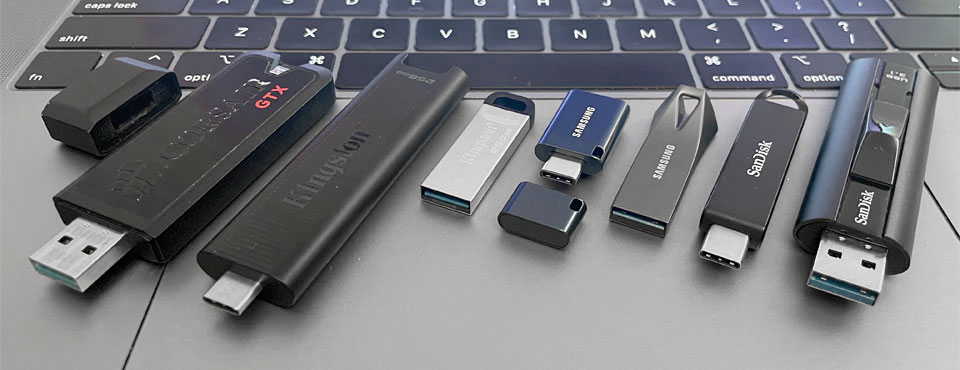
We put eight USB 3.2 drives from Corsair, Kingston, Lexar, Samsung, and Sandisk to test. They all come from reliable brands that have been in the flash drive business since the inception of the product category. And for the purpose of the article, we picked drives that strike a balance between form factor and performance. In our June 2023 update, we also added Lexar JumpDrive M900 to the comparison.
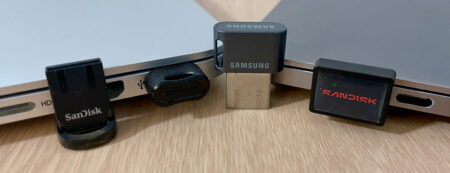
For those of you who value size over speed, mini USB drives serve well as semi-permanent storage for your laptops. Likewise, if you need a drive for data exchange between USB-C and legacy USB ports, dual-headed flash drives are just what you need but speeds don’t match the ones featured in this article.
What are the Best Flash Drives?
Assuming you have the right port (i.e. USB 3.2 Gen 2×1) to match, Kingston DataTraveler Max provides a great performance-to-price ratio and hence is the best choice for power users. Its performance stands head and shoulders above nearly all competitors and is one of the fastest thumb drives given its form factor. You will find the drive quite handy when you need to do a system recovery and run / install Windows on a flash drive.
The drive also comes with a retractable USB-C connector and five years of warranty. Through an optional USB-A to USB-C adapter, it maintains backward compatibility with legacy USB-A ports. For its intended purpose, the DataTraveler Max has earned our recommendation.
Should you find DataTraveler Max to be a tad too bulky, the next best options are Lexar JumpDrive M900, Samsung USB Type-C Flash Drive, and Sandisk Extreme Pro. The Samsung is only one-third the length of the Max, yet it delivers admirable read performance for its size. Both the Sandisk and Lexar has shown consistently robust performance across the board, putting it well ahead of the Samsung USB Type-C in write operations.
Feature Comparison
 Kingston DataTraveler Max Price not available for 512GB |  Kingston IronKey Keypad 200 Price not available for 256GB |  PNY PRO Elite V3 $239.99 for 512GB |  Samsung USB Type-C Drive $145.99 for 512GB |  Sandisk Extreme PRO $134.99 for 512GB |
|
| Connector: | USB-C | USB-C | USB-C | USB-C | USB-C |
| Storage: | 256GB - 1TB | 16 - 512GB | 256GB - 2TB | 64 - 512GB | 256GB - 2TB |
| Interface(s): | USB 3.2 Gen 2 (10Gbps) | USB 3.2 Gen 1 (5Gbps) | USB 3.2 Gen 2 (10Gbps) | USB 3.2 Gen 1 (5Gbps) | USB 3.2 Gen 2 (10Gbps) |
| UASP? | Yes | No | Yes | No | Yes |
| Movie Read: (10GB MP4) | 725.08MB/s | 152.37MB/s | 747.97MB/s | 349.07MB/s | 776.91MB/s |
| Movie Write: (10GB MP4) | 552.52MB/s | 128.01MB/s | 595.45MB/s | 108.86MB/s | 599.55MB/s |
| Photo Read: (10GB JPEGs) | 527.08MB/s | 147.73MB/s | 582.71MB/s | 275.48MB/s | 686.56MB/s |
| Photo Write: (10GB JPEGs) | 364.49MB/s | 105.13MB/s | 347.59MB/s | 87.27MB/s | 336.76MB/s |
| Retractable Connector? | Yes | No | Yes | No | Yes |
| Dimensions: | 82.2 x 22 x 9mm | 80 x 20 x 11mm | 57 x 19 x 6mm | 33.7 x 15.9 x 6.4mm | 80.8 x 18.3 x 11.43mm |
| Build Material: | Plastic | Aluminium | Metal | Plastic | Aluminum alloy |
| IP Certified? | IP68 | ||||
| Color(s): | Black | Metallic blue | Black | Blue & dark grey | Grey |
| Software: | None | None | None | None | SanDisk Memory Zone |
| Aug 2021 | Aug 2023 | Feb 2025 | July 2022 | Nov 2025 | |
| Warranty: | 5 years | 3 years | 2 years | 5 years | Lifetime |
Pricing is last updated by Amazon on 2026-09-12 at 21:53. When you buy through Amazon affiliate links on our site, we may earn an affiliate commission.
Benchmark Analysis
Our tests were carried out on Nodesoft’s DiskBench on a 2019 MacBook Pro with 10Gbps USB-C ports. Note that having USB-C onboard has nothing to do with the speed of the drives. A USB-C thumb drive can be sold as a USB 3.2 Gen 1 (5Gbps) or USB 3.2 Gen 2×1 (10Gbps) storage device.
Kingston DataTraveler Max’s impressive transfer speeds, from the graph below, put the drive ahead of the competition in our 10GB MP4 file benchmark. Still, it’s best to keep in mind that the Max is USB 3.2 Gen 2 (10Gbps) while others reviewed here are limited by their USB 3.2 Gen 1 interface (5Gbps).
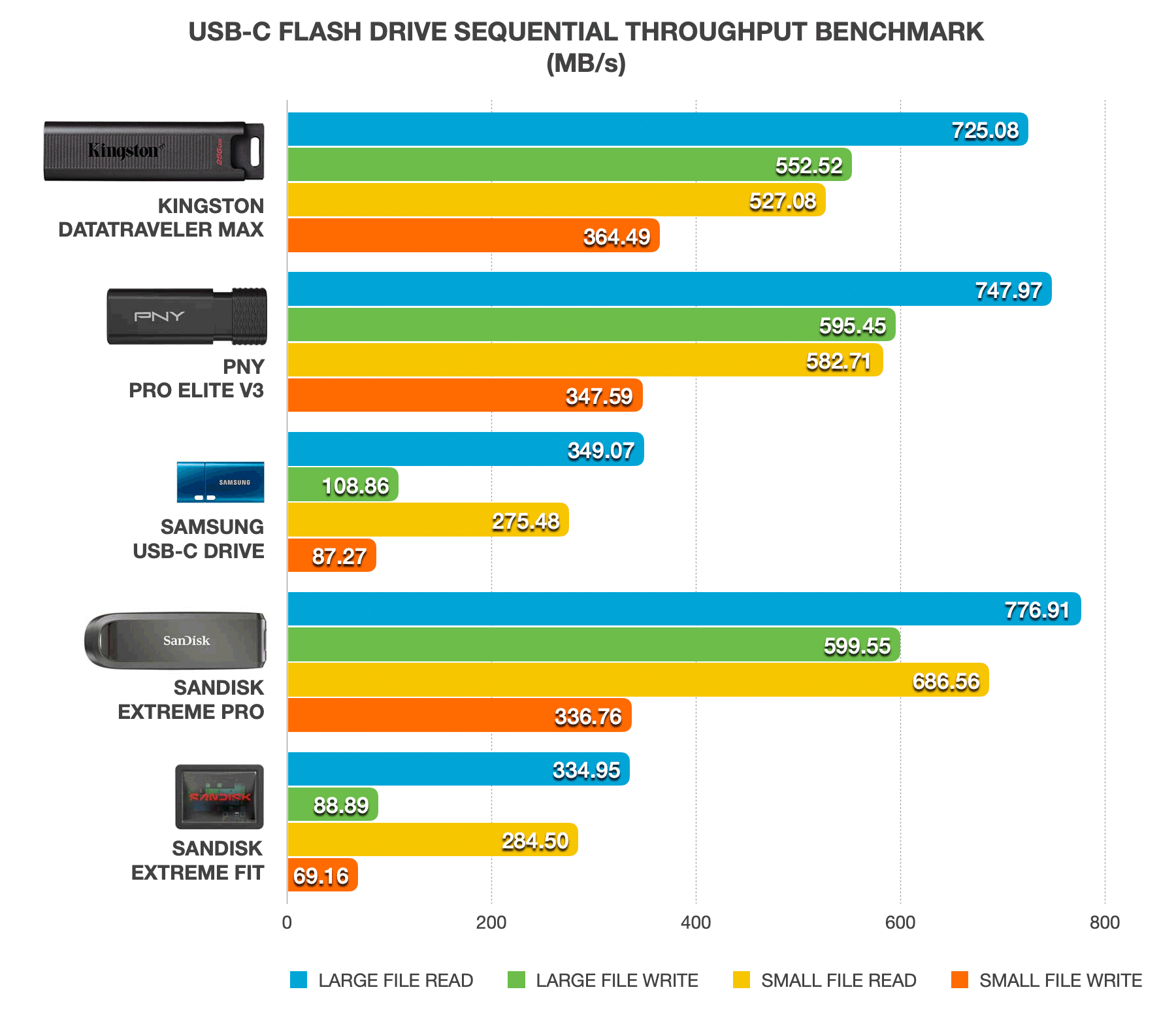
Our only caveat was that the Kingston DataTraveler Max started to throttle after the 20GB mark during a 40GB write endurance test on our 256GB unit. We witnessed speeds dropping to 80MB/s from 550MB/s. The reason behind this could be the drive’s lack of a proper thermal solution with firmware caps kicking in to avoid the drive from overheating. Running out of SLC cache during sequential write for such a large file could also be the cause of throttling.
Corsair Flash Voyager GTX – essentially an SSD coupled with a USB 3.0 to SATA controller – didn’t suffer from the same throttling issue during this endurance test. Due to the SATA limitation and 5Gbps USB-A interface, GTX’s overall speeds were no match against the DataTraveler Max. It’s also worth noting that the GTX – like Kingston’s Max – is both USAP- and TRIM-enabled, meaning the drive is basically an SSD in a thumb drive form factor and should excel in IO-intensive tasks.
Also included in our benchmark involved copying back and forth a thousand JPEGs totaling 4.7GB between the flash drives and our laptop. This test confirmed the level of performance you can expect when transferring small files in bulk. Keep in mind manufacturers usually don’t advertise benchmarks for small file-sized operations so your mileage may vary. Having said that, Kingston DataTraveler Max continued to lead by a sizeable margin in small file benchmarks.
Both the Sandisk Extreme Pro and Lexar JumpDrive M900 delivered solid all-around performance, particularly if you prefer a USB plug slider. However, if you’re looking for a compact option, the Samsung USB Type-C Flash Drive is also a great choice.
Design & Build
Design-wise, the Corsair Flash Voyager GTX’s zinc alloy body adds to its toughness as well as weight. It is clearly built to take a beating, suffice to say. The flash drive should be able to easily survive after a drop or after being run over by a vehicle occasionally. Our only gripe with the chassis is that it’s very prone to scratches which make the drives lose some of their appeals over time. It’s worth mentioning that the Corsair has a wider-than-normal profile which poses a problem in accessing horizontally adjacent ports. Corsair opts for a removable metallic cap that fits snugly with the drive’s USB plug – thanks to the cap’s rubber seal interior.
In contrast to the Corsair, Kingston DataTraveler Max is an all-plastic affair. We had hoped Kingston opts for more premium building materials that add durability to the drive’s body. The unit comes with a retractable USB-C plug as well as a keychain loophole. In terms of size, the DataTraveler Max is slimmer and lighter than the Flash Voyager GTX. It is significantly wider than other USB-C drives reviewed here. Hence, plugging the DataTraveler Max into a laptop will likely block access to a neighboring port if there’s one.
As for the Samsung line-up, the Bar Plus sports a minimalist aluminum alloy body with a Type-A port. Its much smaller sibling comes with a USB Type-C port and is encased in a plastic body.
Moving onto Sandisk’s offerings, the contoured-shaped Extreme Pro goes with the company’s tried-and-true USB slider mechanism with an outer shell that is made of metal alloy to improve its durability. Its minimalist cousin – Ultra USB-C drive – is however built with flimsy plastic material and its slide-out connector mechanism leaves something to be desired. Lastly, Lexar JumpDrive M900 has a retractable plug design and build quality similar to that of the Sandisk Extreme Pro but you will find an activity light on the Lexar.
iPad users may want to know the Sandisk Ultra USB-C is the only flash drive featured here that will directly plug into a compatible USB-C iPad with a case on. For other drives, a USB-C to USB-A adapter or a USB-C dock might not be the most elegant solution but works without a noticeable performance penalty.