To help fulfill the needs of consumers who want powerful, high-capacity storage that also has to be aesthetically pleasing, Hitachi created their Touro line of external hard drives. The largest and fastest of these models is the Touro Desk Pro, which combines a 3TB 3.5″ 7200-rpm hard drive with a case that is both elegant and sophisticated in design. Does Hitachi have what it takes to compete against the likes of Seagate, Western Digital, LaCie, and others in this hotly contested market niche? Read my full review to find out.
Stylish Glossy Design
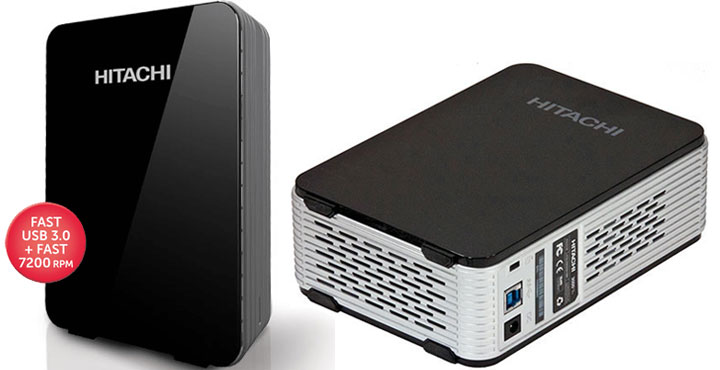
In many ways, the Touro Desk Pro line does not look like your typical external storage device. Instead of looking like either a utilitarian device (e.g. Seagate GoFlex Desk), Hitachi has taken a radically different approach. With its sleek curving lines, high gloss black side panel, and silver body, the Hitachi is meant to be noticed. However, it is doubtful many will recognize it for what it is as it looks more like a media player appliance rather than just a “mere” storage device. It really does embody the design philosophy of hiding in plain sight.

The only issue I have with the overall physical appearance of the Touro Desk Pro is the rather large footprint which appears to take up even more room than necessary. The two-tone color scheme coupled with its monolithic design does not help in this department and in fact, does make it look bigger than it really is. It is only after you place each next to each other that you realize the difference in thickness is only 25mm (158mm vs 183mm). This optical illusion is making a product not only stand out but actually rebelling in it.
With that being said, while it is merely an external hard drive, Hitachi has made the Touro Desk Pro (3TB tested) quite capable. The Hitachi will be no slouch in the performance department with the high-performance 7K300 hard drive coupled with a USB 3.0 interface inside its glossy case. Design-wise, however, I only have two complaints. For starters, there’s no active cooling for the 7200-rpm 3.5″ drive which inherently produces more wasted heat than its slower 5400-rpm counterpart. While Hitachi has done more than Seagate to keep its hard drive cool by including venting into two sides of the silver body, the Touro Desk Pro is still a passively cooled device. There’s also a lack of a power switch. As the drive isn’t powered by USB bus, there’s no way to turn it off without resorting to pulling the plug. Still, the drive does power itself down after a preset amount of idle time.
Software
While the aesthetics of the Touro Desk Pro are certainly impressive, the same can not be said of the software which accompanies this device. To be blunt, the software is rudimentary and it’s not something you would usually associate with such a classy-looking device. If you are used what Seagate, LaCie, Western Digital or most other manufacturers’ software bundles, you will be disappointed with the Touro Desk Pro’s offering.

While it is basic, it still does hit most of the crucial features most consumers require. You can set up manual or timed backup operations and even push your backups to cloud storage (3GB is included for free with the Touro Desk Pro). This, however, is all it does. You won’t have access to more advanced features such as software-based encryption or modifying the amount of time before the device powers down its hard drive. On the bright side, this basic setup is intuitive and easy to use. As long as you are not looking for more robust or “power user-friendly” software, it will get the job done. It is just I do wish that Hitachi had put as much effort into this area as they did on the aesthetics of the Touro Desk Pro 3TB.
HDTach Read Performance
With an average read speed of 120MB/s, the Hitachi Tour Desk Pro may not be the absolute fastest 3TB external hard drive reviewed, but it is still very quick. Honestly, if this is not enough speed for your needs, than you really are going to have to go to either a RAID solution like the LaCie 2Big, or go for SSD such as the Kingston HyperX Max. 
Crystal DiskMark Benchmark

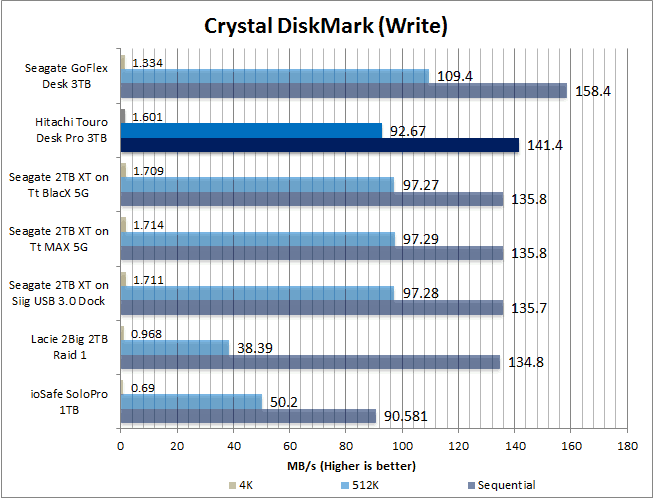
Once again, I saw a slightly lower than expected sequential file performance from the Touro Desk Pro. These numbers are good, but I have seen better. In all fairness, this is still fairly good sequential file performance. I’m also thoroughly impressed by the small file performance. It is obvious that the internal Hitachi 7K300 hard drive was built with small file performance as a priority. Considering most consumers’ need that involves backing up small files (e.g. photos, text files, email files, etc), this is a trade-off that should be more than satisfying for most people.
Real World Performance
Here, the real-world performance of this drive is stellar. It may have a small sequential file performance weakness in synthetic tests, but unless you have an extremely high-performance internal hard drive, you will never ever notice this lowered potential. This is for the simple reason that this 3TB hard drive inside the Touro Desk is going to be faster and more capable than your systems’ own rotational drive.


Recap
Overall, there is very little not to like about the Hitachi Touro Desk Pro 3TB. Hitachi really has been able to combine stellar good looks with the speed to match. It may not be as fast in all scenarios as some others, but it still is really impressive. No matter what your specific performance requirements are, be they small file performance or large file, the Touro Desk Pro is sure to satisfy them. The only two areas in which the Hitachi Touro Desk Pro is less than optimal are its price and software. When you purchase a high-capacity external hard drive, you expect to pay a premium so one really cannot complain about the asking price of $139. It’s just that for the price, you would expect something more from the software. So, if you can live this or simply don’t care about the rudimentary software, then the Hitachi Touro Desk Pro is a decent single-drive backup solution.