When you spend like 10 hours or so in front of a PC everyday, you’ll sooner or later come to appreciate the merits of ergonomic input devices. With these specially-made mice and keyboards we’ve gathered, it’s time to set yourself up for healthy computing.
Logitech MX Vertical Mouse
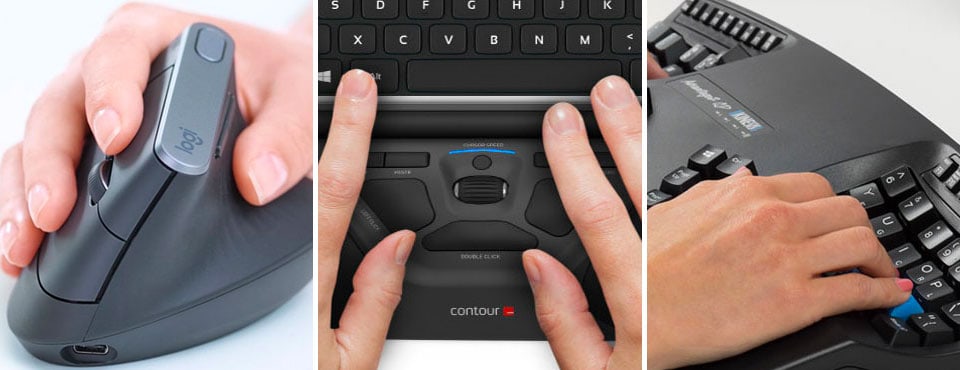
Logitech over the years has rightfully earned a reputation as being one of the best manufacturers for mice of all kinds. Surprisingly, we have never seen the Swiss peripherals maker tried its hand at a true ergonomic mouse. Logitech’s MX Vertical Advanced Ergonomic Mouse changes that.

Design-wise, the Logitech attempts to keep your arm in a neutral, vertical positioning. This inherently encourages more on the use of your forearm to move the mouse rather than solely relying on the movement of your fingers and wrist to navigate. Most importantly, such a design relieves stress on the wrist for those who have carpal tunnel syndrome.
The grip of the Vertical Mouse is also higher than compared to other non-ergonomic counterparts. You may need to change your seating posture by adjusting the height of your desk or your chair to make sure you don’t strain your wrist and arm with improper economics. As far as buttons go, the Vertical Mouse doesn’t come with a thumbwheel but its pair of thumb buttons appear to be more accessible than that of its flagship sibling, the MX Master 2S.
Lastly, on the software side, Logitech provides an immensely useful cross-platform Flow that lets you move your mouse cursor between up to three different computers on the same network; even better, you can also copy, paste and even drag files between these machines.

- NATURAL HANDSHAKE POSITION - MX Vertical’s natural handshake position reduces muscular...
- 57° VERTICAL ANGLE FOR IMPROVED WRIST POSTURE - MX Vertical’s unique 57° vertical angle...
- USER TESTED. ERGONOMIST-APPROVED. MX Vertical has been designed and tested with criteria set...

Contour Unimouse
Every ergonomic mouse you see here is sculpted to support your hand at a fixed angle and in a particular posture as the manufacturer had originally conceived. Hence, such a mouse has no flexibility to speak of. In reality, everyone may eventually wish to make adjustments for their ergonomic needs from time to time. For those who have outgrown the one-size-fits-all ergonomic mice, Contour’s Unimouse is worth checking out.

What makes this Unimouse, well, unique is its hinge mechanism that allows you to tilt the upper section of the mouse at an angle (up to 70 degrees) that most suited for yourself. In addition, Unimouse’s protruding thumb support is equally adjustable, allowing you to rotate it as well as to move it backward and forward until you find the perfect feel. The thumb rest is also complemented by a rubbery, textured surface that provides a good grip.
Interestingly, the Unimouse has a middle button between the left and right buttons. You may need to re-map the buttons unless you want to use your ring finger to make right clicks as your middle finger will only trigger double clicks by default. The Contour Unimouse is available in both right- and left-handed models with either wireless (2.4Ghz) or wired USB version to choose from.
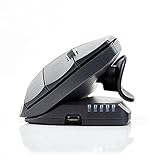
- ✅ WIRELESS RIGHT-HAND VERTICAL MOUSE THAT ADAPTS TO YOU: Set your tilt anywhere from 35° to...
- ✅ OPTIMIZED FOR RIGHT HAND: The Contour Unimouse is specifically designed for Right-handed...
- ✅ WIRELESS CONVENIENCE WITH RELIABLE, LONG-LASTING BATTERY: Enjoy the freedom of a wireless...
Matias Ergo Pro Keyboard
The $200 Matias’s Ergo Pro promises an ergonomic keyboard you would actually want to use even if you don’t have Carpal Tunnel Syndrome. Inspired by on a commonly seen split design, Matias actually takes it to another level by seperating the Ergo Pro into two pieces (5/6, T/Y, G/H, B/N) so you can place them in virtually infinite different positions. More impressive still, each section comes equipped with leg stands which allow for 9 degrees of tenting and 4.5 degrees of negative tilt to further aid in long-term typing comfort.
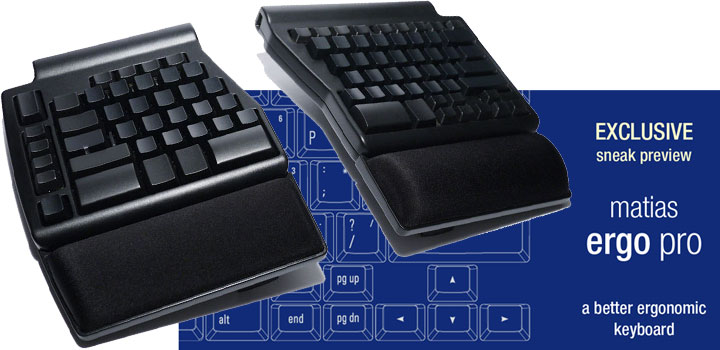
Ergonomic design aside, Matias also picks mechanical switches instead of the common mushroom dome switches. It has specifically opted for its own near-silent ‘Quiet Click’ mechanical key switches which deliver a comfortable typing experience that won’t slow you down nor annoy those around you. Because they are mechanically based, they also have a service life better than that of any mushroom dome key switch model. Last but not least is a vertical row of keys on the left side of the keyboard dedicated to Undo, Cut, Copy, and Paste.
Contour Roller Mouse
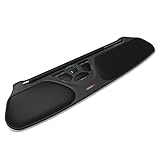
While you might think this is some kind of high-tech wrist rest, the Contour RollerMouse is in fact a mouse with a twist. It sits at the bottom of your keyboard. The not-so-obvious textured rollerbar at the top actually replaces your traditional mouse. It allows you to have accurate cursor control by rolling the bar up, down, and sideways, thanks to seven twin-eye laser sensors housed inside the roller. The bar itself is also clickable. The whole purpose of this is to eliminate the constant reaching and griping of a mouse, which might lead to repetitive injuries in the long run.

In addition to the left and right click buttons below the roller, there are dedicated buttons for double click, copy and paste as well as cursor speed selection. A clickable scroll wheel is conveniently placed in the middle, just like what you find on a regular mouse. The RollerMouse can also accomodate multiple screens with some simple adjustments to the roller. All these might take sometime to get used to. Over time, Contour hopes you will come to appreciate it as the RollerMouse is intended to significantly reduce the risk of Carpal Tunnel Syndrome and Tendonitis. At $270, the ingenuity of Contour’s ergonomic design does come with a hefty price tag, however.
- Designed to fit your hand naturally, avoiding painful positions and allowing you to work...
- Scroll Wheel scroller type for convenient, easy scrolling with maximum usability
- Notebook device support makes data and information immediately available for your convenience...
Kinesis Contour-shaped Keyboard
This is certainly no ordinary keyboard. The Kinesis Advantage2 follows the same approach of the likes of most ergonomic keyboards by splitting the keys into two halves. Each section has a concave shape with keys carefully positioned and angled that match different fingers’ length. It also makes you type with your wrists in a more natural “handshake” posture. Additionally, the distance between the two wells forces you to keep a natural straight line from your elbows to the sides of the keyboard. Kinesis’ design should ideally minimize forearm and finger extension in order to reduce fatigue.
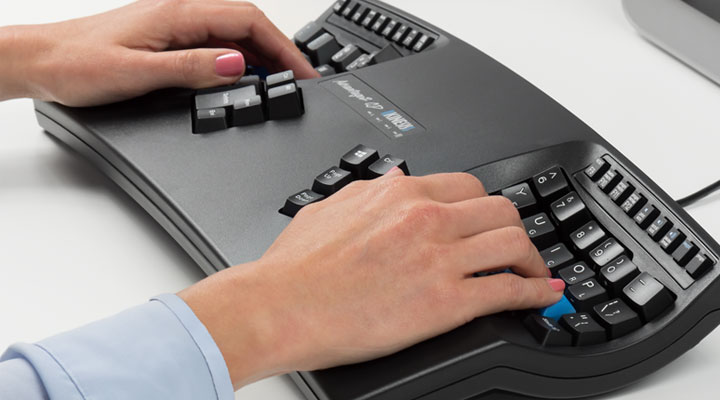
Interestingly, you will find the Backspace and Delete near the left keywell, and the Enter and Space bar next the right keywell. We’re certain the placement is for good reasons, but most of us will initially struggle with such keyboard layout and typing posture. Internally, there’s also 2MB on-board memory to support up to 100 macro. Kinesis opts for Cherry MX low-force tactile switch (peak force: 55g, activation force 45g, travel distance 4mm) for this mechanical keyboard – one of the many reasons why the Advantage2 costs upwards of $300.

- CONTOURED ERGONOMIC SHAPE PROVEN TO INCREASE COMFORT AND PRODUCTIVITY: Patented design features...
- GENUINE CHERRY MECHANICAL SWITCHES FOR PREMIUM TYPING FEEL AND PERFORMANCE: Cherry MX Brown...
- Full onboard programmability with the Driverless Smart Set engine: Custom layouts in QWERTY or...
Evoluent Vertical Mouse
Keeping the wrist in a neutral, vertical position is one of the most beneficial things that could happen to your mousing hand. So what exactly is neutral? Try this: stand up, with your arms relaxed at your sides. Now, using only your shoulders, raise your hands in front of you. Odds are that your hands will be somewhere between a 45° angle and perpendicular to the floor. This is more or less the position your hand will be in when grasping Evoluent’s VerticalMouse C.

There are two advantages to keeping a vertical positioning of the hand. For one, it eliminates pressure on the median nerve – the culprit behind the dastardly carpal tunnel syndrome. Two, it encourages movement of the mouse using your arm and shoulders, instead of movements with the fingers, thus lightening the load on the muscles in your forearm.

The grip of the VerticalMouse is extraordinarily high compared to a traditional horizontal mouse, so using it requires a good seating posture. While the picture shows the mouse is exclusively made for right-handed users, there’s a version for lefties too – for those in need to relieve their wrist pain.

- Continue to supply sufficient power to the portable device
- Superspeed usb.Svga converter enhances productivity, improvesdesktopplacement, extends the...
- Evoluent vertical mouse c series wireless right handed ergonomic design black/chrome vmcrw
Microsoft Sculpt Ergonomic Set
The keyboard of the Sculpt Ergonomic set from Microsoft is internally nicknamed the manta ray because of its eye-catching design, albeit there’s a large gap in the center. And just as with previous Natural keyboards, this one has also been split down the center and curved in and upwards in a reverse tilt to be more ergonomic. The reason all comes down to keeping wrists and forearms in a more relaxed position.
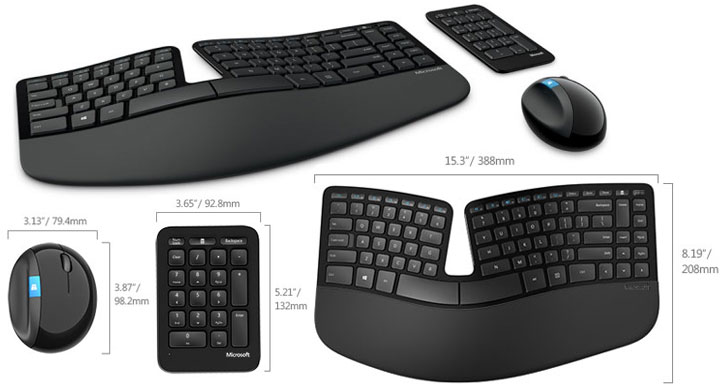
This wireless 2.4Ghz keyboard (with data encryption) comes with all the usual features including multimedia keys, padded palm rest, and quick access hotkey for Windows 10 charms. Also, what makes it unique compared to previous models is Microsoft has separated the number pad from the main unit. This way both can be positioned perfectly when needed and then moved out of the way when not needed.
Last but not least is an egg-shaped mouse with a large integrated thumb rest. Its ergonomic design reminds us too much of the decade-old Natural Wireless Mouse 6000. In a nutshell, its angle and height are carefully thought-out so your wrist would be in a position that reduces the pressure on the carpal tunnel area. The Sculpt mouse also comes with 4-way scrolling and a built-in Windows home button. This combination package has a MSRP of $130.
- Split keyset design helps to position wrists and forearms in a natural, relaxed position
- Cushioned palm rest provides support and promotes a neutral wrist position
- Domed keyboard design positions wrists at a natural, relaxed angle
Our list covers ergonomic mice and keyboards that are all intended to alleviate and prevent wrist pain and shoulder fatigue. If you like to share your experience with ergonomic input devices, you are more than welcome to do so in the comments below.