You will find a bewildering array of choices of adapters, enclosures, and docks on Amazon and alike. Expectedly, there are differences in drive-loading design, chassis durability, and USB bridge efficiency. These three factors come into play when picking the best drive adapter for your need. But first, you have to pick the right adapter suitable for your drive type.
Choose the Right Kind of Drive Adapter
| Compatible USB Drive Adapters | ||
|---|---|---|
| 3.5" SATA | Only docks, enclosures and adapter cables running on their own independent power source will work with desktop SATA drives. It’s also wise to make sure the bridge’s firmware is future-proof with storage capacity support up to 8TB. | No (requires independent power source) |
| 2.5" SATA | Any bus-powered drive converters as well as their self-powered counterparts will work with notebook SATA drives. For 2.5” enclosures, pay attention to the drive height they support. SSDs normally are 7mm in thickness while large-capacity hard drives (3TB or larger) top at 15mm. | Yes |
| M.2 | Only specialized USB enclosures work with M.2 SSDs, which come in either SATA or PCI Express variant, and also in various drive lengths ranging from from 30mm (2230) to 110mm (22110). It’s imperative to confirm with the manufacturer to make sure your drive’s interface protocol and physical size are compatible with the enclosure. | Yes |
| mSATA | One can actually convert a mSATA SSD into a 2.5" drive since its native interface is essentially the same as any other SATA 3. But there are specialized USB enclosures that fit mSATA SSDs perfectly if one wants a smaller drive for travel. | Yes |
Things You Need to Know
- The two common types on the market are docks and enclosures. Bare-bone adapter cables have also become commonplace in recent years. Should you need effortless access to a batch of SATA drives, docks are inherently more convenient for the task. Likewise, if portability is a priority, then better choose an enclosure with metal alloy over plastic for extra physical protection.
- ASMedia and JMicron are the two major players in third-generation USB-to-SATA bridge market. The majority of the USB 3.1 Gen.1 adapters (single-drive models) on the market are powered by either ASMedia’s ASM1153E or JMicron’s JMS578.
- USB 3.1 Gen. 2 adapters, such as ones powered by ASMedia’s ASM1351 and VIA’s VL716, are starting to show up. Even if you don’t have the latest laptop or desktop to match, it’s worthwhile to go with the Gen. 2 adapters as they are optimized for modern SSDs.
- Confirm with the manufacturer that its adapter supports USB Attached SCSI (UASP) so you know you are getting the best read and write performance as well as lower CPU utilization under supported platforms. This is of paramount importance to solid-state drives.
- SATA connectors are fairly delicate components. For this reason, docks and enclosures are inherent to be more suited for frequent drive swapping.
For this article, we’ve picked three models for their brand and popularity. An exhaustive benchmark of all the different adapters would not be feasible. However, expect more benchmarks and analysis of a few more products to be added shortly.
In-depth Look
OWC USB Drive Dock
OWC is a household name in the Apple community for its aftermarket memory and storage upgrades for Macs. Its USB 3.1 Drive Dock is the latest addition to its growing peripheral line-up. There’s another configuration with Thunderbolt 2 in addition to USB 3.1 Gen. 1 (5Gbps). This high-end model at $249 should appeal to performance-oriented prosumers with deep pockets. For the purpose of his article, we put our focus on the USB-only version that retails for $69.
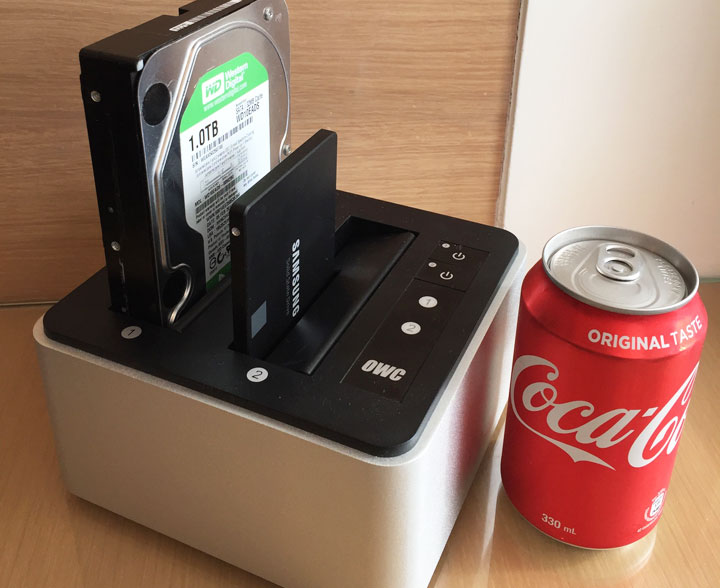
Right off the bat, this is a vertical loading dock with dual slots that allow for simultaneous access to two SATA drives from Windows or Mac. OWC claims it is powered by a pair of ASMedia ASM1153E USB-to-SATA bridge chipsets, which support USB 3.1 Gen. 1 (5Gbps), UASP, and SATA III. This is probably as good as it gets in the USB storage adapter world.
Physically, an aluminum alloy should provide adequate protection in the long run. The metal chassis and the power brick inside that give the OWC dock a low center of gravity help keep this two-pound unit from being unstable even when pulling the drive.
On top of the matte black top are two independent power switches for the SATA III slots so you can swap out a drive without interrupting file transfers on the other. And on the back, you will find a two-prong AC plug, standard USB 3.0, and power switch. The OWC comes with a 2 ft. USB cable, and is backed by a two-year warranty.

- High-performance, swappable, bare drive access tool with USB-C connectivity for reading...
- USB-C CONNECTIVITY: Up to 522MB/s speeds
- Mac and PC compatible
Plugable USB 3.0 Hard Drive Dock
Plugable is a small company that specializes in PC peripherals, largely made up of USB accessories. Their people are very thorough when it comes to answering pre-sale and technical questions on each of their product pages. This gives buyers peace of mind knowing they have less chance of running into something peculiar and unexpected because of their PC setup.
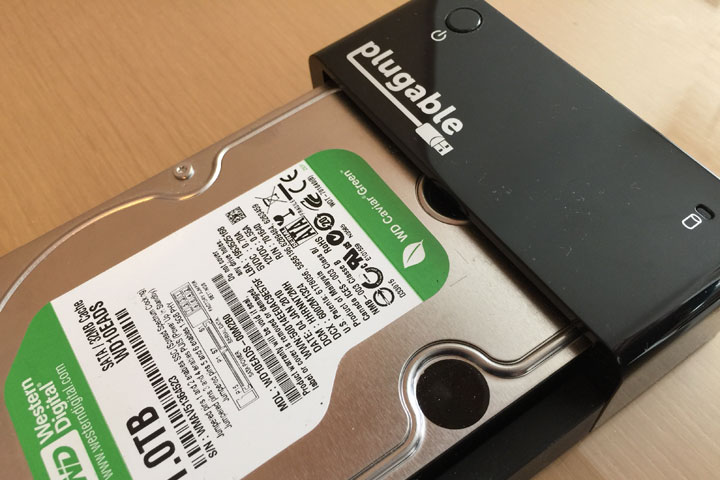
In regard to the dock, the single-bay unit sports a lay-flat design that accepts just one SATA drive. It’s relatively easy to slide out a 3.5” drive but not so much with a 2.5” SATA. An eject mechanism would, however, make things easier for SSD and laptop drive owners. Internally, Plugable is equipped with an ASMedia ASM1053E SATA III to USB bridge chipset with the latest firmware that supports drive size up to 8TB.
The body is primarily made of ABS plastic. Add in the fact that the design leaves the installed drive mostly exposed and unprotected; the Plugable certainly isn’t meant to be lugged around. There’s also a heavy-duty 30W power brick, but at least it’s robust enough for even the most power-hungry drives.
ORICO Tool-free USB Enclosure
This 2.5” enclosure is from ORICO, a Chinese company that sells just about every type and style of USB drive adapter imaginable. It has a strong presence on Amazon, likely due to its aggressive pricing. By design, the enclosure is limited to either 9.5 or 7.5mm 2.5” drive. The micro-USB 3.0 connector on its rear should have no problems powering up the internal drive, especially if it’s an SSD.
Getting this is effortless. Simply slide off the back cover, gently insert the drive to the SATA connector, and put the cover back on. A foam piece is included that can be applied to provide padding between a 7.5mm drive and the case. The unit’s build quality is comparable to that of Seagate’s and Western Digital’s off-the-shelf portable USB drives. Nonetheless, the ORICO’s plastic body isn’t made to be rugged and waterproof so we shouldn’t abuse it too much.
The core of the ORICO is a JMS567 bridge from JMicron; it’s a USB 3.1 Gen. 1 (5Gbps) SATA III bridge with confirmed UASP support. A 3-feet USB 3.0 cable comes with the package. At the current price, this enclosure with an 18-month warranty should work perfectly if you simply need occasional drive cloning or a ten-buck solution to pull data off an old internal drive.
Quick Performance Analysis
The purpose of this benchmark was to find out the full potential of each USB-SATA adapter when paired with one of the fastest SSDs on the market. We conducted two different file tests to better reflect real-world performance. Tests were carried out on Nodesoft’s DiskBench. The first test involved transferring a 10GB MP4 (incompressible) between the Samsung EVO 850 250GB and our late 2014 MacBook Pro via USB 3.0. The other test involved copying 990 JPEGs with a total size of about 4.7GB back and forth between the aforementioned devices.
Note that all these adapters support UASP out of the box provided you have the supported operating systems as well as compatible USB 3.0 controllers on your PC. As this is late 2016, we assume most of us have upgraded our systems (Mac and Windows alike) to take full advantage of UASP.
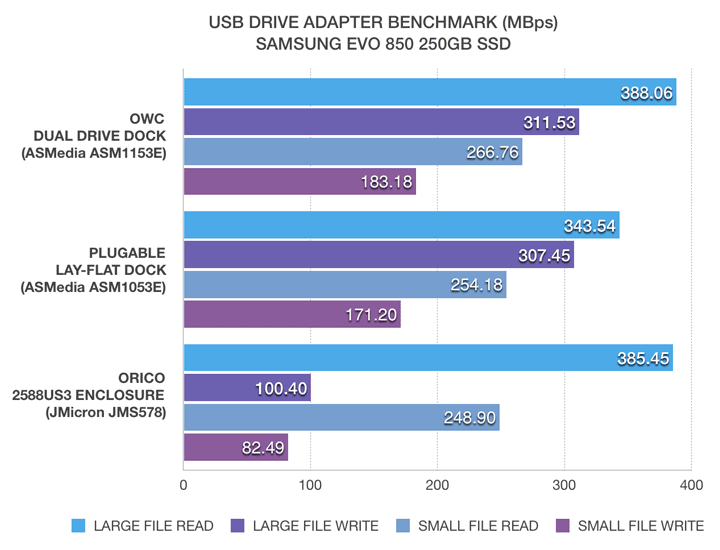
As you can see, ASMedia’s ASM1153E on the OWC managed to maintain a lead while Plugable trailing close behind. It’s important to note our Plugable dock is from last year whose ASM1053E bridge has been out of production. The version available now is explicitly said to be the same chipset found on the OWC.
Moving onto ORICO, we didn’t see anything peculiar until the photo write test during which the onboard JMicron’s JMS578 had a serious problem catching up to the other two adapters. There could be something wrong with this particular chipset implementation in the ORICO. We intend on updating the results as soon as more data comes in.
At the end of the day, it’s the chipset and firmware that determine the performance – not the brand of the adapter or enclosure.
Best Deals Online



Pricing is last updated by Amazon on 2026-09-28 at 03:45. When you buy through Amazon affiliate links on our site, we may earn an affiliate commission.