Since the introduction of USB 3.0, making sense of USB marketing names has been a source of frustration for consumers. This is largely due to the fact that each new USB standard absorbs all previous 3.x specifications and at the same time gives them new monikers. Now that the original USB 3.0 has received two major updates, we are now at USB 3.2.
Different USB 3.2 Speeds
The latest USB specification brings us four speeds altogether and they are as follows:
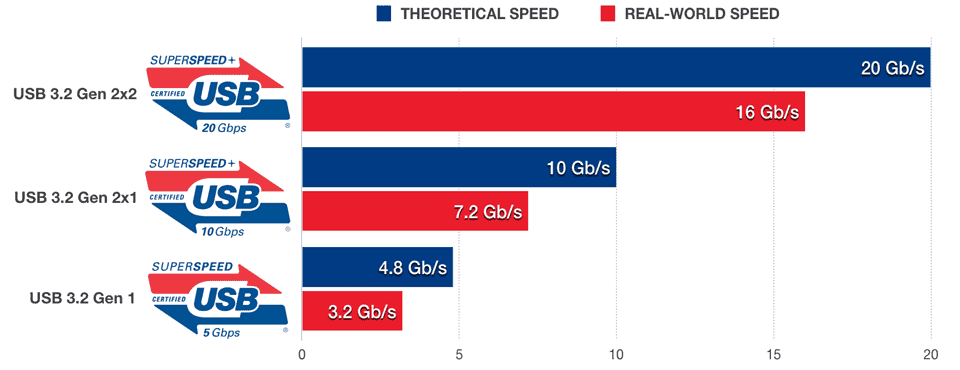
- USB 3.2 Gen 2×2 defines data transfer rate at 20Gbps over two lanes at 10Gbps each, hence the name SuperSpeed USB 20Gbps on its official namesake logo. This speed mode requires the use of certified, full-featured USB-C cables.
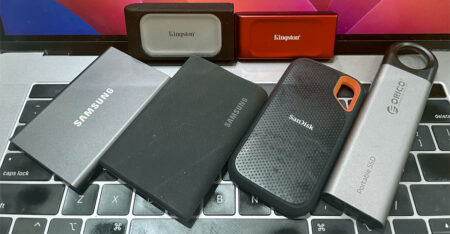
- USB 3.2 Gen 2×1 is alternatively known as USB 3.1 Gen 2. Providing a single lane of 10Gbps, it can work with either USB-C cables or legacy USB 3.0 Type-A cables. This mode – marketed under SuperSpeed USB 10Gbps – is also the fastest speed that Thunderbolt 3 supports natively. Note that passive cables are mostly 1m or shorter in length in order to maintain optimal signal quality transferring data in USB 3.2 Gen 2×1. You’ll find most USB SSDs – in particular NVMe variants – take full advantage of said USB mode potential.
- USB 3.2 Gen 1×2 takes advantage of dual-lane operation capability of a certified USB-C cable, providing two lanes of 5Gbps. This mode, introduced as part of the new specification, boosts 10Gbps transfer rate over a passive USB-C cable of 3m in length. If you need 10Gbps over a longer distance, USB 3.2 Gen 1×2 might be an option (if you can find the host and device that support this particular mode).
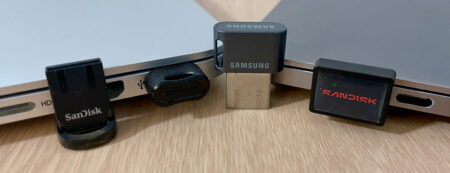
- USB 3.2 Gen 1 is basically USB 3.0 that was superseded by USB 3.1 Gen 1. The maximum theoretical data transfer is 5Gbps. It can also work with either legacy USB 3.0 Type-A or USB-C cables. Mini drives, dual-headed drives, and everyday flash drives run at 5Gbps as this USB speed mode already has more than enough bandwidth for the slower NAND and HDD.
In the real world, we’ve seen second-generation USB 3.2 Gen 2×1 (aka SuperSpeed USB 10Gbps) SSD from Crucial manages to push the real-world performance close to 800MBps (or 6.4Gbps) whereas USB 3.2 Gen 1 (aka SuperSpeed USB 5Gbps) equivalent can reach close to 400MBps (or 3.2Gbps). USB 2.0 is still widely used; it delivers both Hi-Speed and Full-Speed modes that operate at 480Mbps and 12Mbps respectively. (Note: the unit is in bits per second.)
When taking into account protocol overheads, latency, and flow control, the fastest USB 3.2 Gen 1 device should operate at near 450Mbytes per second whereas a USB 3.2 Gen 2×1 device – in best case scenario – should perform at 1.1Gbytes per second under ideal conditions. But your mileage may vary depending on the system. The new Gen 2×2 and 2×1 mode also reduce the overhead from 20% to just 3% with the USB 3.2’s new 128b/132b encoding scheme; hence, you see better effective throughput.
Real-world USB 3.2 Gen 2 Performance
To illustrate how fast USB 3.2 Gen 2×1 (10Gbps) is in real-world scenarios, we compared the speed of five USB SSDs in the bar graph below. These drives, save for Kingston DataTraveler Max, are all NVMe SSDs behind a USB 3.2 2×1 bridge chip. It’s worth mentioning the Kingston is a rare breed for it is the first thumb drive that integrates both SSD controller and USB interface in a single-chip solution. Note that laptops with built-in USB 3.2 Gen 2×2 ports are far from ubiquitous so we didn’t bother to include the new class of SuperSpeed USB 20Gbps SSDs even though they are close to twice as fast.
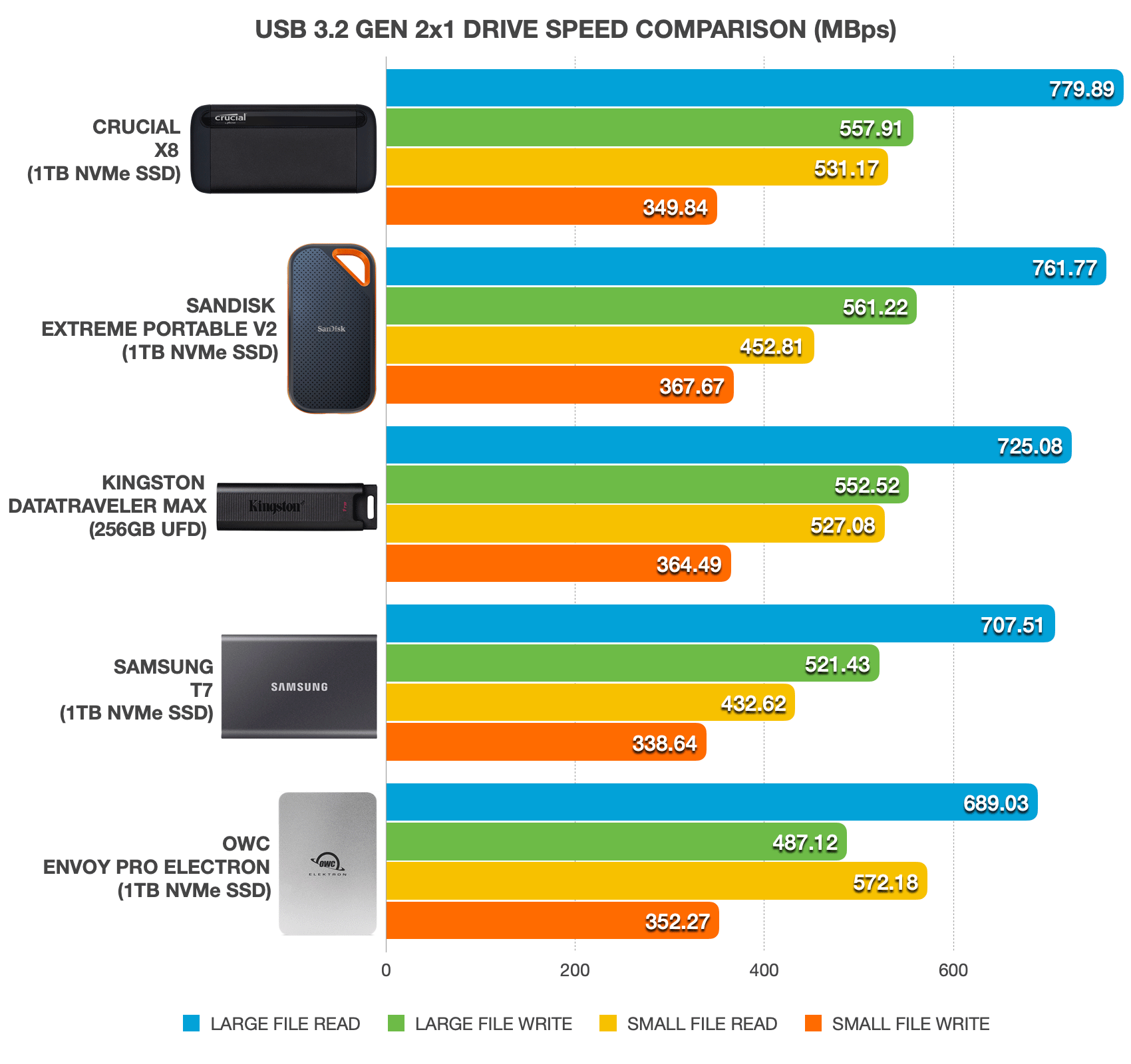
The current testbed as of this writing is a 2018 Apple MacBook Pro running the latest Windows 10 21H1 as of this writing. Results are shown in megabytes per second, based on our sequential non-compressible file transfer tests that involve copying back and forth a single 10GB MP4 and a folder of 5GB JPEGs. These USB 3.2 Gen 2×1 (10Gbps) SSDs with support for UASP are undisputedly the performance leaders in their class. To sum up, you can expect the top sequential transfer rate in the 700 to 800MB/s range under real-world conditions with these USB 3.2 Gen 2×1 devices.
Real-world USB 3.2 Gen 1 Performance
For storage devices that cannot leverage the bandwidth available with the latest USB specs, manufacturers will keep using USB 3.2 Gen 1 with speed of 5Gbps. The graph below illustrates how fast USB 3.2 Gen 1 (5Gbps) drives perform in real-world scenarios. For the purpose of this comparison, we picked two drives that bridge with a SATA SSD; a thumb drive with SATA to SSD controller; and a pair of mini USB drives as well as two external 3.5″ hard drives.
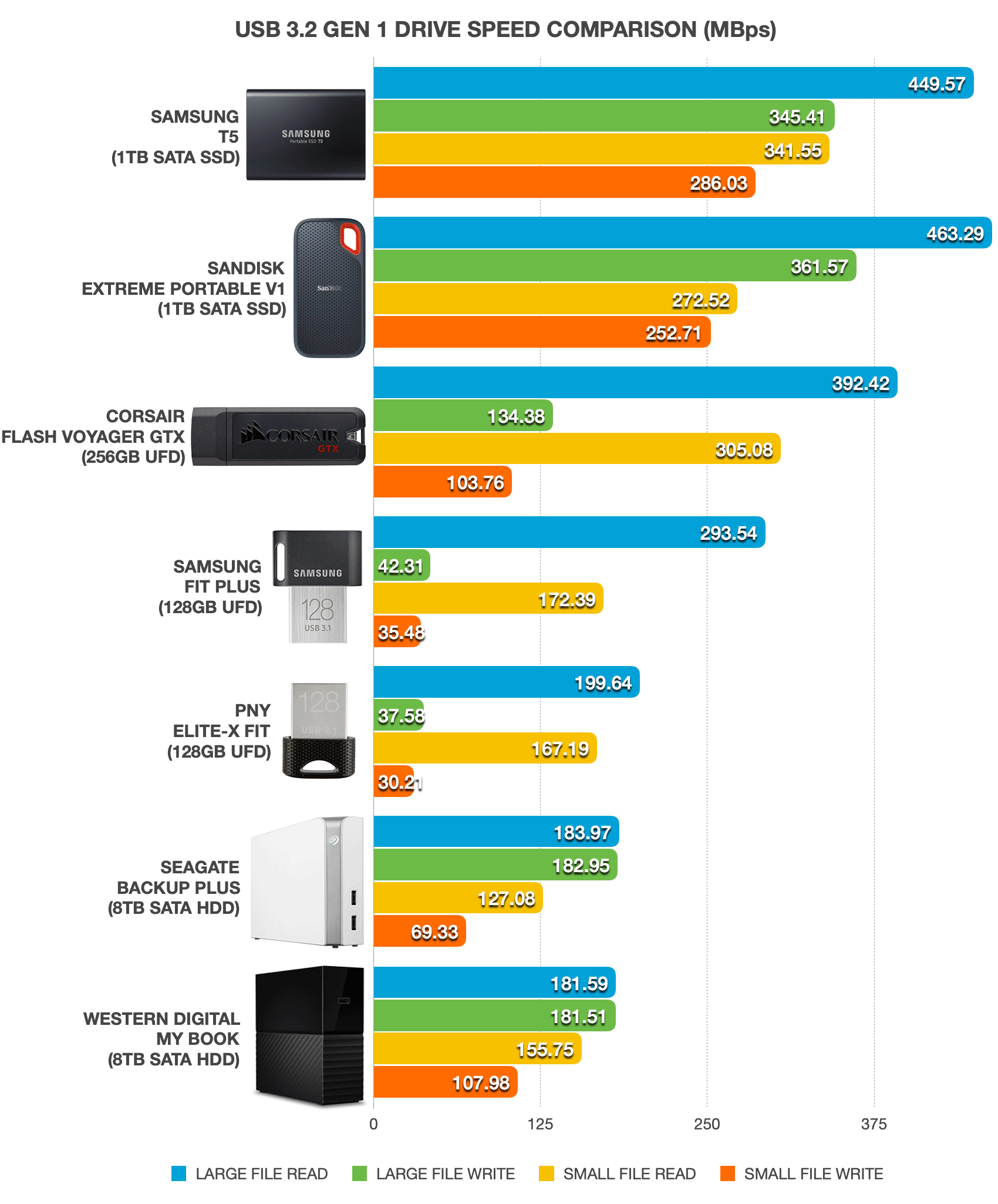
In this comparison, SSD-class drives – namely the Samsung T5 and Sandisk Extreme Pro V1 – are the first batch of external drives that deliver close to the limit of its USB 3.2 Gen 1 interface. Both of them are at heart SATA SSDs; hence, their native speeds won’t go any faster than 550MB/s. By going the USB route, these drives approximately take a 10-percent performance penalty. And like the Kingston DataTraveler Max, the Corsair Flash Voyager GTX is an SSD packaged in a thumb drive-form factor except the latter is at least three generations behind.
Both the Samsung Fit Plus and PNY Elite-X Fit are classified as old-fashioned thumb drives. These mini USB drives aren’t exactly built for speed. Expect write performance to be on par with that of a USB 2.0 drive. Yet they come in handy if you need a quick storage boost for your laptop without needing a major upgrade. Without USAP, these aren’t designed to run applications as efficiently as any SSD-class USB drive but they are more than adequate for moving media files in a timely fashion.
For capacity larger than 1TB, nothing beats hard disk drives. 8TB options shown here managed speed at around 180MB/s. By no means are the Seagate Backup Plus and WD My Book slow; traditional hard disk drives are particularly reliable in long-term archival backup as well as incremental backups that likely demand more storage space consumption.
This bar chart is by no means an exhaustive comparison of USB drive speeds but it should give you a fairly good idea how each storage type performs in real-world scenarios. We intend to add more drives periodically. So, please let us know in the comment below what you would like us to add in this comparison.
USB 3.2 SSD Deals on Amazon






Pricing is last updated by Amazon on 2026-09-18 at 12:38. When you buy through Amazon affiliate links on our site, we may earn an affiliate commission.