USB 3.0 is finally closing in on the mark of ubiquity, appearing in even the cheapest of Dell laptops. So let it be known that Ye Olde USB 2.0 is officially boring and dead now, and so are the days of waiting for files to transfer at a snail’s pace. Flash drives with USB 3.0 interfaces are available here and now, and many crank the write speeds to just under 40MB/s. But this still isn’t good enough for you, is it? Still, nerve-wracked by progress bars? Well, “feast” your impatient eyeballs on the second generation of USB 3.0 flash drives, starting with Corsair’s Flash Voyager GT 3.0. An in-depth review awaits you after the jump.
Design: Rubber, Still
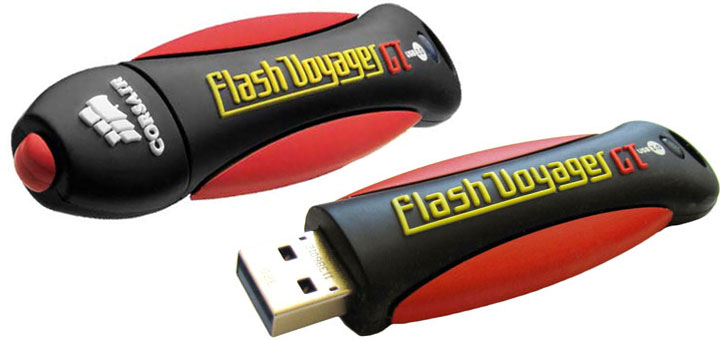
I find I have to constantly remind myself that Corsair’s unique rubber-encased drives are not toys, but profess – OH LOOK THEY BOUNCE! Yes, not much has changed in the way of Corsair’s ever-durable drives. The new Flash Voyager GT USB 3.0 is practically identical in all but color and internals to the 32GB Flash Voyager GTR reviewed last year. Same hardness, same bounciness, same lint attraction, same water-resistant cap that’s easily lost but freely replaced. It’s a design that’s held up well for over five years now.
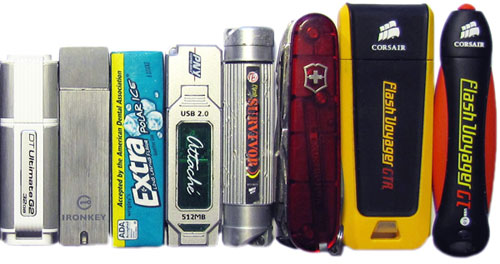
Make no mistake, this is a tall order of a flash drive, employing the same 4-inch form factor of Corsair’s previous 32GB designs. At 5/8 of an inch thick and one inch wide, the drive allows for neighboring USB devices to be plugged into horizontally-adjacent ports, but it’s a tight squeeze. Vertically stacked ports are right out.
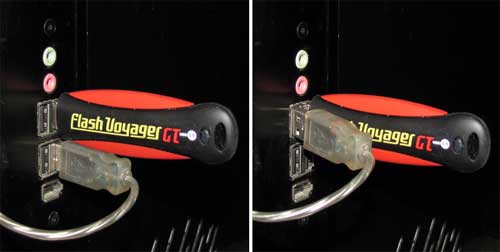
It’s for this reason that I’m perplexed that Corsair didn’t opt to include their usual niceties of a lanyard and USB extension cord. You can order a USB 3.0 extension cable for next to nothing, but Corsair should have picked up the tab since this is a premium flash drive we’re talking about.
Durability Tests
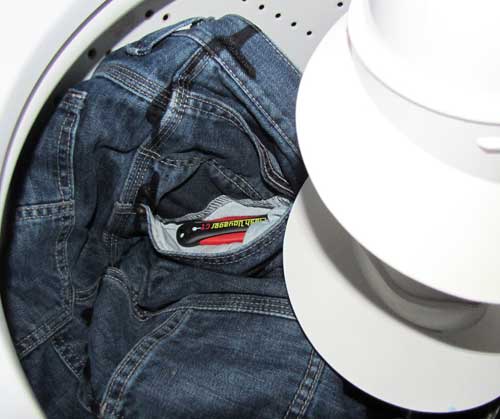
As far as durability is concerned, if these drives had a collective memory, they would surely be warped and twisted from being subjected to toddlers, thrown from buildings, baked alive on a pizza, tormented by high-velocity soapy water, and somehow surviving through it all over and over again. In fact, the only time in recent memory that a Flash Voyager has failed on me may not have even been caused by laundry day as was originally suspected in my Flash Voyager GTR review, but an annoying firmware bug that was later identified by the masses after the review was completed. Oh, there was also that one time I crushed the life out of the original Flash Voyager GT with an SUV. (The Flash Survivor GT was more apt to surviving that test…)
Still, my point stands that this is a generally durable design if you’re a generally decent human being. The USB 3.0 variant of the Flash Voyager GT looks to be no different, having made it through two laundry cycles and still refusing to crack. I’ll need to think of some more devious means of torture for future articles.
If for some reason the drive still manages to die under your less-torturous watch, Corsair has you covered for a good five years under warranty, and their support team has always done an outstanding job any time I’ve called for a bad stick of RAM. But don’t think this excuses you from going without backups! Though I’ve yet to encounter any firmware bugs like what plagued the 32/64GB USB 2.0 GTR drives, and hopefully there aren’t any to encounter, I don’t want to be responsible for your anguish if your data magically goes poof. Practice safe hex.
GT Performance
The USB 3.0 lineup of Flash Voyager GT drives is a bit different from previous GT entries in that there are two different speed ratings depending on the drive you’re looking at. The problem I see with this lineup is that the current pricing offers little incentive to buy the 32GB Flash Voyager GT USB 3.0 over its non-GT cousin being sold for $15 less if you ignore rebates. The standard model reads “only” at 80MB/s versus the GT’s 135MB/s, but this is okay with me since I’m more concerned with write speeds, and that’s where I see no value. 40MB/s versus 41MB/s? Yawn.
The 64GB drive is a better proposition all around, doubling the write speed to an impressive 83MB/s on paper. For double the price, of course. Is this what my mom was going on about when she constantly harped about buying in bulk? Yes, buying the speedy 64GB version is undoubtedly better than having to buy two 32GB drives, but now we’re talking about a $130 flash drive instead of a $55 one, and that’s well above the mental barrier for a stocking stuffer.
Corsair’s rated speeds for the Flash Voyager GT USB 3.0 were pulled from the classic ATTO Disk Benchmark, so that’s what I’ll be using to verify the synthetic numbers. My testing platform consists of an EP45T-USB3P motherboard graciously offered by Gigabyte Technology, with a 3.0GHz Core 2 Duo processor and 8GB of RAM. The USB 3.0 controller is built by NEC/Renesas, and is running the latest v3028 firmware and v2.1.27.0 drivers. “Turbo USB 3.0” mode is enabled on the motherboard to alleviate any potential bottlenecks.
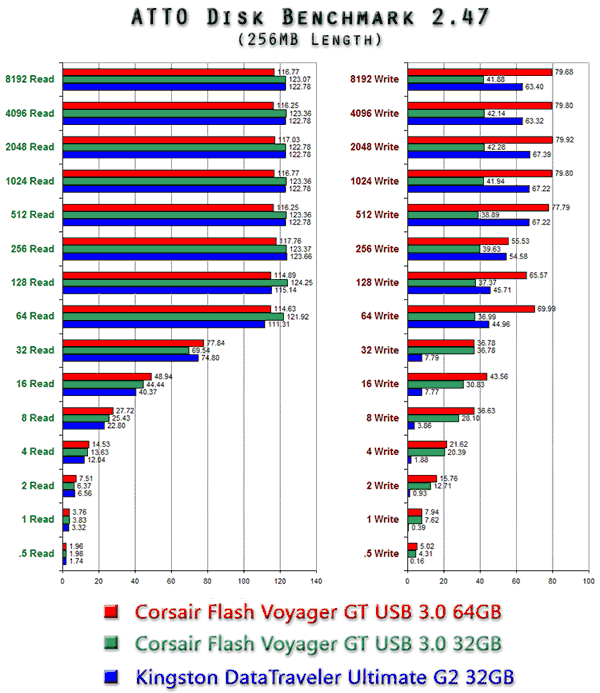
As you can see in ATTO results above, both the 32GB and 64GB Flash Voyager GT USB 3.0 drives were a bit off from their advertised maximum read and write speeds, but not by too much. When using the standard benchmark length of 256MB, the 64GB model’s read speed peaked at just under 117MB/s, with the 32GB scoring slightly higher at 123MB/s, a notable 10MB/s below Corsair’s numbers. Write speeds were closer to spec, with a maximum of 80MB/s for the 64GB and 42MB/s for the 32GB drive.
It’s interesting to note that the benchmarks change dramatically when adjusting the length in ATTO, at least for the Flash Voyager GTs. At a smaller 128MB benchmark length, the read speeds drop to 113MB/s for both drives, but the 64GB and 32GB write speeds soar to 89MB/s and 45MB/s respectively. Increasing the length to 1024MB throws things in reverse, dropping write speeds to 74MB/s and 39MB/s, but boosting the read speeds to 126MB/s and 130MB/s. All the while the Kingston DataTraveler Ultimate G2 behaved more predictably, boosting *both* read and write speeds to 126MB/s and 77MB/s as the length increased.
Though I wasn’t able to hit the maximum 135MB/s synthetic read speed advertised by Corsair, I think that being off by 4% counts as close enough. The excellent small write performance is also noteworthy, oftentimes faster than the read performance at the same level. Being able to surpass Corsair’s own write speeds was rather nice, but I’m not entirely comfortable with having to milk the synthetic benchmarks like I did when I’m used to benchmarking at the default length of 256MB as most other reviewers do.
To test real world performance, I performed a Robocopy test of transferring a 10GB collection of small and medium-sized files–a good equivalent of many high-res photos or MP3s. A second transfer was also performed by moving a much larger 4GB file. Files were transferred to and from an OCZ Vertex 3 solid-state drive, again to ensure that there were no bottlenecks. All drives were formatted as exFAT for this test.
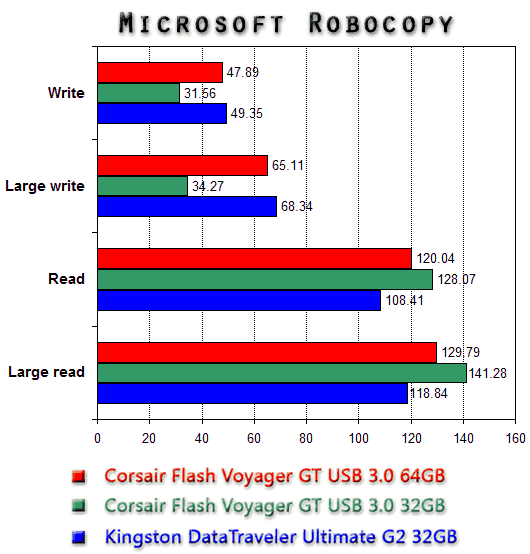
This graph is a bit more telling. Read speeds were certainly fast and in the case of the 32GB Flash Voyager, even faster than what I was able to hit on the synthetic benchmark at an astonishing 141MB/s. But the write speed was absolutely cringing compared to the synthetic benchmarks, only able to write at 65MB/s for the 64GB drive and 34MB/s for the 32GB drive when moving the 4GB file. Remember, we’ve seen these two write at up to 89MB/s and 45MB/s respectively.
Contrast this to the Kingston DataTraveler Ultimate G2, which held much closer to its synthetic benchmarks and consistently knocked the socks off of the 32GB Flash Voyager GT in every write test above 64 bytes. Between the two 32GB drives, the Kingston is a clear winner in terms of raw write performance. To be fair, however, it also costs a good $15 more than Corsair’s offering, plus it cannot be bounced off of walls in boredom.
Recap
The performance-minded Flash Voyager GTs are back and bouncing around with USB 3.0, still durable as ever before. Unless you’re in a war zone or objects just happen to spontaneously combust around you, these drives should have no problem lasting a good many years. The unbridled read speeds are blazingly fast compared to the fastest USB 2.0 drives or even the first generation of USB 3.0 drives.
The 64GB GT kicks write speeds up to eleven, but the 32GB write speed addles my brain given that it’s practically the same as the non-GT Flash Voyager and easily bested by competing for top-tier 32GB flash drives. Real-world write speeds for both are also a bit lacking compared to the synthetic results, but still plenty fast. It’s easy to recommend the Flash Voyager GTs despite these shortcomings, but I’d advise price-conscious consumers and speed junkies alike to nevertheless weigh their many options carefully.