First Impressions
There might be no more hotly-contested computer and peripherals accessory market than the iPod / iPhone ecosystem. Every time Apple releases or refreshes their ubiquitous mobile devices, accessory manufacturers are undoubtedly rushing around trying to bring relevant companion gadgets to market. Some accessories are rather obvious, such as improved stereo headphones, speaker systems with docking connectors, and the like. Others are more targeted, such as slip cases, battery extenders, and FM tuners. Still others yet fall into the class of “combo-peripherals”, where a multitude of functions previously requiring several devices is shoehorned into a single new gadget. The Griffin Simplifi falls into this class.
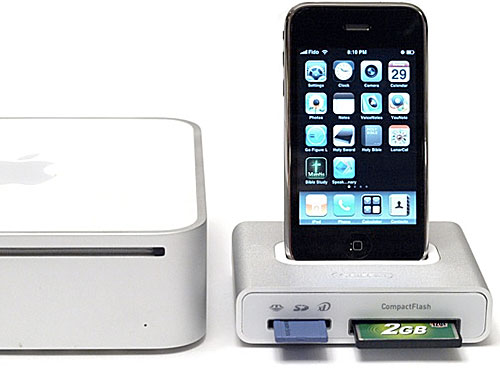
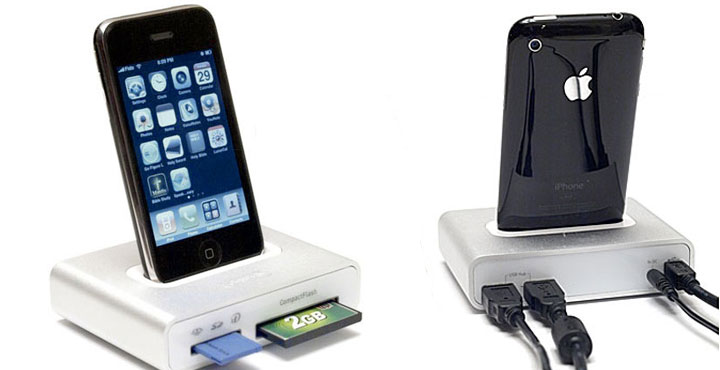
With a sleek aluminum and glossy white plastic housing, Griffin seems to have given their product development team a pile of Mac minis, USB hubs, card readers, iPod connectors, and hand tools with instructions to make a new product only out of existing parts available. The result: a nice looking, multi-function device that is well executed, but still slim on new features.
Attention Neat Freaks
A quick survey of iPod peripherals reveals that Apple makes a pretty nice iPod Universal Dock with remote control and audio/video output for $49. One can pick up a no-frills USB card reader for, say $20. Add a multi-port USB 2.0 hub with power supply for maybe $29, if you got a brand name one on sale. This combination, totaling about a hundred bucks, gets you into about the same class as Simplifi, except the Simplifi is $69 but lacks the audio/video output. How much value you place on the A/V functionality is up to you, but if it’s important to you, Simplifi is not your gadget. Since I can’t see any person buying Simplifi for just the memory slots or the USB hub, Griffin seems to be going after desk clutter with an integrated device.
If you have speakers at your desk where you work, as I do, in all likelihood they’re connected to your computer, not your docked iPod. If you regularly download pictures from your digicam, you might just use the cable that came with your camera. But if you have several cameras, you’d much rather use a card reader than deal with a tangle of cables. You might long to have a second iPod/iPhone sync cable, so that you can sync/charge at the office as well as at home. Still reading? YOU, my friend, are Griffin’s target market. As a declutter device, the Simplifi certainly occupied a welcome smaller footprint on my already crowded desk.
The Little Details
Griffin didn’t cheap out on the included accessories, as a power supply, USB cable, and interchangeable docking adapters for every recent iPod and iPhone with docking connector come in the box. iPod shuffle (1st generation and 3rd generation) can recharge/sync using a standard USB port. Around back are two rear-mounted USB 2.0 ports, they are both capable of supplying full bus power when the included AC power supply is connected.
Another nice touch is the Mac mini-like rubber pad on the bottom of the unit, which serves to give the little dock traction on most desk surfaces. The printing is even engraved in the rubber, just like a mini. Because the Simplifi has a bit of heft to it, it feels like a quality piece, and never looks out of place thanks to its familiar design.
Getting into the USB hub implementation in this particular product, it appears that Griffin made some conscious choices for implementing the electronics in the most straightforward manner possible. It appears everything (dock connector, card slots, and twin USB ports) are driven off of the built-in hub. That is, charging an iPod or iPhone is not possible using just the Simplifi with the AC adapter. You’ll need to have your computer and USB cable plugged in for that to happen. This is rather unfortunate if for some reason you want your iPod to charge while you carry your laptop somewhere else.
Also, the card reader functionality is only available when the AC supply is plugged in. Similar to most USB hubs on the market, the twin USB ports are able to operate when the Simplifi is running on bus power only – but only for devices that don’t draw much current, such as mice and keyboards.
The back panel includes 2 little blue LEDs (one per USB port) that light when a device is plugged in. The front panel includes just one blue LED that illuminates when the USB cable is plugged into the host computer. Sadly, there are no indicator LEDs to show the status of the memory card slots. Rather, the single front LED blinks when there is memory card activity at either slot. We think it would have been better to move the USB port indicators to the front panel where they are visible, and include two more LEDs, one per memory slot. Perhaps Griffin was going for the clean, uncluttered look, and this I can say they have achieved.
Performance
Performance in every respect, was excellent in our lab tests. The Griffin Simplifi handled everything we threw at it, including benchmarks involving flash media in both card slots, USB 2.0 hub performance, and iPhone 3G synching. Here are some test results for the USB hub performance, tested with one of the faster USB flash drives on the market, a Patriot XT 8GB plugged into one of the USB ports of Simplifi. The comparison graph shows the flash drive performance directly connected to the PC (blue) and the flash drive connected thru the Griffin Simplifi.
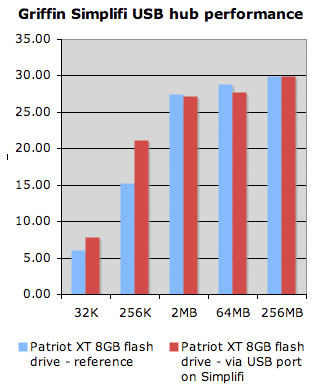 Since I didn’t have another USB card reader available, I couldn’t benchmark the card slots directly with comparable gear. Suffice to say I’m confident the performance is very good, as I measured peak read performance of a Sony Memory Stick Duo (4GB) at 12.8MB/sec, and the same statistic for a Transcend CompactFlash 120x card (2GB) came in at 17.0 MB/sec. All of these numbers are exactly what I would expect from flash memory of this type and class.
iPhone synching is particularly notable for the fact that sync speed (3GB of pictures and music, primarily) between computer and iPhone took about the same time using the iPhone docked with Griffin Simplifi versus a direct connect with the Apple USB cable. It’s worth noting that since the docking connector share the same bus as the USB ports and card slots, there would be a performance hit if you were using other devices at the same time, but I see no reason to try to benchmark this phenomenon, as this is the nature of a shared USB bus.
Recap
All in all, Griffin has a solid combo product on its hands for the style-conscious iPhone or iPod owner. At the same time, I used Simplifi for a few weeks and I’m left hungry for more. Inclusion of audio/video output to me would be a no-brainer. An infrared remote I could probably live without, but I couldn’t help thinking…wouldn’t it be great if my iPhone could access all the data on my memory cards in some way? Perhaps turn iPhone into a high-res photo viewer?
As it is, I like the product for what it does to my workspace. Given the current economic situation, consumer electronics are selling at street prices far lower than MSRP and thus the Simplifi makes sense if you can pick one up at a healthy discount. I’m all for simplicity and elegance, I just think Griffin went one step too far in simplifying the product past the point of providing good value. What it does, it does well. But is that enough? You decide.