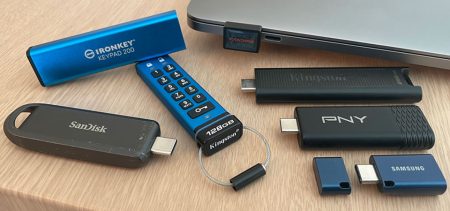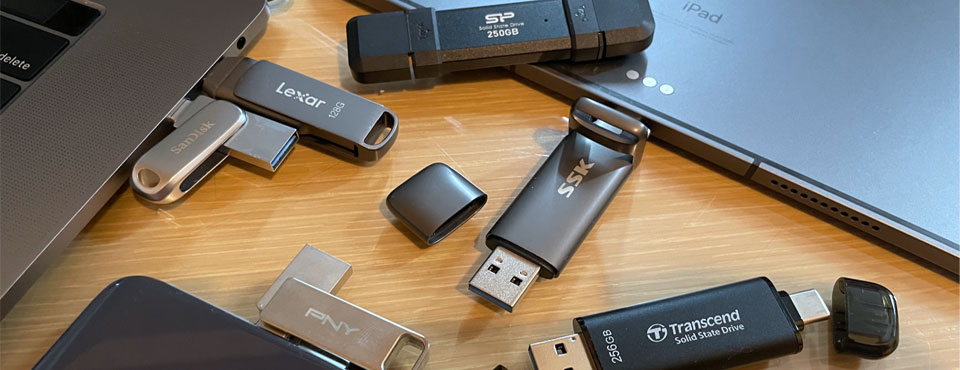
We tested seven dual flash drives from Kingston, PNY, Sandisk, Silicon Power, SSK, TeamGroup, and Transcend. These drives serve as a bridge between USB-C and legacy USB-A ports. With both connectors available, there’s no need for multiple drives or adapters, making it easier to transfer files across devices of different platforms.
Our Pick
The SanDisk Extreme Pro Dual Drive stands out as the best dual-headed flash drive we’ve tested. It offers a combination of a large 64GB pSLC cache for quick bursts and a stable 360MB/s native flash speed for sustained transfers. This dual-layer performance profile makes it essentially a mid-range SSD in a thumb drive form factor, allowing it to breeze through high-volume workloads that cause other drives to stutter. Additionally, it offers a reassuring lifetime warranty and includes SanDisk’s reliable backup and encryption software.
What are Dual Flash Drives?
Dual flash drives – having USB Type-A and USB-C connectors on opposite ends – are becoming more relevant as more computers and smartphones ship with the reversible USB port exclusively. They make sure you have readily access to your data on your future-proof USB-C devices as well as giving you backward compatibility on PCs with good old USB Type-A. For this reason, it will never hurt to have at least one of these dual-headed flash drives in case you need a quick and easy file transfer solution.
Feature Comparison
 Kingston Dual Portable SSD $154.99 for 512GB $256.00 for 1TB | 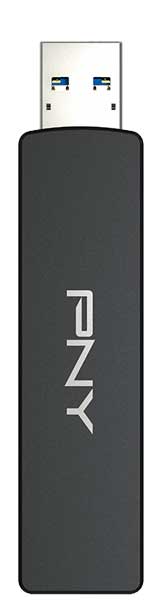 PNY Duo Link V3 $123.99 for 512GB $129.99 for 1TB |  Sandisk Extreme Dual Pro Price not available for 512GB $268.00 for 1TB |  Silicon Power DS72 $256.30 for 1TB | 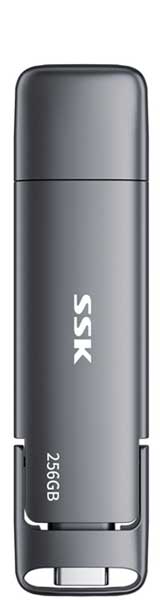 SSK Dual USB-C Drive $87.99 for 512GB $148.99 for 1TB |  TeamGroup X1 Max $94.99 for 512GB | 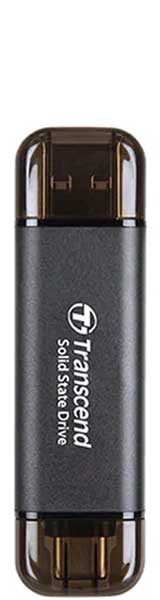 Transcend ESD310 $119.99 for 512GB $189.99 for 1TB |
|
| Storage: | 512GB - 2TB | 256GB - 2TB | 256GB - 2TB | 250GB - 2TB | 128GB - 2TB | 256GB - 2TB | 256GB - 2TB |
| Interface(s): | USB 3.2 Gen 2x1 (10Gbps) | USB 3.2 Gen 2x1 (10Gbps) | USB 3.2 Gen 2x1 (10Gbps) | USB 3.2 Gen 2x1 (10Gbps) | USB 3.2 Gen 1 (5Gbps) | USB 3.2 Gen 2x1 (10Gbps) | USB 3.2 Gen 2x1 (10Gbps) |
| UASP? | Yes | Yes | Yes | Yes | Yes | Yes | Yes |
| Dimensions: | 71.85 x 21 x 8.6mm | 79.5 × 18 × 10.4mm | 80 x 18.29 x 10.67mm | 81 x 21.3 x 10.4mm | 78 x 20.5 x 8.6mm | 63 x 20 x 8mm | 71.3 x 20 x 7.8mm |
| Weight: | 13g | 40g | 23g | 15.6g | 37g | 12g | 11g |
| Build Material: | Plastic & metal | Metal | Metal | Metal body & rubberized caps | Metal | Plastic body, plastic caps | Metal body, plastic caps |
| Keychain Loophole? | No | Yes | Yes | No | Yes | No | No |
| USB Plug Protection? | Two removable caps on opposite ends | Rotating cap | Rotating cap | "Flip" caps | One removable cap and one rotating cap | Two removable caps on opposite ends | Two removable caps on opposite ends |
| Activity Light? | No | No | No | Yes | No | No | No |
| Color(s): | Red | Black | Grey | Black | Gray | Black | Black, silver & pink |
| Android File Manager? | No | No | Sandisk Memory Zone | No | No | No | Transcend Elite data management |
| Release Date: | Nov 2025 | June 2025 | Jan 2025 | April 2024 | April 2023 | June 2024 | April 2023 |
| Warranty: | 5 years | 2 years | Lifetime | 5 years | 5 years | 5 years | 5 years |
| Country of Origin Label: | Made in Taiwan | Made in Taiwan | Made in Taiwan | Made in Taiwan | Made in China | Made in Taiwan | Made in Taiwan |
Pricing is last updated by Amazon on 2026-10-18 at 10:30. When you buy through Amazon affiliate links on our site, we may earn an affiliate commission.
Benchmark Analysis
We carried out our drive benchmarks on a MacBook Pro (2019) running Windows 10 Pro. Our testing with the USB-C interface involved transferring a 10GB MP4 file back and forth between our laptop and the drives. We then repeated the process with a 10GB folder containing 2000 JPEGs to better test sustained performance during high-volume transfers. Tests were carried out on Nodesoft’s DiskBench.

Performance-wise, these SSD-grade dual flash drives are in a league of their own when compared to previous generation USB 3.2 Gen 1 drives. Most of these top-tier models use Silicon Motion’s SM2320 native USB flash controller – the same one found in Kingston’s DataTraveler Max and XS2000. Their use of an SSD-grade controller, fast NAND, and a USB 3.2 Gen 2 (10Gbps) interface puts them well ahead of previous‑generation flash drives, which are often limited to USB 3.2 Gen 1 (5Gbps) and simpler controller designs.
From the graph above, we can see there is a “specialization split” in the high-end flash drive market. Having the highest read speed no longer guarantees the best overall performance, especially for write-heavy tasks like 2000-photo folder test. While the TeamGroup X1 Max hit the 800MB/s mark in large file reads, narrowly beating the Kingston Dual Portable (791MB/s) and Transcend ESD310 (787MB/s), this slight performance advantage was diminished by the fact that it was outperformed by all other tested drives in the photo write operations.
SSK Dual Drive is limited by its 5Gbps USB 3.2 Gen 1 interface; otherwise, it should perform a lot better. Lastly, SanDisk’s Ultra Dual Luxe, which has undergone a silent upgrade, showed a significant performance boost over the previous version. However, it still fell short of SSD-grade drives from PNY, Silicon Power, TeamGroup, and Transcend.
Endurance Test
As all seven drives are technically SSDs, we also looked past the average sequential speeds to analyze the pseudo-SLC (pSLC) cache capacity and post-cache “native” flash speeds. The results revealed a massive disparity in how these drives handle large workloads. Details are in the table below.
| Kingston Dual Portable SSD | PNY Duo Link V3 | Sandisk Extreme Dual Pro | Silicon Power DS72 | SSK Dual USB-C Drive | TeamGroup X1 Max | Transcend ESD310 |
|
|---|---|---|---|---|---|---|---|
| SLC Cache Size: (approx.) | 30GB | 25GB | 64GB | 15GB | 30GB | 40GB | 70GB |
| Post-cache Native Flash Write Speed: | 78MB/s | 350MB/s | 360MB/s | 360MB/s | 60MB/s | 360MB/s | 70MB/s |
| SLC Cache Write Speed: | 560MB/s | 550MB/s | 560MB/s | 590MB/s | 350MB/s | 560MB/s | 580MB/s |
The Transcend ESD310 and SanDisk Extreme Pro Dual offer the most generous buffers at 70GB and 64GB respectively, allowing users to transfer massive files without ever seeing a dip in performance. The SanDisk Extreme Pro Dual maintained a respectable 360MB/s even after its SLC cache was filled. In contrast, the Transcend’s write speed plummeted to a sluggish 70MB/s once those buffers were exhausted. That said, if you work within the 70GB limit, you wouldn’t have a problem.
It’s worth noting that the PNY Duo Link V3, Silicon Power DS72, and TeamGroup X1 Max utilize relatively small pSLC caches, forcing the drives to rely on their native flash speeds almost immediately after falling off the “cache cliff.” While their native speeds are a solid 350 to 360MB/s, the large pSLC buffers on the SanDisk Extreme Pro Dual and Transcend allow them to maintain peak performance for a significantly longer duration, outpacing the rest of the group during any file transfers that fall within those cache limits.
iPad Compatibility
Beginning with iPadOS 15, a progress bar was introduced in iPadOS’ Files app to indicate the amount of data being copied and the remaining time needed for the file transfer to complete. Apple also has made significant improvements to USB drive performance on iPadOS, bringing it up to par with that of Windows. Before the much-needed overhaul, there was definitely something wrong with how Apple handled write operations on UFDs. It’s good to hear the issue has now been resolved.
Lastly, for content creators: every model tested here – except for the SSK Dual Drive – is fast enough for 4K 10-bit ProRes recording. While this capability began with the iPhone 15 Pro, it has become the standard for all subsequent Pro models. At 4K60, ProRes 422 HQ consumes approximately 12GB per minute (6GB at 30fps). Because 60fps recording requires a sustained sequential write speed of at least 220MB/s, a fast external storage isn’t just recommended — it’s a requirement.
Drive Build & Design
Both the PNY Duo Link V3 and Sandisk Extreme Dual Pro Dual feature the same swiveling cap design and a durable all-metal body. In contrast, SSK Dual Drive has a flip cap for its USB-C connector and a removable cap for its USB-A connector on the opposite end. The Silicon Power DS72 is fitted with TPU rubber flip caps for both connectors, but we had a feeling that the caps could fall off over time with frequent use.

In comparison, Kingston Dual Portable, TeamGroup X1 Max and Transcend ESD310 come with two removable plastic caps for plug protection as well as preventing the drive’s sharp edges from puncturing jean pockets. The caps on these flash drives are easy to misplace if one isn’t careful. All the drives come with a metal build helps dissipate heat effectively, but in the case of Sandisk, we had to wait half a minute or so before unplugging the drive as it can become too hot to handle after several minutes of intense I/O operations. This is still preferable to internal throttling.
Lastly, a look at warranties: coverage varies significantly across the field. While most of the tested drives offer a standard five-year warranty, SanDisk leads the pack with a limited lifetime warranty, providing the best long-term peace of mind. On the other hand, the PNY Duo Link V3 is the outlier with only two years of coverage. Given that flash drives from reputable brands are generally reliable, opting for the extended protection of SanDisk or the five-year standard of the other five models is preferable if you intend to use the drive for the long haul.
Recap
SSD-class dual-headed drives are steadily replacing slower “dumb” alternatives, though the size-to-performance trade-off remains; higher-speed models require more surface area for thermal management. In this burgeoning category, the SanDisk Extreme Pro Dual offers perhaps the best overall performance profile, pairing a generous pSLC cache with a fast native flash write. This combination effectively closes the performance gap between flash drives and bulkier external SSDs.
The PNY Duo Link V3 and Silicon Power DS72 are close competitors, though they are somewhat limited by smaller caches that force them to rely on their native flash much sooner. In contrast, the Transcend ESD310 and Kingston Dual Portable are “sprinters” that falter under heavy use. Once the Transcend exhausts its 70GB cache—or the Kingston its 30GB buffer — both drives hit a definitive performance wall, with write speeds plummeting to a sluggish 70 to 78MB/s. Meanwhile, the TeamGroup X1 Max remains a decent high-speed option for sequential tasks, though its underwhelming small-file write performance makes it less ideal for users frequently managing large libraries of photos or documents.
Still, if you frequently shuttle massive file libraries, edit 4K/8K footage directly from the drive, or perform hours-long backups, a traditional external SSD remains the safer bet. The larger physical footprint of a dedicated SSD provides better thermal management and more robust controllers that can sustain peak performance under prolonged, heavy loads without the heat-related throttling common to ultra-compact drives.
Best Deals Online




Pricing is last updated by Amazon on 2026-10-18 at 10:30. When you buy through Amazon affiliate links on our site, we may earn an affiliate commission.