When a fellow editor looked at Logitech G35 – the company’s first gaming headset, he did walk away impressed but wanting a few items improved, particularly the gaming compatibility and the inability to tweak the sound level of each of the virtual speakers. Today, I will be looking at the latest Logitech G930 wireless headset. Besides being wireless and powered by Dolby Headphones, do these virtual surround sound headphones have any other tricks up their sleeves? Read on for the full review to find out.
Contents
Headset Design
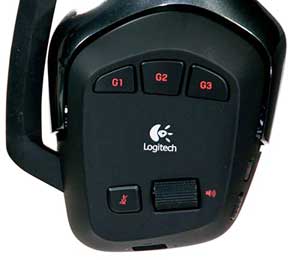
Design-wise, Logitech has kept to the same core concepts of the G35 headset and worked at correcting some of its deficiencies. As with the previous Logitech headphones, the Logitech G930 is in iconic matte red and black. The left speaker retains the same set of controls as the G35 including 3 G-keys; a volume adjustment wheel; a mic mute button; and then a switch to enable Dolby Pro Logic II virtual 7.1 surround sound.

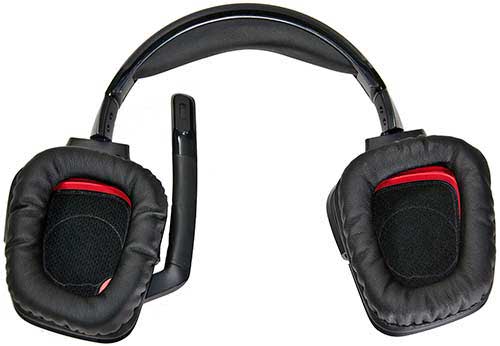
The Logitech G930’s cups, like its predecessor, are large with cushions that are soft and plush. This combination makes for an extremely comfortable pair of headphones for extended wear. Even after an all-day LAN party, they still felt great. This is much better compared to the rival Psyko Audio 5.1 headphones, which get heavy after less than two hours of use and can leave your neck sore. The most appreciable improvements from the G35 are wireless ability and a greatly improved headband.
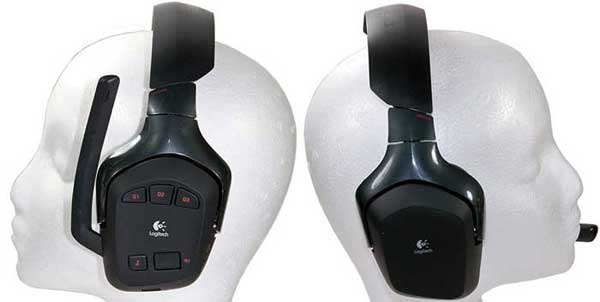
The headband has been improved in both looks and comfort. To be blunt, the soft rubber band of the G35 headphones stood out in a bad way. The new thinner hard plastic headset of the G930 may look cold but is much more comfortable to wear. Tension and spacing are also set on a graduated adjustable track for good fit and quick storage.
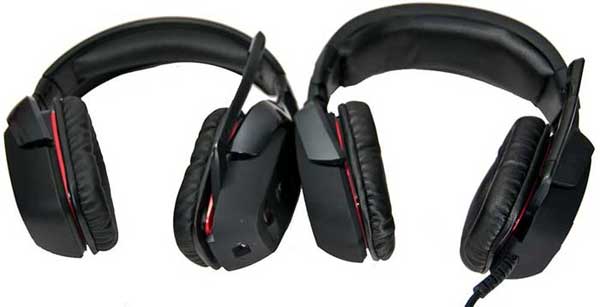
If there is one thing I wish Logitech had improved, which they didn’t, it has to be the lack of a carrying case. For a headset costing as much as the Logitech G930, a carrying case seems like it should be included as an accessory. Luckily, this headset can do that all on their own, but if you have never experienced them, it is a tougher sell. If you intend to travel with the headset, I would suggest getting a good Pelican hard case.
Software Control Panel
The included configuration software has been greatly improved on that of the G35. The interface for tweaking the sound volumes and features is finally polished and intuitive. There is also a 10-band equalizer that allows you to adjust certain frequencies to your personal tastes. The top right section is for the voice morphing features. There are six presets which allow you to change your voice to a cyborg, troll, giant, alien, mutant or squirrel. The newness of this feature does wear off quickly and is more of a toy than anything useful. It is fun to sound like Darth Vader once in a while. Frankly, if Logitech removed the feature, I would have the same complaint.
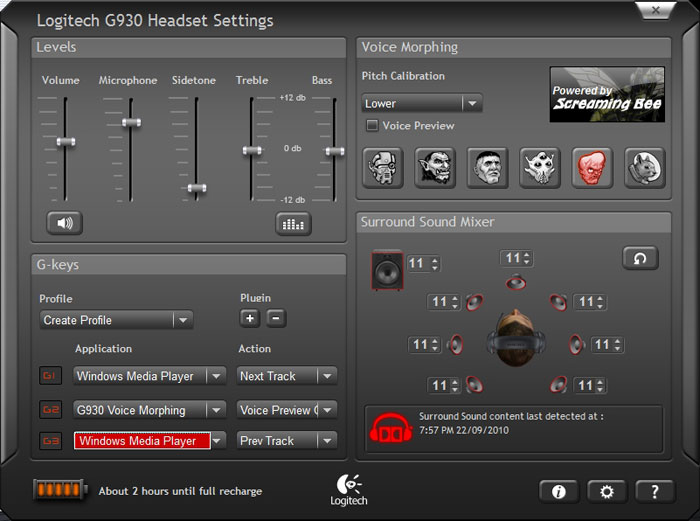
The lower left section of the control panel software is for the G-key customizations. Once again, your options for what each of those three G keys is rather limited. The G keys are nice but still extremely limited when compared to the function Logitech infuses in their G700 mouse and G510 keyboard G-keys.
 The lower right section of the control panel is what really distinguishes the G930 from the G35. Per the G35 review, the inability to tweak the sound level of each of the virtual speakers was one of the headset’s greatest weaknesses. It seems Logitech has listened as you get full control over the seven virtual speakers and subwoofer. Each of the speakers is represented by an icon and a box that goes from 1 to 11. This tiny aspect grants extensive abilities to customize the soundscape for each game. By the same token, it is annoying that this artificially induced demarcation between the two headphones has been created by Logitech. You have to wonder what killer feature a successor to the G930 will omit upon release.
It’s worth noting that the version of software shipped with the headphones had a terrible memory leak and was prone to constant crashing. Mercifully, Logitech released a software update that fixed it.
Audio Quality & Battery Performance
Given the limitations of most wireless headphones in poor range and low fidelity, we’re happy to report that the G930 is afflicted with neither. Logitech’s purported 40-foot wireless range actually seems humble. You receive the same crystal clear sound near and far. The dual internal antennas help to maintain acoustic fidelity sound over distance or through interference. A minor complaint is that the G930 does not give you much warning as you approach signal loss. There is no static or any warning that you are about to exit its range.
When it comes to battery life, the G930 is above par, lasting on average about 9 1/4 hours. The G930 functions perfectly while charging over USB. The battery reaches full charge in under 3 hours, even quicker when not in use. Unfortunately, the G930 does not have an easily replaceable battery, which is a Lithium-ion battery that requires taking apart one of the headphones to get at.
Stereo & Surround Sound Quality
Great looks accompanying the beefy 40mm drivers do produce a surprisingly lush, vibrant sound. I didn’t expect the Logitech G930 to match with the sound quality of their tethered brethren, but it did. Listening to Thelonious Monk and Coltrane work their magic was extremely relaxing. Being able to get up and move with the rhythms made the experience just that much more enjoyable.
Every genre of music tested was handled deftly by the G930. If there is one weakness of the headset, it is their bass. Using default settings, the bass is a little too forward and can even be considered overpowering. The bass is also a tad muddy and is easily outdone by more audiophile-class headphones like the HD555s. This issue is easily rectified by lowering the bass levels. You can scale back the bass and still get some very decent thump without suffering the losses to clarity. The G930s will leave lovers of extreme bass performance disappointed. The virtual 7.1 audio setting is a nice extra. While it only improves certain types of audio, it can add depth to an otherwise flat sound stage but it can also ruin the sharpness of other types of sound such as classical music.
 When it came to movies, the surround sound option was every bit as good as the Logitech G35. Both the older G35 and the newer G930 headset are great choices for watching movies late at night without disturbing anyone else around you. Going wireless, you can sit down in your easy chair 15 feet away from your HTPC; watch on your 65″ HDTV your favorite movie; and experience immersive sound.
Last but not least is the microphone. Its noise filter performed really well and all ambient noise was effectively removed. Unfortunately, the software is very aggressive and thus your speech can suffer from clipping. Communications become unintelligible when the last half of your last word would be cut off. It didn’t happen all that often, but it was worth noting given that the microphone is otherwise very good.
Gaming Sound & Compatibility
When it comes to gaming, Logitech’s lack of DirectSound support hurts an otherwise superior gaming headset. Older games still require a lot tweaking to get some of them to work. Even more recent titles did not always work well with this headset. It seems this secondary issue is related to what kind of sound card you have. Put bluntly, the G930 headphones work best with systems that do not have a dedicated sound card in them. In my older PCs with onboard Realtek audio chip, I saw zero issues with new games while older games still were hit or miss. I did see several problems using the G930s with a newer system equipped with a Creative X-Fi sound card.
Immersed in games that make use of positional audio, the Logitech G930s performed very well. I was very impressed with the situational awareness the Logitech G930 headphones provided. You really do get a more enjoyable and a more compelling gameplay experience than any USB headsets might be expected to give.
 In games like Left 4 Dead 2, these headphones gave a better experience than other tested candidates. In L4D2’s The Passing level, the monsoon rain did give a sense of claustrophobic dread that was almost palpable. Yet unlike the others, the rain didn’t drown out everything else. It is hard to believe that these are stereo headphones with only simulated surround sound and not “true” multi-speaker surround sound headphones.
The depth to which one can fine-tune the audio settings sets the G930s above the crowd. Being able to independently adjust left, right, center and rear channels based on the soundscape of each game made drastic changes in the audio’s participation in the gaming experience. This is a landmark feature that you can only get with the G930s as of this writing. Simple yet game-changing tweaks like this are what make Logitech an industry leader and not merely another follower.
G930 Compatibility (Windows 7 x64)
All these tests done on the G930 were carried out on a Windows 7 x64 PC.| Game | Result | Remark |
|---|---|---|
| Battlefield: Bad Company 2 | Pass | Works extremely well after tweaking the individual virtual speakers volume levels. End result was almost as good as my PA 5.1 headphones. Did suffer from memory leak issue causing software to crash. Software update fixed this. |
| Borderlands | Pass | Works extremely well after tweaking the individual virtual speakers volume levels. End result was almost as good as my PA 5.1 headphones. |
| Call of Duty 4: Modern Warfare | Pass | Works great! 5.1 must be configured manually. |
| Call of Duty 5: World at War | Pass | Worked fine no real tweaking required. |
| Call of Duty 6: Modern Warfail 2 | Pass (mostly) | Works as good as this game allows. Required some tweaking but the end result was as good as the PA 5.1 headphones, though it still is a less than optimal sound due to the poor effort on the developers part. |
| Counter-Strike: Source | Pass | Worked fine no real tweaking required. |
| Crysis Warhead | Pass (mostly) | Did not work on 1 of my 3 systems. Same issue as the G35 most likely culprit. When it did work on, sound was very good, |
| Fallout 3 | Pass (mostly) | Worked for fine on two of three systems. Did not work on an older XP based system. Same issue as the G35 most likely culprit. |
| Left 4 Dead | Pass | Works amazingly well. Almost as good positional awareness as PA 5.1s! |
| Left 4 Dead 2 | Pass | Works amazingly well. Almost as good positional awareness as PA 5.1s! |
| Mirror's Edge | Pass (mostly) | Did not work on 1 of my 3 systems. Same issue as the G35 most likely culprit. On the ones it did work on, sound was very good. |
| Portal | Pass | Works extremely well after tweaking the individual virtual speakers volume levels. |
| Quake 4 | Pass (mostly) | Works fine. Required manually setting to OpenAL in-game. |
| StarCraft 2 | Pass | Worked fine no real tweaking required. |
| Team Fortress 2 | Pass | Works fine. |
| Unreal Tournament 2004 | Pass (mostly) | Works fine. OpenAL must be diverted in order for surround sound to work. Follow the instructions at http://raffi.beyondunreal.com/tweaks.html. Mad props to okx for finding this tweak! |
| Game | Result | Remark |
Recap
All in all, I’m really happy with these headphones. From their looks to comfort and performance, they completely outshine the Logitech G35 (and it was no slouch). The wireless feature of the G930 is their major claim to fame; it works and it works well. Struggling with charging and recharging is a hassle but 9 hours of playtime per charge is bearable. More importantly, it’s 9 hours of crystal clear sound. When you do need to plug them in, you can seamlessly transition from wireless to wired. The dual antennas work and are not mere marketing hype.
The next best feature is the improved granular control the included software provides. Having the ability to tweak not only individual frequencies via the built-in 10-channel equalizer but actually tweak all 7 + 1 virtual speakers takes these headphones to the next level. They may not provide audiophile-grade sound, but it is the best we’ve seen from a USB headset. If you are in the market for a new pair of gaming headsets, the Logitech G930 should be on your shortlist. If you own a pair of G35s and are ready for an upgraded experience in gaming, movies, or music, you won’t be disappointed in these cans.
Latest Wireless Gaming Headset Deals





Pricing is last updated by Amazon on 2026-07-03 at 22:52. When you buy through Amazon affiliate links on our site, we may earn an affiliate commission.