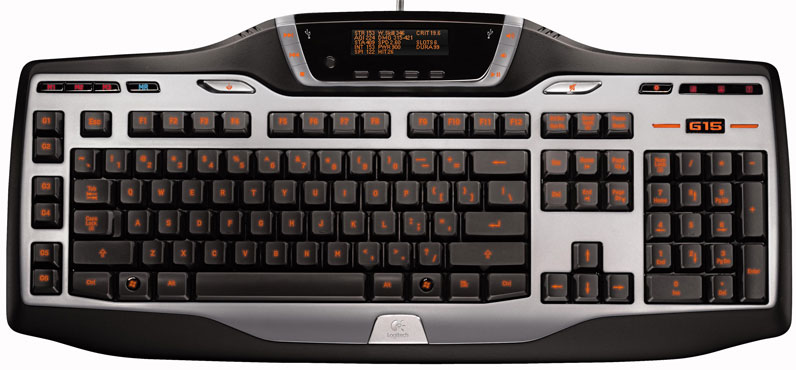
When Logitech rolled out the original G15 gaming keyboard it was revolutionary for many gamers. We felt so too when we reviewed it in 2005. Not everyone felt that way though with a huge footprint and gobs of macros that many gamers didn’t need the original Logitech G15 caught some flack. The company has redesigned the G15 for a smaller, sleeker look. Did Logitech improve on something close to perfection for many gamers, or geld the stallion that was the original G15? Read on to find out.
Keyboard Layout & Design
As soon as you lay eyes on the new Logitech G15 you see the family resemblance to the old G15. The new G15 has the same colors of silver and black on the keyboard and familiar layout that is smaller and svelter than the original. If you were one of the many gamers that found the original G15 to be too bulky, the new G15 will impress.
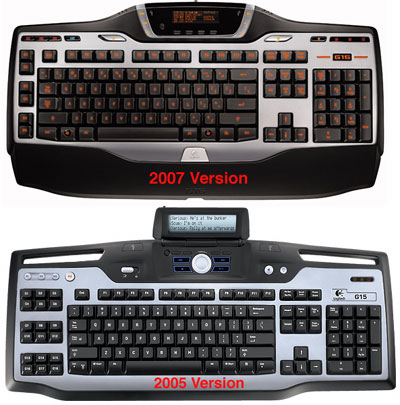
The new Logitech G15 measures in at about 19.5-inches long by 10.5-inches wide, which makes it about 2-inches narrower than the original G15. You might think that 2-inches hardly makes a difference, but it means that the vast majority of users will be able to get the new G15 into the keyboard tray on their desk and may even still have room for their mouse as well. The old G15 simply wouldn’t fit into many keyboard trays.
GamePanel LCD & Backlighting
The original Logitech G15 used blue backlighting that was a bit dim, even on high for my tastes. The new G15 gaming keyboard uses an orange backlight that is adjustable to high, low and off. The orange color is more attractive to my eye than the blue and is brighter and more uniform than the original G15. Another change to the new G15 from the old one is in the LCD display.
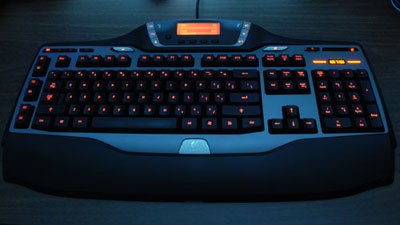
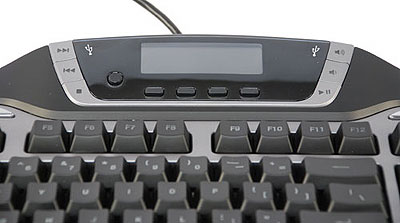
The LCD display on the new Logitech G15 keyboard is fixed in place, fatter and more rounded than the original flip-down LCD on the G15. The LCD change gives the entire keyboard a different, more organic look. You still get the same functionality with the new G15’s GamePanel LCD that the old version offered. By default the LCD can display system statistics like core usage on the CPU and will show all four cores on a quad-core CPU and shows RAM usage. Other built-in features are a stopwatch, and a clock with calendar.
Several games are compatible with the LCD screen like Battlefield 2142 and some applications like Ventrilo are as well. In Battlefield you can get information about the game on the LCD like armor left and ammo, Ventrilo allows you to see who is talking. I still have the same issues with the LCD now as I did on the original G15, who wants to take their eyes off the screen during a hectic game to look at the keyboard LCD when the same information is typically listed on the in game HUD.
Media Controls & Gaming Keys
The keys on the new Logitech G15 keyboard include all of what you would expect to find on a current gaming keyboard with media control keys arrayed around the LCD display that include forward, back, stop, play/pause, and volume up/down. On the flat portion of the keyboard to the right of the LCD is a large dedicated mute button that is easy to find and hit if you need to mute your game quickly for a phone call. To the immediate right of the mute button is the control for the brightness of the backlighting.
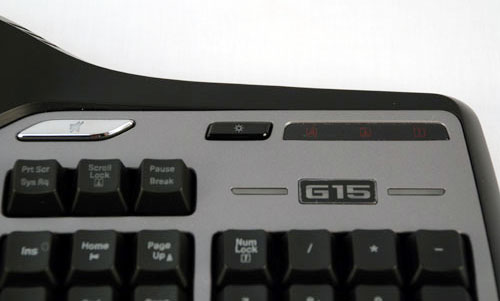
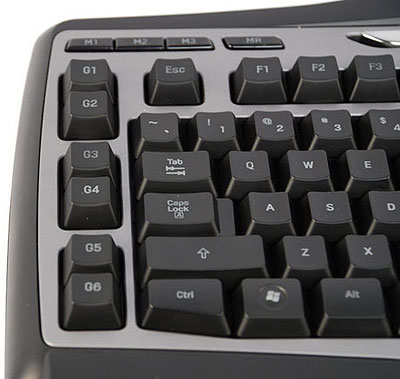
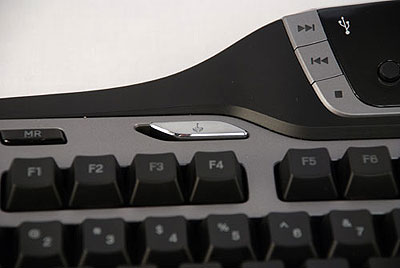
On the opposite side of the keyboard, you find a large gaming button that is used to disable the Windows key during game sessions, keeping you from accidentally closing your game window. To the left of that button is the large key dedicated to recording macros on the fly. Next to the MR (macro record) button are the three buttons for the different macro profiles labeled M1, M2, and M3. Directly below the macro profile buttons on the far left of the keyboard are the six macro buttons that provide a total of 18 available macro programming options. The remainder of the standard QWERTY keyboard keys is present and accounted for as is a full number pad.
Typing Feel, Durability & Ergonomics
Typing feel on the new Logitech G15 is identical to that of the old G15, which is a good thing, I liked the typing feel of the original. The keys offer a nice tactile feel and an audible click when pressed without feeling spongy. That isn’t to say that either G15 version has the best typing feel available. I found the scissor keys on the Razer Tarantula to be fantastic and very much enjoyed typing on the Microsoft Reclusa, which I used as my daily keyboard for a number of months. However, the new G15 would come in a solid third place for all time typing feel on a gaming keyboard for me.
I use a keyboard much more heavily than most users not only gaming, but by putting about 10 hours of typing per day during the week as well. I found that on the original Logitech G15 and on the Reclusa that the key tops wore quickly to the point of the letters being illegible. Logitech changed the method they used for printing the keys onto the original G15 key tops when they started to wear prematurely.
I would assume that the new Logitech G15 uses the more durable key tops like the replacement unit I got. Judging by the look and feel of the key tops, Logitech did use the more durable keys on the new G15. To improve comfort Logitech uses a removable wrist rest on the new G15 that is a black plastic with a slight texture to it. While the wrist rest on the G15 isn’t padded, it is still quite comfortable.
Unlike some users, I don’t travel to LAN parties, so I have never had a problem with breaking the wrist rest pins that secure the rest to the keyboard. However, if you do take your G15 on the road frequently, beware that the little pins that keep the wrist rest attached to the keyboard do look a bit thin to me.
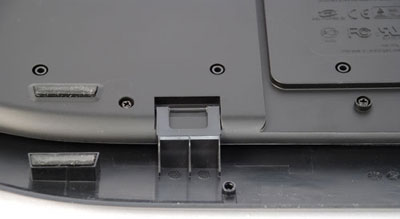
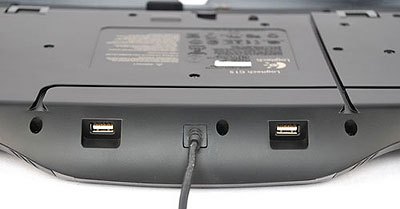
On the back of the Logitech G15’s LCD are a pair of USB 1.1 ports that will not support high speeds for flash drives and won’t support USB gadgets requiring higher power. Logitech provided trenches on the underside of the G15 to route cables from behind the keyboard to the front without upsetting the keyboards balance. This is a very nice touch.
Macro Recording
I mentioned the ability to record macros on the fly previously to the 18 possible macro keys. To record the macro all you need to do in game is hit the MR button and instructions appear on the LCD screen telling you to select a G key from the left. Once you hit the key you want to bind the macro to you hit the keys or sequence of keys that compose your macro. Once done you hit MR again to stop recording and your macro is ready to use. When not gaming, you can also record macros within the Logitech G15 software using the macro manager area of the software.
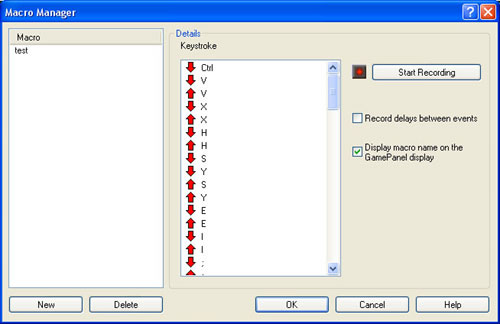
You can choose a name and have it display on the LCD if you desire and record an unlimited number of keystrokes per macro. In testing I made up a macro with over 50 characters and the G15 never flinched. You can also use the software to assign profiles of macros to specific game titles. For instance you can set up a profile for Command and Conquer that will launch when the game is started. You can also set up other macros for games and applications as you desire.
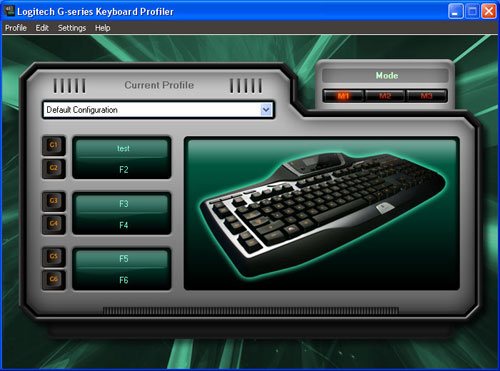
Some gamers that are heavy users of macros will complain about the new G15 losing over half of the macro spots that the original version had. However, Logitech said that the main complaint they received about the original G15, next to the size, was that there were too many macros. Most gamers simply don’t use that many macros. The natural thing for Logitech to do to shave size from the G15 was to shed the extra G keys that many gamers didn’t use anyway.
Recap
In the end the new Logitech G15 gamer keyboard is much friendlier and still a very capable gaming keyboard that the vast majority of gamers will be much happier with than the original. The smaller footprint more than makes up for the missing G keys in my opinion and the software is as easy to use as it always was. I much prefer the new LCD over the original screen on the G15 that flipped up and down for no reason.