No stranger to the ubiquitous pointing device, Logitech boasts an impressive 20+ year history of building mice and computer peripherals. Having surpassed the one billionth mouse mark back in 2008, they are the undisputed leader in electronic rodent computer peripherals. New for 2009, the Logitech Anywhere MX combines wireless connectivity with unique Darkfield tracking technology for a mouse that is said to be able to track on pure glass and other highly reflective surfaces. Designed to be a fully-featured portable workhorse, the mouse also brings a rather unique scroll wheel to the party. How well does it all work in the cold, cruel world? Read on to find out.
Aesthetics and Ergonomics
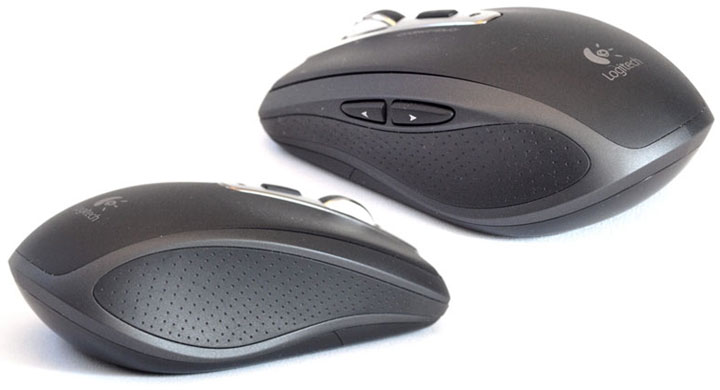
The mouse breaks little new ground in terms of design, and we don’t think that’s a bad thing. There is no glowing underside, strobing lights, or other extraneous protrusions. It looks like a smartly designed mouse, black in color, with a pleasing heft from its two AA batteries and a good grip provided by the lightly dimpled, rubberized side sections. On closer inspection, the wireless mouse is a model of simplicity and subtlety, with just a moderately shiny darkened chrome section in the middle housing a single LED indicator, the Switch Application button, and the adjustable MicroGear Precision scroll wheel with textured rubber inlay.

The left side of the mouse has two customizable buttons, clearly a nod to the majority of right-handed users out there. Although, in our experience, a good portion of computer users do their mousing with the left hand to avoid or reduce the repetitive stress injuries they are already suffering in their right hand, so left-handed users get the soft shaft, again.
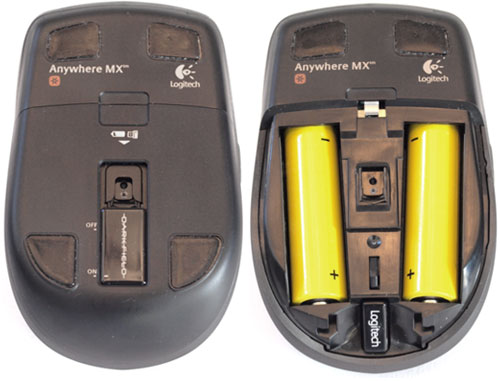
Bottom side, we find the four Teflon corner feet, the neatly integrated battery door, and the spring-loaded on-off switch which doubles as protection for the LED when not in use or traveling. The little tiny USB dongle is worth a specific mention, not just for its diminutive size, but for what Logitech calls its “Unifying” technology. This dongle receiver supports up to 6 compatible wireless Logitech keyboards, mice, and keypads so that only a single USB dongle is required, saving USB ports and the chance of losing parts in transit.

SetPoint Software – Mac
For some reason, Logitech provides an install CD for the Windows drivers and software, but Mac users are forced to go to the company’s download section to get their drivers. The install is easy enough, except the registration application seems to freeze upon launch, making registration impossible. Entering the Logitech Control Center from System Preferences, you are presented with a pleasant screen that gives you lots of relevant information, including battery level and any Logitech Unifying devices also connected.
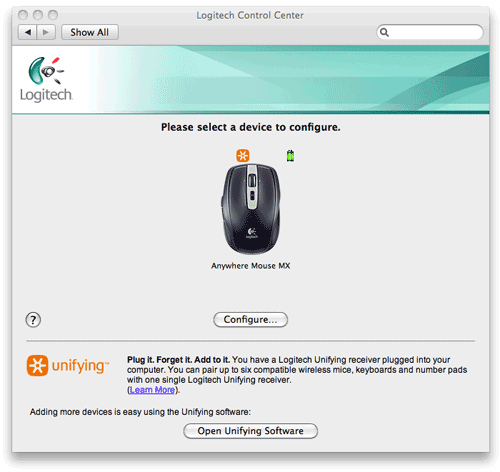
In the General “tab”, you can set the tracking speed. Logitech’s driver provides a much greater range of control than is available in the Mac OS standard Mouse control panel. Whether this is a good or bad thing is really up to you, since I think the extremes of the range are, well, too extreme for normal use.

Clicking on Configure brings you to the meaty portion of the Control Panel, where you can set the specific functions of each of the buttons. Most settings are pretty standard, but once you get into a specific keystroke assignment, it gets really powerful. Here you can see I have the thumb buttons mapped to provide forward and back browser functionality – a great time saver.


SetPoint Software – Windows
Installation of the Logitech SetPoint 4.80 software is trivial. Just pop the CD in and follow the on-screen prompts. The installation does proceed rather slowly, making one wonder what exactly is getting installed and how much hard drive space is disappearing into outer space.
Upon installation, SetPoint is where you will find customizations to your mouse’s five buttons and MicroGear Precision tilt wheel. The Windows version of the software provides visual cues to let you know which part of the mouse you’re fiddling with. I like the Mac version more as there are just a lot more pre-defined command actions to select from for each button as well as for left and right tilt.
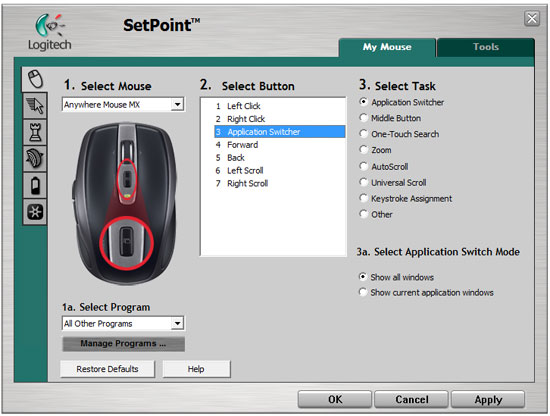
Under this tab, Logitech SetPoint provides a very powerful tool to personalize scroll wheel attributes (i.e. speed, acceleration) for applications individually. So you can have maximum acceleration for vertical scroll in iTunes while a more subtle acceleration in Adobe Reader and Internet Explorer where you may prefer a more precision scrolling experience.

User Experience
I spent several weeks using the Anywhere MX daily, and it traveled with me 2 days out of every week as well. My little mouse companion faithfully tracked on any surface I could throw at it – standard desk surfaces, woodgrain furniture, plate glass tables, even tile, and carpet. I’m very confident saying that tracking is dead reliable – there’s no point in trying to make it fail because it just doesn’t. The tracking engine, dubbed Darkfield Laser technology, really works impressively.
 The MicroGear Precision scroll wheel, being adjustable for either detents or smooth operation, is generally a pleasure to use. One can toggle between detented and smooth (free-wheeling) operation by pressing down on the wheel, much like you press the wheel button of most mice. I found myself much preferring the detented option, as the smooth scrolling often made me overshoot the mark when scrolling, and exacerbates the issue of the computer causing a bit of scrolling delay due to video refresh and processing.
Battery life seems to be phenomenal, as I never had to change the batteries in almost 4 weeks of hard operation. I assure you, 4 weeks of mouse time with me equates to probably 12 hours per day. If one needs to change the batteries, the little LED on the top will glow ORANGE and it’s a simple matter of opening the well-integrated door on the bottom. Concealed in the battery compartment as well is a little crevice that perfectly fits the USB receiver – very smart and slick. This combined with the spring-loaded on-off switch over the LED sensor combine to give a positive impression that Logitech designers sweated the little things.
Perhaps even cooler is the fact that, despite the battery compartment having space for two batteries, the Anywhere MX wireless mouse runs just fine on a single battery. When you’re packing a lot of gear like me, those few extra grams saved may not seem like much, but it sure makes me feel smart and efficient.
The uncreatively named “Switch Application” button on the top can serve any number of mapped functions but defaults to be the Exposé button on Mac OS X, and the “Show all Windows” (Flip 3D is listed as “Document Flip”) button in Windows. Perhaps one could argue that it’s placed a little too far rearward, but clearly, Logitech designers didn’t have much choice. Perhaps a button surrounding the wheel, and accessible just below it might be a better place to put it.
Recap
All-in-all, the Logitech Anywhere MX is a winner. Its understated good looks and solid feature set make this a very capable everyday workhorse, at home, in the office, or on the road. Time to toss that gunk-covered mouse pad and go bare desktop. Despite a few software installation glitches, we heartily recommend this little number.