With a variety of gaming keyboards on the market and the move to gaming consoles, can Microsoft re-capture the hearts of gamers with their latest gaming specific keyboard? A past business history with Razer taught Microsoft a few lessons on how to build a gamer keyboard with the Reclusa, but how can Microsoft possibly improve on designs that companies like Razer and Logitech spend hundreds of thousands of dollars to perfect, these are only two of the many questions we are going to answer today in our Sidewinder X6 review.
Contents
Keyboard Design
The Sidewinder X6 has received countless reviews and opinions since it is the first gaming keyboard from Redmond to bear the Sidewinder’s name. Previously their Reclusa branded keyboard was co-logod with Razer, renowned for their expertise in designing PC peripherals aimed at the gaming crowd. While the Reclusa was a great first attempt at capturing gamers’ interests at a time when gaming keyboards were still the new kid on the block, gaming keyboards have matured to the point that people are looking at true value and performance benefit from investing a considerable amount of their gaming budget into something as simple as a keyboard.
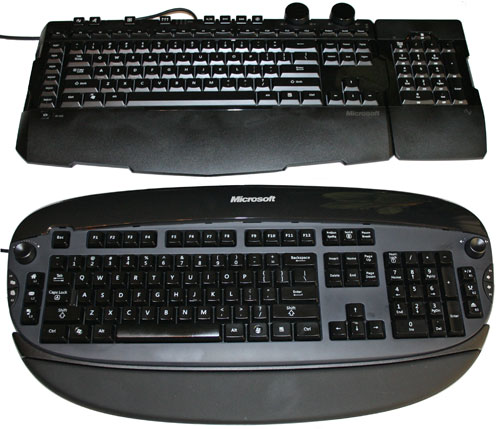
The Reclusa (21″ x 10.5″ x 1.9″) sits alongside with the SideWinder X6 (20.2″ x 9.22″ x 1.8″)
Keyboards are, however, anything but simple. This holds especially true for gaming keyboards which must now sport at minimum macro recording/playback functionality, a well laid out key design, good feedback on keys for intense gaming, easily accessible multimedia controls for those times when gamers need to control media playback and a durable design to withstand hours of hardcore gaming action. If you’ve ever watched a pro-gamer play counterstrike you know that their keyboards are measured with an average life expectancy of a few weeks at most.
In-depth Look
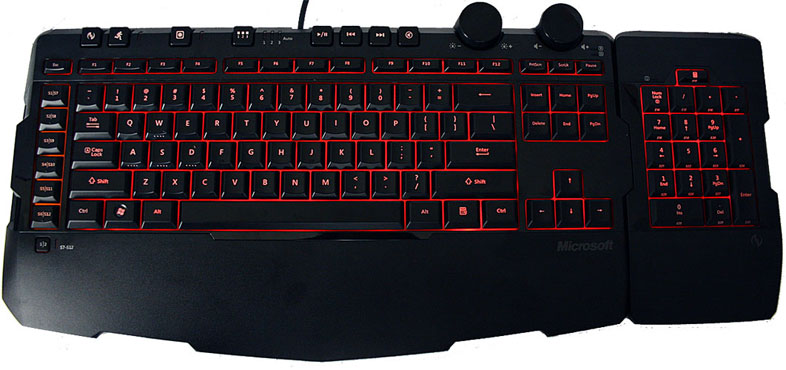
The Sidewinder X6 therefore features a classic keyboard layout to complement the typing and gaming skills of both average joe and pro-gamer. The advantages of this keyboard over others are the detachable numeric keypad and large dials to control both volume and back-lighting. I am surprised that Microsoft didn’t get Lucasarts endorsement for this keyboard as a Star Wars-themed keyboard since the black-on-black color scheme does remind me of a TIE fighter, especially once night comes and the red back-lighting is dialed up to full intensity.
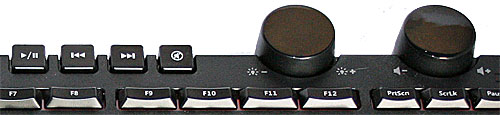
While the back-lighting is intense there is little to no light leakage at any location on the keyboard where you would not expect it. The use of a dial also helps you tune the lighting to your specific needs without destroying your room ambiance. Key characters are well lit and easy to find in complete darkness and retain their usual key shapes.
For those who want to use the numeric keypad on the left side of the main keyboard, the Sidewinder features two magnetic points on both left and right sides with a proprietary docking port to attach the numeric keypad too. The magnetic points help guide the numeric keypad into the main keyboard similar to Apple’s magnetic tip power supply and thus reduce any damage induced by repeatedly trying to force the keypad in at odd angles.
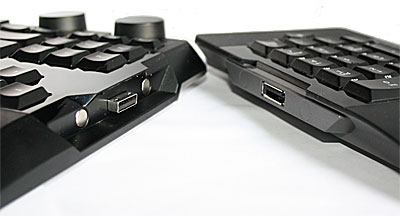
The keyboard does not feature any integrated USB port(s) to allow users to attach their low-/full-speed mice directly which does annoy when you have a plethora of USB peripherals and attached cables cluttering your desk. The lack of height adjustment also gives the keyboard bad marks since height adjustment via retractable feet should have been easy enough to integrate into the design. Even Microsoft’s previous gaming keyboard, Reclusa, had retractable feet for height adjustment. Given the focus on gaming, this is probably the Sidewinder X6’s biggest caveat since seating at LAN parties can often be a sore point which can impact your typing/gaming response speed if you’re sitting lower than the keyboard and your wrists are strained after numerous hours of blasting away at undead hordes. The lack of a detachable wrist-rest means users with reduced desk sizes will also need to occupy a sizable portion of their desk even when not resting their wrists.
After using the keyboard for a few days, you’ll also start noticing the attraction of dust particles on the keyboard’s mirror finished surface, so for those with pets, you have been warned. Expect to clean the Siderwinder X6 from fingerprints, pet hair, and dust particles on a repeated basis. Maybe Microsoft should have included a cleaning cloth to counter this or stuck to a matte finish instead.
The left side of the keyboard features a column of macro keys ready for your custom macro assignment and lights up brightly with an amber glow while the main keyboard keys light up red. When the numeric keypad is switched to the macro mode it uses the same amber glow, when the numeric keypad is used without the macro function the keys light up red, making number entering tasks or accessing an individual macro key a breeze in the dark.
The Sidewinder X6 is built with a strong black plastic frame and no detachable parts which means it should rarely if ever have any parts that fall off. The keys feel solid and give great tactile feedback when pressed and don’t wobble sideways after quick typing. For those looking for a click sound after every key press I’m afraid this isn’t the keyboard for you. The Sidewinder X6 purrs like a kitten when in use and while not as silent as the Logitech Illuminated or the Reclusa, it is as silent as a gamer might want it. The lack of retractable feet also reduce any chance that the feet might be snapped off in the middle of a gaming match and possibly the only issue we could foresee is that the keypad might stop functioning with repeated hot-swaps between the left and right side of the main keyboard even though the docking port has magnetic tips to help guide the connectors together and the connector itself appears fairly robust.
Comparing to the Reclusa…
Compared to the Reclusa keyboard, the Sidewinder X6 sports small, notebook-like keys with a lower profile. Depending on your preference you might find typing easier on the Reclusa since the individual keys are easily distinguishable and accommodate bigger fingers. The Function keys are also sizably bigger on Reclusa which helps when shortcut functions are mapped in applications to these keys. The lack of a dial to scroll content on the Sidewinder is not missed and neither is the awkwardly positioned volume dial on the right side of the Reclusa.
Both the Reclusa and Sidewinder’s different key design & layout represent different ends of the gaming keyboard spectrum but both do an amazing job in games. If you prefer a notebook style keyboard layout without compromising key accuracy while gaming, stick with the Sidewinder X6. If you found gaming on small profile keys hard on previous keyboards, then the Logitech G15 or MS Reclusa might be a better choice.
Macros, Macros Everywhere
Microsoft allows you to assign macro banks (up to 3) for the 23 available Macro keys, thereby expanding the total number of customizable macros to 30 configurable combinations which are then accessible via selected macro bank with the Bank Switch key located next to the media playback keys. The Macro keys located on the left of the keyboard have their own Macro toggle key to quickly switch between the first 12 Macro keys (S1-S12) while the Numeric keypad stores the remaining Macro keys (S13-S30). Recording macros has also never been easier via either the Microsoft keyboard manager software or via the instant Macro Record key.
To complement the ease of accessing and programming macros a Cruise Control key is also located in the top row of the keyboard to allow any depressed key combination to run indefinitely until the Cruise Control key is pressed again. This should help alleviate those times when you have to run half-way around the world in the latest MMO game but don’t feel like holding down the run button forever.
Another clever use of macros relates to the use of macro definitions within your operating system to predefine access to certain directories or performing a set process in your favorite application. Adobe Photoshop is one of those applications where the use of a macro can help to automatically launch filters to previously used values. With enough attention to the macro key input there are virtually no limitations on what the macro can do for you.
Food for Thought
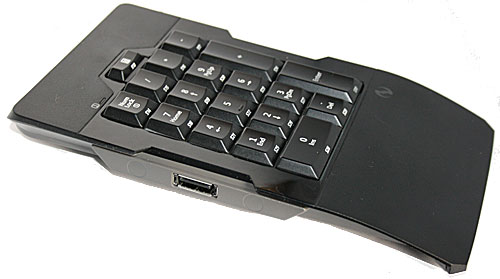
The detachable numeric keypad unfortunately is inoperable while detached. If I had to make one suggestion to Microsoft then I would say move or copy some of the major media controls to the numeric keypad and make it Bluetooth enabled when detached to allow users to take the numeric keypad away from their desktop setup. Like many modern day computer hardware enthusiasts and gamers, my desktop is connected to my 37″ LG TV in case I want to watch a movie or game through my PC. Instead I resort to carrying around an extra Logitech wireless notebook mouse to control my media playback while sitting on the couch. While there are more elegant solutions for home media center type applications including the Logitech DiNovo Mini, manufacturers should take into consideration that the average computer user does not enjoy juggling multiple keyboards, mice and remote controls to manage his home entertainment.
Lastly I would like to mention one more feature from Microsoft’s previous keyboard, the Reclusa, that was sadly missing on the Sidewinder X6. The Reclusa featured an integrated USB cable storage compartment underneath the keyboard to help preserve the keyboard’s USB cable and reduce cable clutter. This feature could easily have tipped the Sidewinder X6 into the must-have wish-list for any pro-gamer but sadly it was absent. Hopefully we will see Microsoft re-design the Sidewinder brand with this included since it should only have added a small tooling cost to the keyboard case.
Management Software
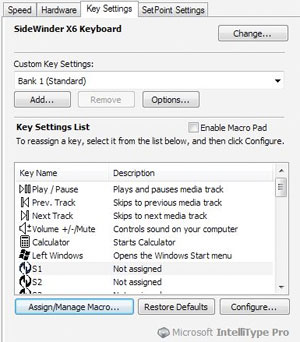 The Microsoft keyboard manager software is fairly simplistic to work with allowing users to customize the keyboard shortcut key functions and to specify macros in-depth for the assigned macro key. The use of instant macro recording functionality gives the keyboard flexibility to be used on the go while gaming and spending as little time as possible in the operating system pre-defining the macro in advance. If Microsoft could have tapped into the possibility of capturing mouse tracking coordinates and clicks into the macro recording function it would have expanded the capability of the keyboard beyond competitor’s offerings. Unfortunately the use of this type of macro recording could easily be seen as cheating in online MMO’s, but could have been a valuable asset in RTS games where formations and a sequence of commands could set up strike squads within seconds repeatedly.
It is sad to see that Microsoft has again decided to deliver its keyboard manager software only to its own operating systems since today’s Linux distributions have brought Windows gaming to Linux desktops with ease (W.I.N.E.) and OS X has also received a healthy dose of gaming since Windows became the platform of choice for game developers. If Microsoft really wants to open up its doors to further business then this is something we hope will change with their next gamer products.
Recap
Microsoft finally delivered to computer users an awesome gaming and casual keyboard alike by listening to gamers needs. The keyboard does its job dutifully and delivers great gaming control with good key feedback. Compared against equals such as the Logitech G15 or the Razer Lycosa, the Sidewinder X6 provides the same or more features at the same or a lesser price and all with a robust design. Readers looking for an upgrade from a standard non-feature rich keyboard should seriously consider making the move to gaming keyboards with the arrival of the Sidewinder X6. Pro-gamers looking for an upgrade to the previously mentioned gaming keyboards may want to stick to their current weapons of choice as there are few features to be gained overall but a lot of minor evolutions in function.