Not that we had any doubts they’d someday exist, but four terabyte hard drives are finally a reality. Seagate earns the marks this time around for being first, curiously choosing to deliver their 7,200 RPM behemoth exclusively as an external drive for the time being. USB 3.0 benchmarks, fancy photos, commentary, and goblins all await you in our in-depth review of the Seagate GoFlex Desk 4TB. Well, maybe not the goblins. Read on for my full-featured review!
Modular Design
It was almost five years ago that Seagate introduced their FreeAgent line of external hard drives, and with it, the concept of modular interfaces. Over the years we’ve seen many changes to the FreeAgent including the addition of USB 3.0 and FireWire 800, the loss of eSATA, and a handful of redesigns that gradually dropped the edged weapon aesthetic in favor of Space Odyssey monoliths. I, for one, happen to like monoliths and rather dislike the numerous flawed implementations of eSATA, so hooray for progress.
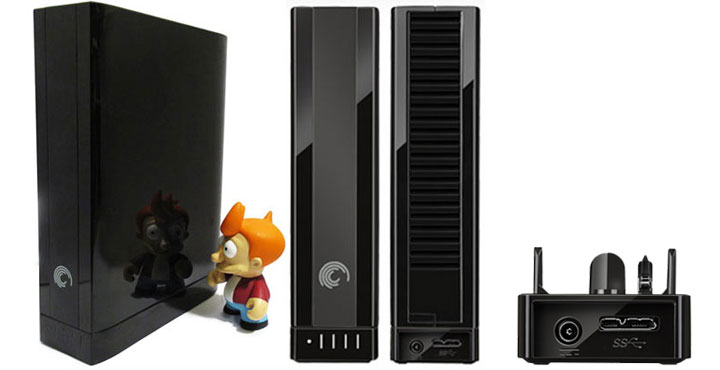
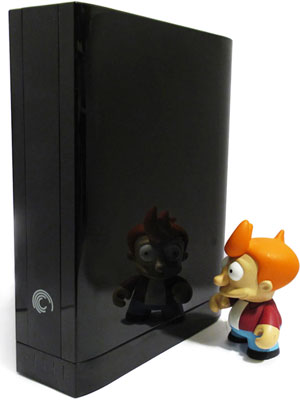 The 2011 GoFlex models in particular share some key advantages over their 2010 predecessors, despite the overwhelming impression that both appear to be modeled after a vertical slab of black plastic. As a matter of fact, the 2011 models are much more refined slabs of black plastic, doing away with the contoured edges, oversized logos, and cheese-grater side paneling. Provided you can keep your oily fingers restricted to the edges of the drive, minimalist glossy black never looked so good.
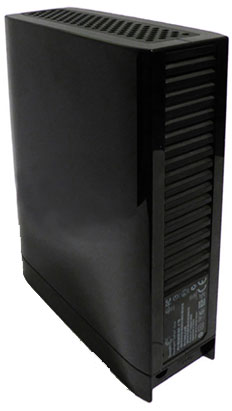 The second major difference in favor of the 2011 models is that all of them seem to be shipping the USB 3.0 GoFlex dock as a standard feature, meaning that we’re treated breakneck speeds without having to buy a $40 adapter on the side. Excellent. Lastly, the passively cooled enclosure seems to be better ventilated than before, with an array of slats on the rear for air intake and ample vent holes on the topside that expose the 3.5″ drive within. The internal 4TB drive still runs fairly warm at up to 62C under heavy use according to HD Tune Pro, but thankfully the enclosure remains cool to the touch. Throughout my testing, I didn’t see temperature negatively impacting drive performance.
The USB 3.0 GoFlex dock itself is very plain, lacking a power switch such that it’s always powered on unless sleeping. The front of the dock features the drive’s power and activity light, pulsing ever so subtly whenever data is being transferred. Alongside the power light are four vertical bars that indicate the drive’s consumed space in 25% increments, provided the Seagate Dashboard software is installed on the computer. I’m still preferable to the capacity bars in Windows Explorer, but at least the drive lights are cleanly presented so they don’t become a distraction.
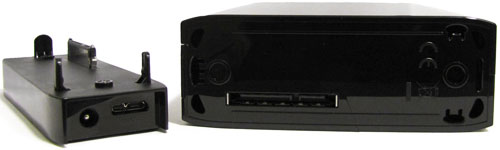
The only real problem I can see with the GoFlex Desk’s design is that it can only be stood upright, lacking the rubber feet for sideways placement like the FreeAgent Xtreme could be. True, rubber feet would diminish the sleek design, but now cat owners will need to be ever more vigilant lest the drive takes an unfortunate tumble.
Breaking the 2TB Limit
As some of you may already know, a logical barrier exists with disks larger than 2TB that can cause problems for many computers manufactured before 2010, not to mention the hordes of people that have yet to migrate to Windows 7 or Vista. In a nutshell, MBR-partitioned disks are generally unable to store partitions larger than 2TB, due to their 32-bit addressing of 512-byte sectors. (2^32 sectors x 512 bytes = 2199023255552 bytes = 2TB). Why 512-bytes? Because that’s been the standard ever since the first hard drive was made in 1956. The preferred solution to this 32-bit addressing dilemma is to make use of the newer GUID Partition Table (GPT) standard, supported by Windows 7, Vista, Mac OS X 10.4+, and most distributions of Linux. Unfortunately, there are still a ton of older operating systems in use, mostly Windows XP, that have no idea how to read GPT disks.
As an alternate workaround for this and many other reasons, the storage industry has been shifting towards an Advanced Format standard, or 4-kilobyte sectors. Using 4K sectors, the math now becomes 2^32 x 4 KB = 17179869184 KB = 16 TB maximum partition size, well above the 4TB we need for the GoFlex drive. It’s this technique that GoFlex uses in order to present itself as a 4TB drive to Windows XP and all other operating systems.
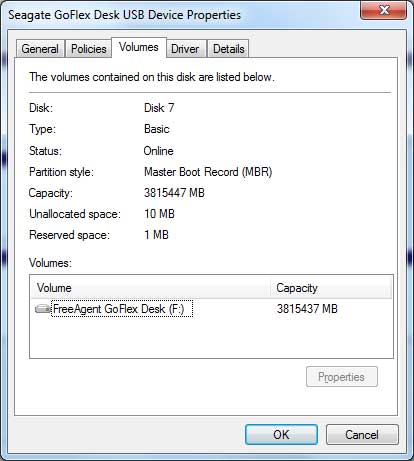
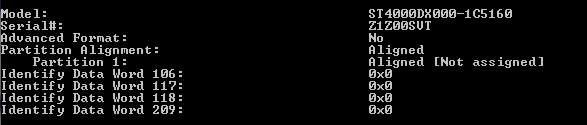
What’s curious about all this, however, is that plugging a shaved SATA cable straight into the drive enclosure reveals that the internal hard drive is not an Advanced Format hard drive with 4KB sectors. Rather, the drive actually makes use of classic 512-byte sectors and relies on the GoFlex dock to translate this into 4KB sectors for Windows. It’s this clever trickery that allows XP and Windows 7 users alike to experience the joys of a single 4TB partition out of the box.
Just to be extra sure that this wasn’t an Advanced Format drive with 4K sectors that emulates 512-bytes for Windows (512e standard), I hooked up the drive to my Intel SATA ports and ran Dell’s DetectAF utility. Vive la 512!
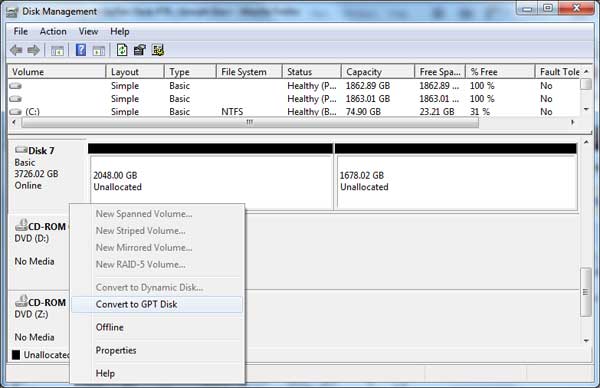
On a more practical note, if you want to stick with MBR partitioning and ever need to repartition the drive, your only choice is to use Windows XP for the task. Windows 7 and Vista both require the drive to be converted to GPT in order to create partitions totaling anything more than 2TB, no matter what the sector size is. This is a Windows limitation and applies to all >2TB drives from any manufacturer. I’m unsure off the top of my head if Mac or Linux share the same problem or not. If you’re only ever going to use the drive under Windows 7 or Vista, don’t fret too much and just stick with GPT.
Macintosh Compatibility
Out of the box, the GoFlex Desk 4TB comes formatted as Microsoft NTFS, which I consider to be one of the most portable formats since it can be accessed by Windows, Mac, and Linux machines alike. That said, Mac users have always had a small problem with NTFS in that they could never write to it without installing 3rd party software. Seagate bundles a copy of Paragon Software’s NTFS for Mac driver to address this, a rather nice touch that should minimize user involvement and keep performance on-par with Apple’s own HFS+ formatting.
Of course, NTFS becomes a moot point if you plan on doing backups with Apple’s Time Machine, in which case you really have no choice but to reformat the drive as HFS+. And just because I know some readers are already thinking about it, no, avoid the temptation to use FAT32. FAT32 doesn’t support volumes greater than 2TB, nor does it support files over 4GB. Stick to NTFS, exFAT, or HFS+ if you can.
Another area Macs have been behind their Windows counterparts is support for USB 3.0, or rather the complete lack thereof. Unless you have an expensive Mac Pro with an aftermarket USB 3.0 card installed, you’re limited to USB 2.0’s frustratingly slow speeds around the 30MB/s mark. Yuck. But there is still some room for hope. If you happen to have a FireWire port on your Mac, I highly recommend picking up the GoFlex FireWire 800 Desktop Adapter (STAE105) for $40. It’s designed for the older 2010 GoFlex models but will work with the 2011 ones as well, and should offer a significant boost over USB 2.0’s performance.
Backup Software
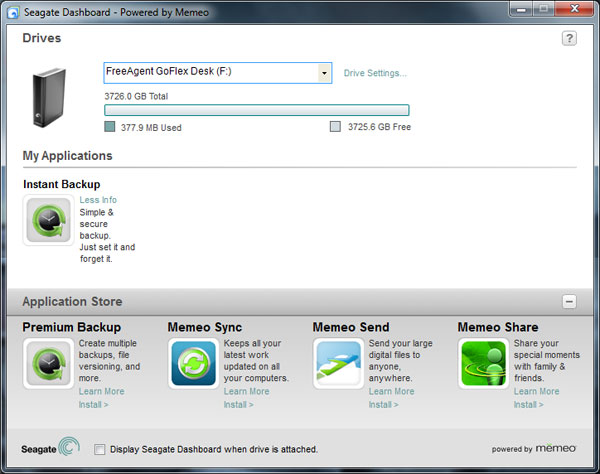
Seagate includes their usual Dashboard software on the drive, living in the Windows Notification Area and serving as a launch point for Memeo software along with drive configuration settings. This includes adjusting the sleep delay from 3 minutes to five hours or disabling it entirely, as well as disabling the LED status lights or performing a simplistic health check of the drive.
Also bundled with the drive is a free copy of Memeo Instant Backup, a simple backup utility that’s the main draw is the ability to constantly monitor files for changes and back them up immediately rather than on a set schedule. Instant Backup features 256-bit AES encryption as an advanced option and should fit the needs of most users.
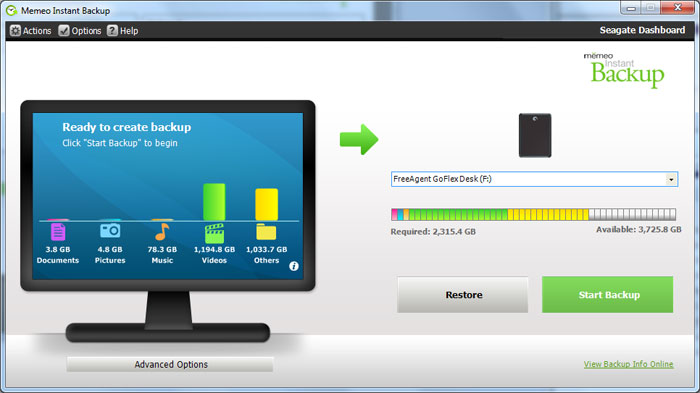
Power users on the other hand may find the lack of control over versioning, setting file exclusions, or backing up virtual hard drive files to be a cause for frustration. In this case, I’d recommend looking at alternatives such as Windows 7’s free Backup utility, Acronis TrueImage, or the $50 Memeo Premium Backup. It should also be noted that Instant Backup is unable to create system images or access anything within the Windows or Program Files folders, so it’s best left for backing up personal files in case of accidental deletion or recovering from hard drive failures. Don’t count on it to save you from malware infections.
Performance
When connected to a USB 3.0 port, Seagate GoFlex’s 4TB drive is as fast as I could ever hope it to be. Spinning at 7,200 RPM with a density of 800GB on each of its five platters, the GoFlex well exceeds the limits of USB 3.0 cards connected to a PCIe x1 interface. Only if you’re lucky enough to have USB 3.0 built onto your motherboard will you be able to reap the full benefits of the drive. Let’s take a look at some benchmarks.
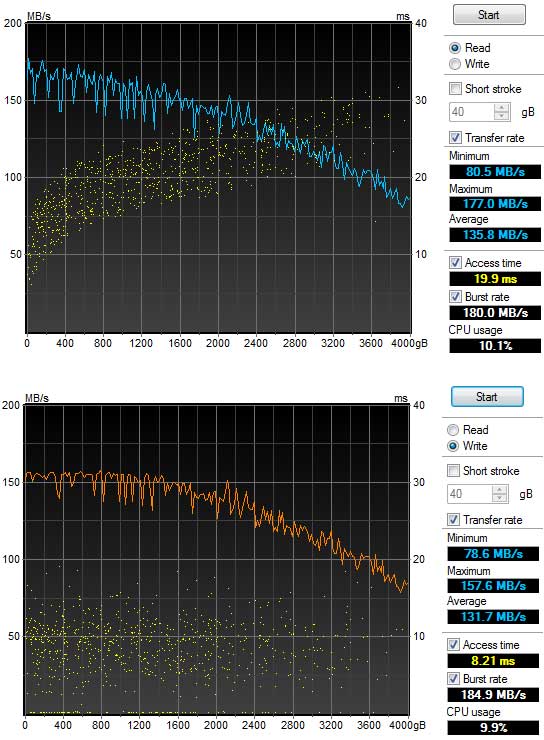
As you can see in the above HD Tune Pro benches, the GoFlex attained a maximum read and write speed of 177MB/s and 157.6MB/s respectively. Dropping off towards the outer edges of the drive as all rotational drives do, performance sunk to around 80MB/s, giving average read and write speeds of 135.8MB/s and 131.7MB/s. This is very, very good for an external drive, and beats Seagate’s own rated speed of 125MB/s. The gradually sloping curves in the chart also do well to indicate that the SATA to USB 3.0 bridge chip is moving data along rather efficiently as if it were an internal drive. Seagate does have some room for improvement based on the plateaued write performance throughout the first quarter of the drive, but this is easily overlooked by the sheer awesomeness of having average write speeds in excess of 130MB/s. Bravo.
ASMedia USB 3.0 Host Issue
One note of caution that I’d like to share is that the GoFlex USB 3.0 dock might be incompatible with ASmedia-based USB 3.0 controllers. I’m currently in the process of reviewing HighPoint’s RocketU 1144A which features no less than four ASM1042U controllers on a single PCIe x4 card, and was disappointed to see that the GoFlex drive would repeatedly exhibit I/O errors and flake out when connected to this card. Thankfully, the problem appears to be mitigated by uninstalling the Seagate Dashboard software.
None of my other USB 3.0 drives have a problem with the RocketU USB 3.0 card. Likewise, the Seagate drive is rock solid when connected to the NEC/Renesas controllers on my motherboard and PCIe x1 cards, with or without the Seagate Dashboard software. So where does the problem lie? I’m not yet sure, but I’ve reached out to Seagate and their engineers are currently looking into things. I’ll update this review if we get a definitive response back. If you have an ASmedia-based USB 3.0 host and end up purchasing a 2011 GoFlex drive, we’d like to hear from you!
Warranty and Pricing
Like the 2010 models before it, the GoFlex Desk comes with a basic 2-year warranty. This matches LaCie’s 2-year warranty term and doubles what Western Digital and Buffalo currently offer for external drives, but falls short of OWC’s 3-year warranty for their Mercury drives. So while it’s impossible for me to say that Seagate’s warranty is bad in a relative sense, I can’t help but bemoan how pathetic of a warranty it is compared to what was being offered by Seagate only a few years ago. Both the original FreeAgent Pro and the FreeAgent XTreme offered 5-year warranties. Five years! I don’t know if the slashing of warranties expresses lower confidence by manufacturers in their own products or if it’s merely a symptom of the downed economy and cutbacks, but this industry movement is bad for consumers and is only getting worse. Seagate, you’re seen as a market leader. Please reverse this trend.
The 4TB GoFlex Desk should retail for $250 according to Seagate’s original press release, but as of December 2011 hard drive prices are inflated across the board due to the serious flooding in Thailand where many hard drive parts are manufactured. Amazon and Newegg are both price gouging at $320, and the cheapest I can currently find is $300 at Micro Center (online), or $250 at Best Buy’s brick-and-mortar stores. Thankfully, these both still beat my psychological barrier of 10 cents per gigabyte, but you’ll want to shop cautiously for the next few months until the market stabilizes.
Recap
Seagate’s got a clear winner on their hands with this four terabyte juggernaut. Boasting average read and write speeds in excess of 130MB/s, an innovative solution to the 2TB limit for XP users, easy backups, and inbuilt compatibility with Mac and PC, it was hard to find anything not to like about this drive. Assuming that you can forgive the lack of a power switch and feet for horizontal placement, the GoFlex Desk 4TB comes highly recommended.