

Contents
Thermaltake Fingerprint Security Mouse
Thermaltake’s Black FP is a biometric security gaming mouse whose original design can be traced back to Black V2. Adding a fingerprint reader to a mouse seems like a no-brainer. After all, who wants to reach for the keyboard to enter a user name and password when signing in is as easy as placing your thumb on the sensor.
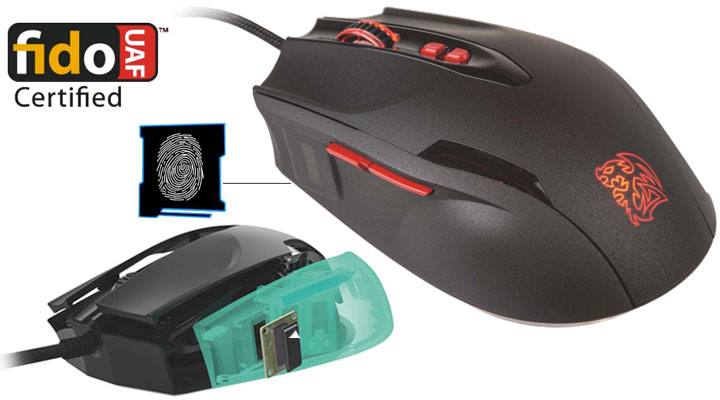
The core of the FP is a sensor with “Iron Veil” technology by Synaptics. Being a FIDO UAF certified device, the mouse lets you start using Windows Hello security features – like logging into your desktop, FaceBook, online banks and etc. – out of the box. And being a true gaming mouse, the Black FP has a 5700-dpi laser sensor, and packs with 7 programmable buttons for customization of 35 macros across 5 profiles. It comes bundled with software that records and displays gaming performance. Basically, it takes gamers’ stats and compares them with that of pro gamers so you can further sharpen your gaming skills.

- Iron Veil biometric fingerprint scanner, FIDO UAF certified
- Ergonomic design with matte surface coating
- Gaming grade AVAGO laser sensor capable of up to 5700 DPI

Asus Touchpad Mouse
The Asus VivoMouse is in a class of its own in that it is trying to do too much. Namely, the mouse combines a large round touchpad area (up to 3 points of multi-touch capability) with an oddly shaped mouse body. The reason for this mouse’s design is because Asus wants to give consumers a single dual-purpose input device that will allow them to navigate ‘seamlessly’ from touch-enabled Metro apps to mouse-centric desktop apps.
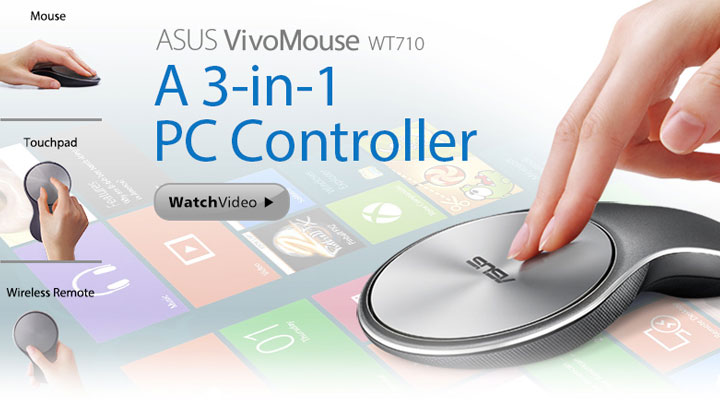
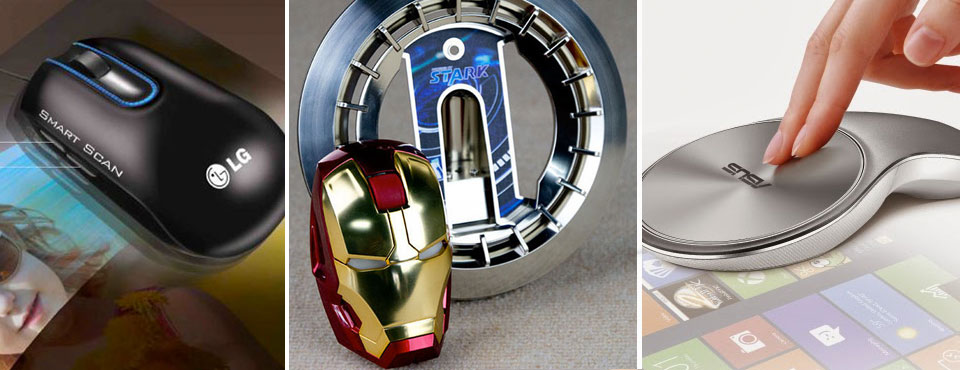
This is a bold idea, even with its multi-touch and full Windows 10 touch gesture capabilities. Though, we doubt many will find this device seamless at either task. For the small subset of users who absolutely need to use Windows 10 but do not already own a touch-enabled device and have no interest in adding a second dedicated touchpad, the VivoMouse could possibly work.
Iron Mouse Mark I
What appears to be a Mark 42 helmet’s replica is in fact a 2-button wireless mouse with an unusually wide scroll wheel. It runs on two AAA batteries and boasts 1000 dpi optical sensor. These are pretty much-outdated specs by today’s standards. To help justify the asking price of $100, the mouse’s resting stand is made to look like Stark’s Arc Reactor, and the iconic eyes do light up at the flick of a switch.
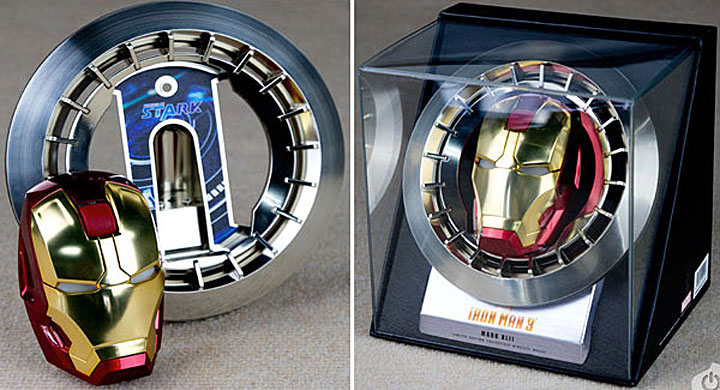
We doubt whoever buys this will ever remove the mouse from its clear acrylic box. It’s nonetheless a collector’s item that will likely live on a shelf rather than on a desktop. At best, it will serve well as a backup mouse. Frankly speaking, the video ad below turns out to be far more impressive than the product itself.
Logitech Cube Mouse
Logitech’s Cube is made for the ‘on the move’ user that is looking for a lightweight and multifunctional input device. In stark contrast to the other mice, the Cube is in geometric shape, yet they share similar aims. They both intend to make a more visual statement than a functional one. Interestingly, the Cube also hides its buttons within slick touch-sensitive panels along its top surface but it isn’t a touchpad as there’s obviously a sensor at the bottom of the so-called mouse.
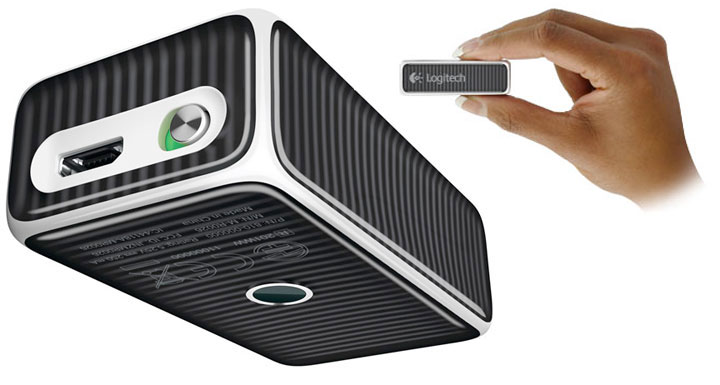
The two features that set this mouse apart from others are the touch surface software. This software allows for the momentum style ‘infinite’ scrolling feel found in some of their mice and most mobile tablets and phones. On top of that, the Cube is perfect for presenting as well. It has a 30 ft. range using Unifying USB dongle which you can pair up compatible Logitech devices. The Cube enters into presentation mode as soon as you lift it off of a surface. Clicking the top in presentation mode advances the slide. To go backward, simply roll the mouse in your hand and click. When you are done you can flip the ‘off’ switch and tuck the tiny mouse in your bag or pocket and be on your way. Adjacent to the power switch is a micro-USB port which you can re-charge the built-in battery. The Cube is competitively priced at $69.
Genius Ring Mouse
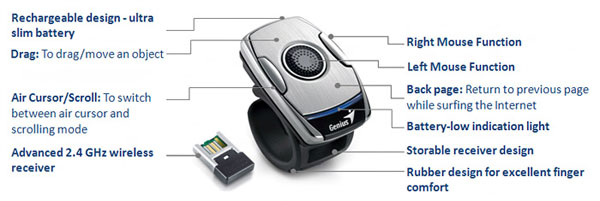
Yes. This is a mouse. Slip the Genius Ring Mouse’s natural rubber ‘ring’ over a free finger; plug in the nano USB receiver; and right away, you can start controlling your cursor either by moving your hand in the air or by running another finger over the ring’s integrated 1250 dpi resolution touch panel. Rounding out the control features is small left and right ‘mouse’ buttons built on the top of the Ring 2.
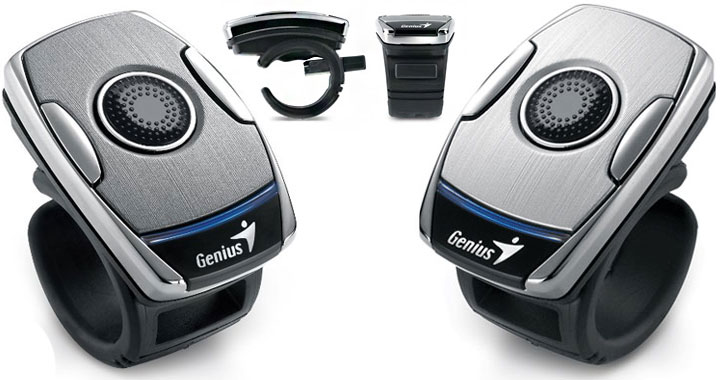
Genius stated you can control your computer from up to 30 feet away; though, this in all likelihood requires a clear air environment. On the positive side, it is unlikely you will ever lose the receiver as it slides back right into the ring’s chassis. As with all things wireless, the Genius Ring Mouse relies upon an integrated Li-ion battery and you will have to plug it in from time to time to recharge. A device like this does sound perfect for your next presentation or public speaking engagement.
LG Scanner Mouse
We’ve seen gadget after gadget come through here in the “Mouse that’s also a (whatever)” category but having the LG name behind it makes it a different story. The underside of the $150 LG LSM-100 Scanner Mouse houses a scanning window that when activated by the trigger button starts to scan. Images are uploaded directly to your computer at USB 2.0 speed.

But can it only scan ID-sized images and what’s the resolution? It doesn’t matter, either way, thanks to some really tight-looking stitching software. Taking advantage of the optical tracking functions of the mouse and the scanned image data, the software is able to track where you are on your real-life image and quickly stitch together your sweeps into a single digital image. OCR software rounds out the package enabling you to pull reports or graphics straight out of magazines or books straight into your documents.
- Using Optical Character Recognition (OCR) software scanned documents can be converted to a text...
- Scanned files can be sent as e-mails, SNS(Facebook, Twitter, Flickr), and via smartphones.
- Five button 1200 dpi mouse works on Mac and Windows operating systems.
Asus x Lamborghini Wireless Mouse
At first glance, Asus WX-Lamborghini wireless mouse could easily be mistaken for an Asus-branded Gigabyte Aivia M8600. This, however, is incorrect as unlike that mouse, the Asus WX-Lamborghini is trimmed in leather and comes in a very striking two-tone color scheme (yellow and black, white and black or all black are the three options available).
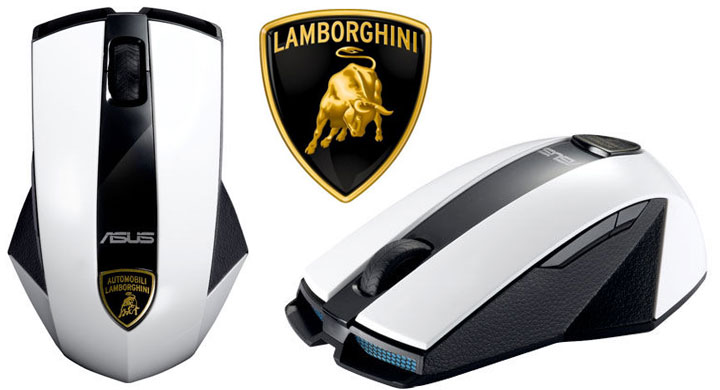
While it may not have dual wired / wireless abilities, it does come with a downright small “nano” receiver (with 10-meter capabilities). The mouse also may be lacking quick change batteries, but it also much lighter and relies on an easily sourced AAA battery (which is included). It is too bad that it does not have as large DPI sensor as some others on the market (as Lambo’s are known for their monster engines) but with its 800 – 2500 DPI laser sensor, it is more than the average consumer will need or be able to handle.
With an MSRP of only $79.99, this may just be the closest many of us get to owning a Lamborghini. If you like the style, are a hardcore Lamborghini collector, or even just want to have bragging rights to owning a Lamborghini, this may just be the mouse you have been waiting for.
Creepy Torso Mouse
The aptly-named Pat Says Body Mouse has the form of a female’s torso. It is available in 7 different models which all boil down to the same mouse, just with different paint jobs. Most come with a paint job of your favorite football team like France, Brazil, Britain, etc, and then there is what is best described as the panty model (a.k.a. “limited model”) where the body mouse is painted to look like a woman’s torso in panties and bra only.

To be fair, the Pat Says Body is a fully functional 1200-dpi mouse and the reason for the extra-large breasts is that they double as your left and right mouse button… and umm… you need to have a good grip for proper double-clicking and umm… it’s a good idea to make them big and easy to hold? Granted, this is a totally cheesy and tasteless novelty gadget, and yet for some reason, we can really think of a lot of buddies we would like to give it to as a gag gift.
Metal Sphere Mice
These mice are constructed from stainless steel and are plated in one of 3 precious metals: titanium, gold, and platinum. These plated finishes are available to suit your personal sense of luxury or ‘bling’. The smooth, high-gloss exterior is easily cleaned or disinfected which makes it an interesting option for institutional use. Design aside, even eye-catching is the cost – $299.
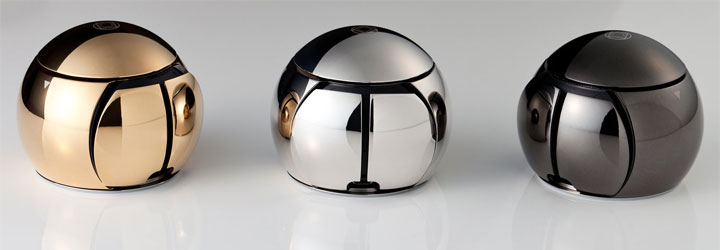
Borrowing from the success of the original, the Sphere 2 has added high-tech functions. The surface of the Sphere is now touch-sensitive for clicks. This is ingenious but almost necessary. Given its shape and depending on your grip, the Sphere 2 may not be comfortable for all people in regards to clicking. The scroll wheel is another new addition. The top of the mouse almost frictionlessly rotates similar to the scroll rings found around some trackballs except this one is almost imperceptibly integrated into the orb.
Asus Magic Mouse
Asus may be better known for their netbooks and motherboards. For your consideration, they deliver the WX-DL Mouse. In the Sisyphean effort to build a better mouse, this is definitely an option, albeit not quite as one would hope. In nearly 30 years of commercial use, the basic shape and use are relatively unchanged. Asus’ WX-DL mouse is named for one of its designers, David Lewis. David has given this a bit of a 90’s look with a chrome finished exterior and dark accents. The all-aluminum body should feel cool to the touch as well as the eye. The top surface is a touch-sensitive control system that can recognize some gestures. It also has active areas that function as remote control buttons for media players.
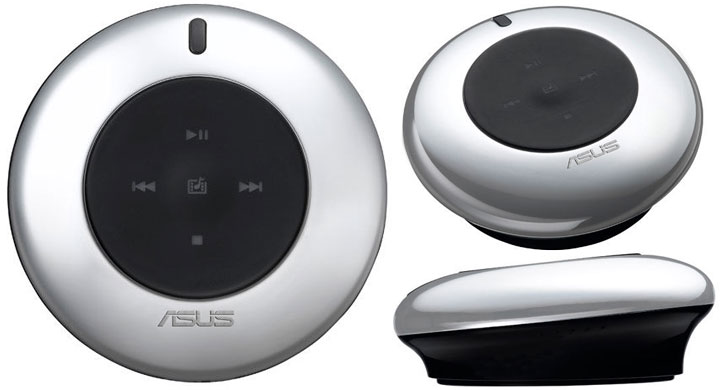
While the combination of mouse and multi-touchpad is currently championed by Apple’s Magic Mouse, this worthy suitor may be a PC-friendly alternative. You must be willing to forgo the desire to bounce pinballs off it to beat Tommy’s high score. These are available for sale at various vendors for roughly $79 and should be a bit easier to track down than the truly revolutionary Cylo/Orbit mouse of years past. We’ll wait for some hands-on reviews to see if the touch surface can finally replace that awkward scroll wheel we rely on so much.
Transformers Mouse
These Transformers-inspired USB mice from Japanese-based company Takara Tomy are quite cleverly conceived. They can actually transform into robotic beasts from their “mouse” mode. There are 2 in total, which are modeled after Grimlock and Trypticon. This line also comprises of 3 other flash drives: Ravage, Cheetus and Tigatron.
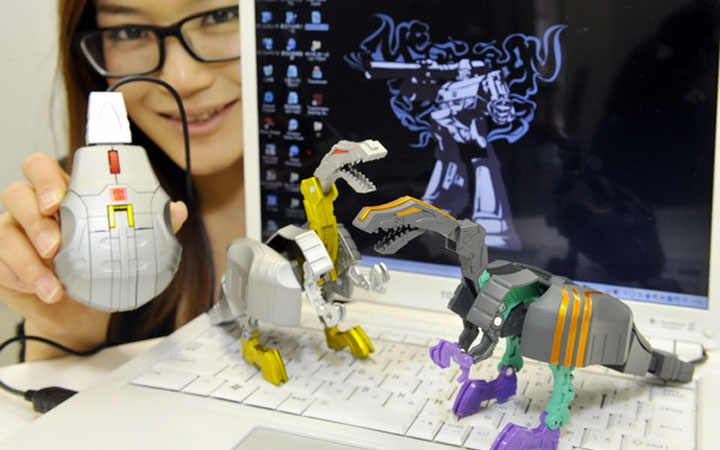
There’s nothing more to be said. The mice are likely among the most highly collectible items if you are a Transformers fan. We doubt most fans will keep them in “mouse” mode given how cool Grimlock and Trypticon look in their robotic beast form. Keep in mind they are all dated back to 2009, and are long out of production. Trying to find one isn’t going to be easy and but luckily, Amazon still carries them at about $60 each.
Mouse with a Built-in Scale
There’s no shortage of hybrid mice on the market. From a mouse that checks your pulse rate to ones that double as a remote, a calculator, and a gamepad, we just haven’t seen the last of them, and double-duty pointing devices continue to surprise us with new functionality. So, how about integrating a digital weighing scale into a mouse this time?
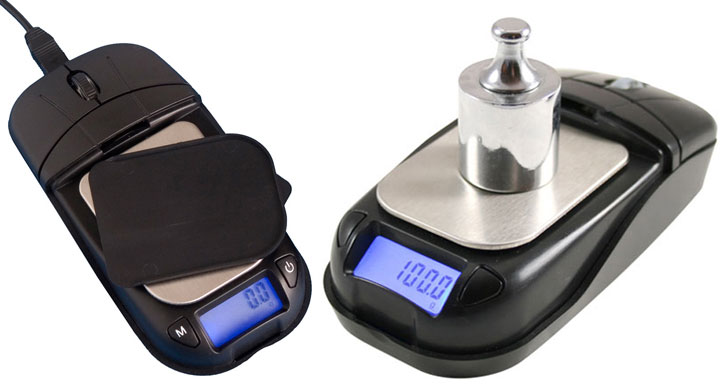
It would seem American Weigh has already done this too with the MSC-500 Mouse Scale, which is a feasible solution to quick checking weight of our USB gadgets for our reviews. Its stainless steel, measuring 2.25″ by 2.7″, is revealed by removing the mouse cover. The scale can operate independently with an internal USB rechargeable battery, and weight readings are incremented by 0.1g, 0.005 oz., 0.005 ozt., or 0.1 dwt. And American Weigh wants $59.95 for this.
Asus Pulse-sensing Mouse
Judging by some of the products that we have seen out of Asia over the years, it seems our friends there are obsessed with the minutia of their health. Weird gadgets that folks here in America would not think of buying, like microscopes to get a close look at your skin, are evidentially popular over in Asia.
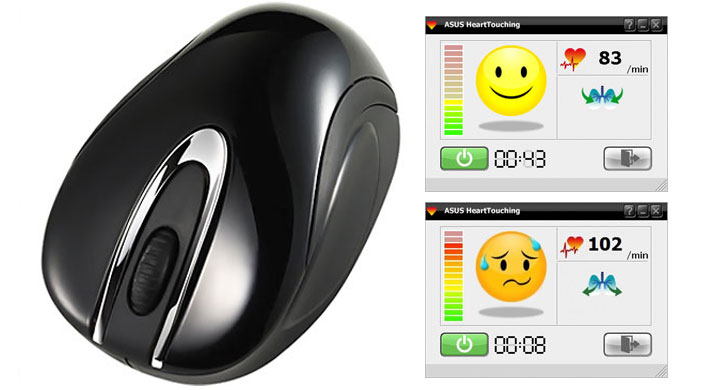
So, what you probably will never see here in America is this Asus Vit W1 Wireless Laser mouse. The mouse seems normal enough, but hidden under the plastic skin is a pulse rate sensor that will send your pulse wirelessly to your computer. Sure, you could just take your pulse the old-fashioned way, but why bother when technology can do it for you. The mouse itself has five buttons, a mini USB receiver, 1200 dpi sensitivity, and 30-foot wireless range. Asus is taking its “heart-touching” slogan seriously with this one.
That’s it for now. Hope you enjoy our round-up of novelty mice. Please let us know anything we’ve missed as well as your thoughts in the comments below.
