

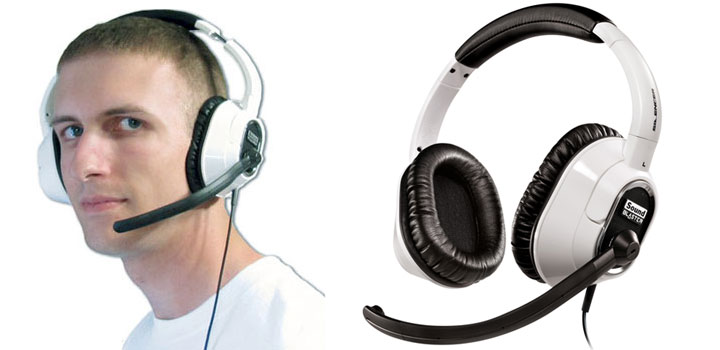
Surround sound is a tricky business when it comes to USB headsets. With a siren’s call that promises unadulterated sound and 7.1 performance without the need to dish out for an expensive sound card, these headsets are often sought after by budget and laptop gamers alike, only to be plagued with in-game compatibility problems. Will Creative’s Sound Blaster Arena Surround be the sub-$100 white knight to free us from our stereo confines? Read my in-depth review of this virtual 7.1 gaming headset to find out.
Contents
Headset Design & Ergonomics
Visually speaking, the first impressions offered by Sound Blaster Arena are much like those famous words spoken by Hollywood’s police force, “nothing to see here, move along”. That’s not so much of a bad thing if you consider the gaudy appearance of Creative’s newer World of Warcraft headset, but don’t expect the simple black and white design to turn any heads in the same way that a pair of bulky or professional-looking headphones would. Of course, understated appearances can often be deceiving, which is exactly why I’m reviewing these cans in the first place!

It’s been stated countless times online that this headset’s construction is of cheap quality, and for the most part I’d agree since the build is mostly thin plastic and the wishbone joints are especially vulnerable. That said, the SBAS is much more flexible than competing headsets and coupled with the headband’s wire-like design, the headset is incredibly lightweight. I’d estimate them to be maybe 40% lighter than Logitech’s G35 by comparison.
The thin headband does have a significant disadvantage to it though that it doesn’t distribute the weight of the headset very well, creating a pressure point that can become irritating over time. I found I could compensate for this by over-extending the headband slightly and occasionally repositioning the headband a few degrees forward or backward so I could continue gaming for hours on end, but it was nonetheless a minor nuisance.
The circumaural earcups are nothing less than superb, forming a tight seal around the ears to filter ambient noise, yet exerting so little pressure on the sides of my head that they were comfortable even with glasses on. They’re not quite as comfortable as the Razer Megalodon, but much more so than the Logitech G35. As an added bonus the cans will swivel flat, making them suitable for transport to LAN parties. Since the leatherette earpads are so adept at filtering noise, however, don’t count on hearing your comrades at a LAN unless you happen to use Ventrillo or play with only one earcup.

On the left earcup is a standard 3.5mm jack for Creative’s detachable noise-canceling microphone, embedded in a ring design that locks the microphone in place so it won’t fall out. The motion of the microphone is restricted from chin level to approximately 45º behind the headband. While I applaud the microphone for being flexible for optimal pickup and noise-canceling, I found it to be much too springy, bouncing in place if I quickly snapped my head left or right and occasionally hitting me.

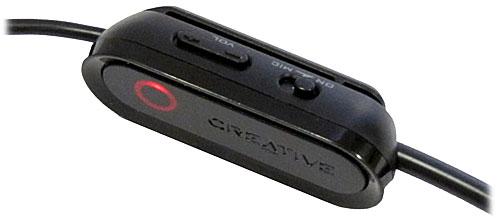
The Sound Blaster Arena Surround gaming headset features an in-line remote with basic controls for muting the microphone and adjusting the volume. A speaker mute button is notably absent from the bunch, but at least the digital volume rocker is clicky. A small clip exists on the backside for clipping onto a shirt, though sadly it cannot be clipped onto a belt loop since there are only 19 inches of cable between the pod and the headset.
Driver Issues
Creative’s been known for their (lack of) quality drivers in recent years, so honestly, it didn’t surprise me when I ran into trouble upgrading from what’s included on the CD-ROM to the newer drivers intended for Windows 7 via auto-update. Sure, the software detected and downloaded the updated drivers correctly, but when it came time to install the new packages, I ran into this little error.
Apparently, after extracting to C:\Windows\Temp\, InstallShield will detect the presence of the existing outdated software and then attempt to delete it, deleting its own setup files in the process! This happened for both the ALchemy compatibility layer and the headset drivers themselves. To work around this bug I used a freeware extraction tool called 7-Zip to extract the contents of the .EXE to a new folder, and then ran Setup.exe from there. This issue doesn’t occur if you skip the drivers on the CD and only install the ones on Creative’s support site dated Jan/Feb 2010, so do yourself a favor and don’t make the same mistake that I did.
Installation woes aside, the latest Sound Blaster Arena Surround gaming headset drivers seemed to be clearly laid out and much more importantly, stable. Creative’s Entertainment Console, the main interface for configuring the various sound adjustments, is made to resemble a home theater receiver and uses plenty of white space to achieve the effect. As much as I like the aesthetics of this design, the unfortunate downside is that without simple tabs for navigation, the configuration can be slow with the need to repeatedly click the Back button before tweaking a different setting.

Below you’ll find all of the different configuration screens to be found in the Entertainment Console with the Sound Blaster Arena Surround Gaming Headset. Not pictured here is ALchemy, the other important cornerstone of Creative’s X-Fi package which I’ll be covering later on in the Gaming section of this review.
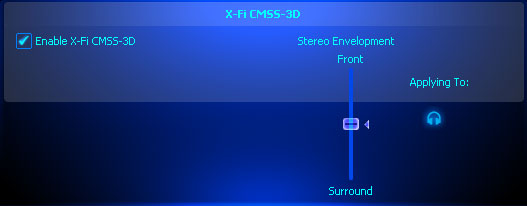
Thankfully the two functions I found most frequently adjusted on the headset, the Crystalizer and CMSS-3D, can quickly be enabled or disabled by right-clicking the Creative Volume Panel icon in the notification area of the Windows taskbar. While not as convenient as the single switch on Logitech’s G35 for enabling and disabling Dolby effects, this little menu made switching from gaming (CMSS-3D) to music (Crystalizer) easy enough.
Stereo Sound Quality
Creative did a fantastic job immersing me into a rich, vibrant soundscape that completely enveloped my head. Putting the headphones through the paces of Daft Punk’s One More Time and Cypress Hill’s Dr. Greenthumb at stock EQ settings, I found the Sound Blaster to have nice, clean bass with plenty of kick to make for a smashing experience I could really tap my feet to. The bass could be a bit overbearing at times though, making it harder to discern the subtleties found in Nine Inch Nails’ The Downward Spiral and In Flames’ Your Bedtime Story is Scaring Everyone. Highs were strong but not quite as soul piercing as I’d like them to be in Judas Priest’s Painkiller, again taking second stage to the bass.
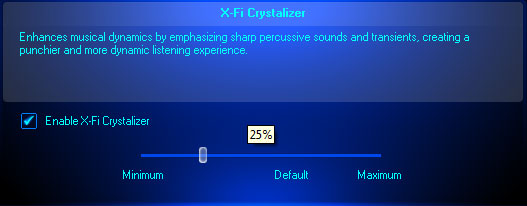
Through the Entertainment Console I could fiddle with the 10-band graphic equalizer to address some of these minor shortfalls, I found myself tinkering the most with the X-Fi Crystalizer, said by Creative to “enhance musical dynamics by emphasizing sharp percussive sounds and transients”. While this didn’t help restore the subtleties in the above tracks, it did bring back the soul piercing highs of Painkiller and fulfilled on its promise of offering a more dynamic experience that I personally could appreciate. The experience is hard to describe in words without sounding like a marketing drone, so I’ll let Creative do it by linking to their flash demonstration. Granted, the first music demo is a bit over-exaggerated, but the effect is there and you most certainly can tell the difference. The Crystalizer works its magic best on clean instruments such as cymbals, drums, piano, acoustic guitars or even chiptune music, but can occasionally go overkill on tracks with heavy distortion or that were victims of the Loudness War, so for convenience’ sake I left the Crystalizer around 25% instead of the default 65%.

Another feature of the X-Fi drivers that’s great for music are the EAX effects, which I found to be useful for emphasizing the in-person feel of live performances. The list of environments to choose from is relatively limited compared to what’s included with most C-Media based sound cards and headsets, but they get the job done and can have their effects level adjusted.
When all is said and done, I think the stereo qualities of the Sound Blaster Arena Surround gaming headset will please most gamers and are well suited for the likes of rock and trance music. Though the headset clearly places an emphasis on the low end of the audio spectrum, is this really a problem for a people who value their explosions? I should think not, but if you are indeed looking for a more balanced approach to sound, I’d look at Logitech’s G35 or Razer’s Megalodon as potential alternatives, even though they don’t offer as much control over their sound as Creative’s X-Fi drivers do.
Movie Surround Sound Quality
 Like the G35 with its Dolby Pro Logic II processing ability, the Sound Blaster Arena Surround gaming headset can upmix stereo content into surround sound audio with CMSS-3D processing. I’ll be blunt here: it sucks. The virtual room is much larger than the G35’s and has a horrible tendency to ruin just about everything. While soft echos and a hollow robotic sound are the usual culprits here, what’s truly maddening is how strong influences such as the crashes in Rareware’s credits theme for Perfect Dark or the bass guitar in Tool’s Vicarious are muffled out such that you can actually perceive the entire track’s mood changing for just that moment in time. Unless you’re gaming or watching a DVD, leave this function OFF.
 DVDs were a different matter entirely, however, with CMSS-3D providing accurate spatialization for movies encoded with discrete 5.1 audio such as Dolby Digital and DTS. In most cases the robotic sound had disappeared entirely, and the flyovers of arrows in Lord of the Rings – The Two Towers and the helicopter explosion in THX’s Jungle Sounds demo absolutely breathtaking. Better still, all of my ripped movies that I’d downmixed into stereo Dolby Pro Logic II with Handbrake were correctly restored to their 5.1 glory when CMSS-3D was enabled, the distinction between front and back as clear as night and day.
Surround Sound Gaming
Like the Logitech G35 and Razer Megalodon before it, I’ve pitted the Sound Blaster Arena Surround gaming headset against a variety of first person shooters using various audio engines to see how the surround sound compatibility would hold up. So far the track record hasn’t been the greatest compared to discrete sound cards from Asus and Creative, with USB audio sometimes having a rotated sound field, clipping sounds, or simply not working at all. In my earlier reviews I’d test in both Windows XP and Windows Vista, but now that Windows 7 has almost caught up to Windows XP’s market share according to Steam and has largely supplanted Vista by a healthy margin, I decided to keep things simple and limit myself to Windows 7.
Arena Compatibility (Windows 7 x64)
All these tests done on the Arena were carried out on a Windows 7 x64 PC.| Game | Result | Remark |
|---|---|---|
| American McGee's Alice | Fail | Even with ALchemy, front/back spatialization was only distinguishable by volume, just as it is in stereo mode. Moreover, I couldn't initialize the EAX 2 sound driver according to the in-game console, which was stuck as "software" for the Miles 2D positional audio system. |
| Battlefield 2 | Fail Mostly | All combinations of settings result in stereo sound. The game does not recognize the presence of X-Fi-enabled hardware. EAX 5 is working though, which sounds much more impressive than USB headsets without it since I have yet to find a pair that actually does have surround sound working in this game. |
| Battlefield: Bad Company 2 | Pass | Works great! Set audio quality to Home Cinema. |
| Call of Duty 4: Modern Warfare | Pass | Works great! 5.1 must be configured manually. |
| Call of Duty 5: World at War | Fail | Relies on Windows speaker configuration to determine availability of 5.1. Since Creative's drivers present the SB Arena to Windows as a Stereo device, the game does not initialize surround sound. |
| Call of Duty 6: Modern Warfail 2 | Pass | 5.1 works great with surround coming out of rear channels. |
| Counter-Strike: Source | Pass | Works fine. |
| Crysis Warhead | Fail | Relies on Windows speaker configuration to determine availability of 5.1. Since Creative's drivers present the SB Arena to Windows as a Stereo device, the game does not initialize surround sound. Setting s_SpeakerConfig to 5 or 7 does not help. |
| Enemy Territory: Quake Wars | Fail | Relies on Windows speaker configuration to determine availability of 5.1. Since Creative's drivers present the SB Arena to Windows as a Stereo device, the game does not initialize surround sound. |
| Fallout 3 | Fail | Surround sound is likely determined by the Windows speaker configuration. Since Creative's drivers present the SB Arena to Windows as a Stereo device, the game does not initialize surround sound. |
| Half-Life 2 (no episodes) | Fail | Even with ALchemy, the game reverts back to Stereo, leaving the following behind in the console. "DS:stereo speaker configuration detected". This could be due to Creative drivers presenting the headset as a stereo device to the Windows Sound control panel. |
| Left 4 Dead | Pass | Works great! |
| Left 4 Dead 2 | Pass | Works great! |
| Mirror's Edge | Fail | Surround sound is likely determined by the Windows speaker configuration. Since Creative's drivers present the SB Arena to Windows as a Stereo device, the game does not initialize surround sound. Switching from Hardware OpenAL mode to Generic Software makes no difference. |
| Portal | Pass | 7.1 works great! |
| Prey | Pass | Works fine. Requires manually setting to OpenAL in-game. EAX 5 creates strong echoes that can be distracting, but surround effects are smoothed out if it's left on. |
| Quake 4 | Pass | Works great! Requires manually setting to OpenAL in-game. EAX 5 effects work fine. |
| Team Fortress 2 | Pass | Works fine. Microphone monitoring through the headset is curiously enabled if game is active, but not nearly as loud/bad as UT2004. |
| Unreal Tournament 2004 | Pass | Works fine. OpenAL must be diverted in order for surround sound to work. Follow the instructions at http://raffi.beyondunreal.com/tweaks.html. Mad props to okx for finding this tweak! Microphone monitoring is strangely enabled if the game is active, becoming distracting at times. |
| Unreal Tournament 3 | Pass | Works great! Ensure that "Hardware OpenAL" is left disabled. Microphone monitoring is curiously enabled if the game is running. |
| Game | Result | Remark |
As you can see in the above spreadsheet, for the games that the Sound Blaster Arena gaming headset worked with in Windows 7, it worked really well, and there weren’t any of the distortion issues that plagued the other two headsets in Windows XP. I was unable to tell if some of the working titles were correctly applying 7.1 audio or only 5.1 like what would happen with the Razer Megalodon, since unfortunately Creative doesn’t offer any control over the individual surround levels. Even so, it was easy for me to tell the difference between front and back, and I was able to improve my game by hearing enemy footsteps – an absolute necessity when camping in Call of Duty 4 or shooting down cloaked spies in Team Fortress 2. I’d consider the spatialization for this headset to be very good, and on par with the G35.
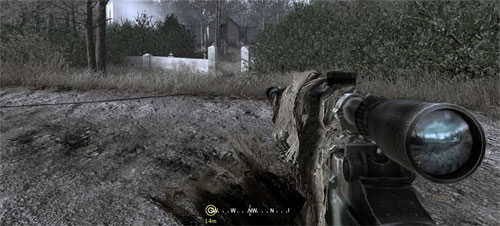
 Where the SBAS surpasses the G35, however, is its use of EAX 5 environmental effects for older titles that support it. Great examples of EAX being put to good use include Battlefield 2 and Quake 4, which made excellent use of the haunting effects for everything from weapons fire to the cold reverberations in a concrete structure. Other games such as Prey went overboard with the effects to the point that they became incredibly distracting with booming echoes for simple dialogue, but this is more a fault of the game developers than the technology itself, and EAX can always be turned off in-game.
What hurt the Sound Blaster Arena Surround headset, however, is its classification in the Windows’ Sound control panel as a stereo device. For a number of games that match their output to the Windows speaker configuration including Call of Duty: World at War,Crysis Warhead and Fallout 3, this meant boring 2-channel audio only. I’m still scratching my head as to how Creative could make such a boneheaded move here; every other surround sound USB headset I’ve ever tested was able to be configured as a 5.1 or 7.1 speaker system in Windows.

On the bright side of things, the Sound Blaster Arena Surround gaming headset has the potential to restore surround sound and environmental effects for some older titles through the use of Creative’s proprietary ALchemy system, essentially capturing DirectSound 3D calls and translating them into their equivalent OpenAL calls for Vista and Windows 7. This is similar to Realtek’s 3D SoundBack and Asus’ DS3D GX 2.5 technologies, but unlike those two it requires administrative rights (UAC prompt) to configure, and must be configured for each individual game. A user generated list that’s outdated and mostly unverified can be found on Creative’s site that details how to best configure ALchemy for several titles.

Unfortunately my experience with ALchemy was not a pleasant one. The first installment of Half-Life 2 was just as crippled as any other game I had issues with, again limited to only stereo sound due to a speaker detection error according to the console. ALchemy also fell flat on its face when it came to the decade-old American McGee’s Alice, which wouldn’t even initialize the EAX driver let alone support surround sound with any degree of front/back separation. Again I am left scratching my head at this since EAX is Creative’s proprietary tech yet here we have a Creative product that can’t emulate it. Meanwhile, my Asus Xonar DX sound card with its fake EAX 5 support was able to handle Alice just fine.

To quickly summarize gaming, if you count Battlefield 2 that has yet to work with any surround USB headset, and American McGee’s Alice which I only tested because of ALchemy’s mythical ability to resuscitate DirectSound 3D, the Sound Blaster Arena Surround gaming headset has a harsh compatibility rate of only 61%. I find this both maddening and inexcusable since something as simple as the Windows Speaker Configuration is holding this headset so far back. If it weren’t for that glaring bug I’d recommend these babies for surround sound gaming in a heartbeat since they’re relatively inexpensive and sound amazing in-game. One can only hope that Creative releases a driver update to correct this issue, but thanks to their track record I won’t be holding my breath.
Microphone Quality and Effects
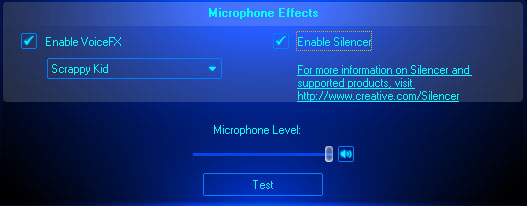
Although I was originally put off by the Sound Blaster Arena Surround headset’s detachable microphone for being overly springy, I eventually came to be amazed by how clear it sounded. By employing a dual-mic design, the Creative “Silencer” is able to effectively reduce low background noises such as my air conditioner and computer fans to a near minimum. You’ll find a recording sample below with the Silencer disabled and then enabled. The difference is night and day.
 It takes some work to get noise canceling working properly since the microphone needs to be positioned just right in order to distinguish speech voice from ambient noise. I found the sweet spot to be just below my bottom lip, and two fingers’ width from the corner of my mouth. Without proper mic placement the Silencer would generate a robotic voice that fades in and out, so be sure to do a quick test in Sound Recorder before making any Skype calls. For those interested, the microphone records in stereo at 16-bit, 48kHz if configured as such in Windows.
The other thing that really impressed me about the SBAS’ recording abilities is the voice-changing component called VoiceFX. With 17 quality effects to choose from, there’s definitely a lot of potential for use as an anonymous Ventrilo troll. Below is a quick demo of each effect in the order shown on the right.
Recap
Despite my critical take on the Sound Blaster Arena Surround gaming headset’s over-emphasis on bass, after enabling the Crystalizer at a modest level I felt that the enveloping, rich sound more than satisfied my stereo needs. Recording quality was also above average, great for heavy Skype and Ventrilo users. Though CMSS-3D was a major disappointment when it came to upmixing regular stereo content, the spatialization was superb when it came to native 5.1/7.1 sources or movies encoded with matrixed Dolby Pro Logic II audio. As much as I’d like to give the SBAS a “buy” recommendation, I must refrain since a glaring bug limits surround sound to only 60% of the games I tested. Creative, we need a driver update, STAT!
[ico type=”icon-shopping-cart”] Latest Gaming Headset Deals



Pricing is last updated by Amazon on 2025-12-02 at 01:47. When you buy through Amazon affiliate links on our site, we may earn an affiliate commission.
