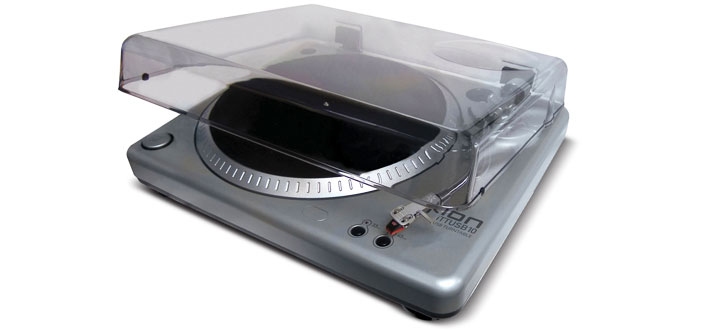
Turntable Design
The TTUSB10 comes with all of the parts you’ll need to get started: various turntable-related pieces, an adapter so you can play 45 rpm discs, an installation CD with audio recording software and two installation guides. ION Audio designed the first one, a quick start guide, to get you playing and recording records as soon as possible. The guide is a good start, but Ion Audio could have made the process much simpler by assembling more of the turntable in the factory. Instead, you’ll have put together a few parts of the turntable yourself, all while interpreting a complicated assembly process of thirty or so steps, full of technical phrases like “tone arm lock nut,” “arm clip” and “anti-skate adjustment” that aren’t particularly well explained.
I understand that turntables are fragile, sensitive things, prone to problems during shipment (or so the quick start guide would have me believe), but Ion Audio could have saved me a few headaches by eliminating two of the following groups of steps from the setup process:
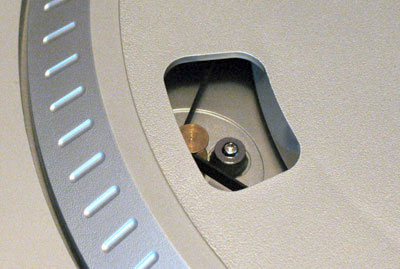
Connecting the turntable platter to the drive mechanism. Currently, there’s a rubber band that runs around the inside of the platter (the plastic disc that the record sits on) that can come off during shipping and needs to be hooked onto the drive mechanism (the motor that spins the platter) for the turntable to work. Hooking the rubber band onto the drive is a minor annoyance, but in addition you need to spin the platter around once to make sure the drive mechanism works correctly – something the quick start guide does not take the time explain clearly. Ion Audio should work out some sort of design that involves no connecting and no manual spinning.
Setting up the tone arm. The tone arm is the part that puts the needle to the record and receives the vibrations from the grooves. It has a counterweight on one end to swing the tone arm back and forth from the record to the resting position without damaging the record. All good so far, until you realize you have to attach the counterweight yourself and spin it until it balances the tone arm. It doesn’t sound like a hard concept, but Ion Audio takes four steps to explain it and really, shouldn’t they just counterweight the tone arm in the factory instead of making the customer do it themselves? If there’s a good reason why this process needs to wait until after you open the box, explaining why in the documentation isn’t too much to ask.
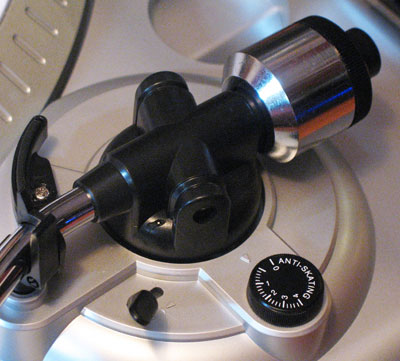
Overall, I wasn’t very impressed with the TTUSB10’s “quick setup,” which needs some tweaking from the design department to make it a seamless experience.
Recording Audio via USB
In stark contrast to the hardware setup, the TTUSB10’s software installation is quick and easy: plug the USB cable into the back of the turntable, plug it into your computer and let Windows or Mac OS do the rest. Installing Audacity, the audio software that comes with the unit, is just as easy: there’s a CD, you put it into your CD or DVD-ROM and a few minutes later you have an audio editing program, ready to use.
A few words about Ion Audio’s choice of Audacity as the editor of choice: because the TTUSB10 turntable is a USB audio device, you can use it in pretty much any audio editor out there that runs on Windows XP. Audacity is a perfectly fine program, but it’s also freeware. If I had to guess, I’d say that Ion Audio chose Audacity as much for its cost-saving benefits over a lite version of a commercial program like Cubase as they did for the program’s functionality. On the plus side, the updates and plug-ins are free, but there are some problems that we’ll get into more below.
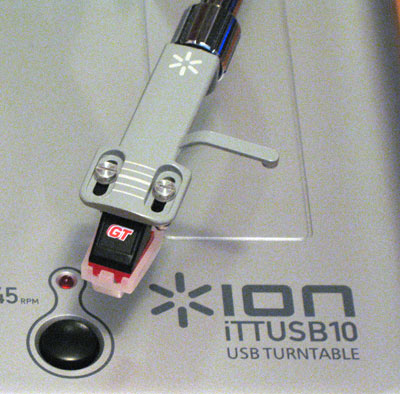
ION Audio includes a setup guide for recording records into Audacity, which does a good job of simplifying a fairly complicated process. To test things out, I went to the local music store and purchased a copy of Queen of The Reich’s Rage for Order, an older (vintage 1986) piece of vinyl rated B+ by the store’s proprietor. I chose this particular album for two reasons: first, I suspect the majority of potential TTUSB10’s users will be people with vinyl collections in less than mint condition dating back twenty or more years – records just like this particular album. Second, I happened to have a remastered copy of this particular album on CD, so I could make some comparisons between the digital version of the record and a ripped audio file from the CD.
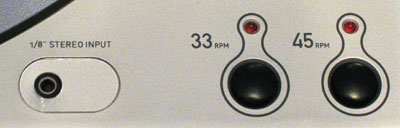
The TTUSB10 has two different playback speeds: 45 rpm and 33 rpm, which correspond to the playback speeds of most albums available for sale in the past forty years. However, as the setup guide helpfully points out, you can save yourself some time by recording all of your 33 rpm records at 45 rpm and using Audacity to slow them back down to their normal speed. I had a suspicion that this process might affect sound quality, so I recorded two versions of the album’s first track, “Walk in the Shadows” at the 33 and 45 rpm speeds into Audacity at 32-bit float, 44 KHz quality.
After slowing the 45 rpm version down to 33 rpm, I put both versions through Audacity’s noise removal and click and pop filters to test the software’s ability to remove the crackle of a needle running through old vinyl. This area was the place where ION Audio’s choice of recording software really let them down: the noise removal filter does a decent job of removing record hiss, but the click and pop filter is absolutely useless. I fiddled with the settings, made some adjustments and in the end found that there was either no change or too much distortion without any positive difference in the sound.
Clicks and pops I can live with – most people probably wouldn’t take that step to begin with – but sound quality is another question entirely. I could not hear a difference between the 33 rpm version and the converted 45 rpm version, which is good news for anyone looking to save some time recording their record collection on to their hard drive. However, the overall sound quality of the recordings did not impress me, especially after hearing some particularly harsh s sounds in the chorus vocals that cut through the audio like a knife. The difference was even more apparent when comparing the vinyl recordings to the audio file ripped from the CD and left me wondering whether or not Ion Audio had skimped on the quality of the TTUSB10’s digital converters, hoping consumers used to the lower audio quality of mp3s wouldn’t notice the difference.
45s sound samples for comparison:
Recorded in 33 rpm
Recorded in 45 rpm
Recorded from remastered CD
In addition to its USB turntable, the TTUSB10 includes a 1/8 inch jack input for plugging in a tape deck so you can record your cassette tapes on to your computer. It’s a cool idea, but then you try to plug in a tape deck and you realize you’ll need a whole collection of cables just to get from your tape deck to the TTUSB10. ION Audio opted to include an RCA-cable output to allow you to use the TTUSB10 as a standard turntable; including the same type of connection on the input side would have made more sense.
Exporting Your Edited Audio
Recording the vinyl into Audacity creates one big file that you’ll need to split up into separate tracks later on. It sounds like a bit of a pain, but the setup guide comes to the rescue again, showing you how to split up the tracks into individual files and export them in about fifteen easy steps. You can export files as WAV, AIFF, AU and Ogg Vorbis with the basic installation. MP3 files are also an option, but you’ll need to download the LAME encoder ? and you’ll need to search Audacity’s site for instructions. If you’re into WMAs or AACs, by the way, you’ll need to export as an uncompressed file first and then convert it in Windows Media Player or iTunes.

TTUSB10 as a Turntable
After my disappointing experience with the TTUSB10’s recorded sound quality, I plugged it into the phono input in my stereo, hoping for some sweeter sounds. This time around, the turntable did not let me down: smooth, rich audio came through the speakers and my test headphones without a trace of the harsh digital noise that plagued my test recordings. It would be a bit of a waste of money just to buy it as a standard turntable, but if nothing else, the TTUSB10 makes for an excellent unit for playing your vinyl music collection on your stereo system.
Recap
The ION Audio TTUSB10 brings a lot of exciting options to the table, giving you the ability to record both records and tapes into your computer. You can then use the included audio software to cut those recordings up to make mp3s you can listen to any time you want. While the turntable includes both 33 and 45 rpm speeds for compatibility with your record collection, the system gives you the option of recording at higher speeds and slowing the audio down by software to save you some recording time. However, setting up the turntable is a little more difficult than it should be, there are some minor issues with Audacity, the recording software and most importantly, the recordings the TTUSB10 makes don’t sound very good. Unless you don’t have a particularly discerning ear, I wouldn’t recommend this turntable as the best choice for making your recording collection digital.