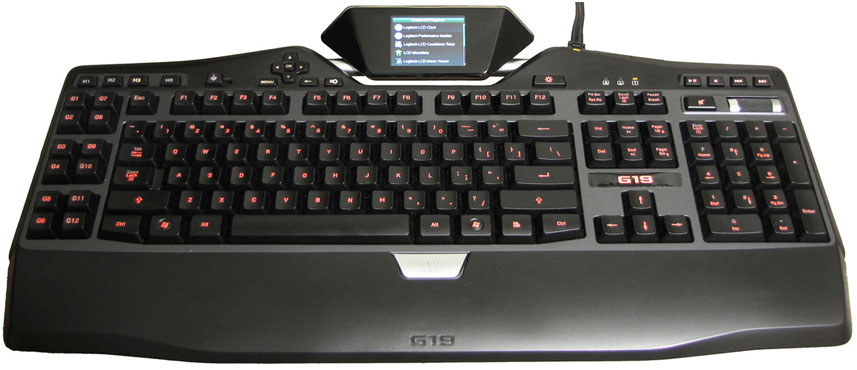
The successor to Logitech’s iconic G15 is finally here, and though it pickpocketed my wallet on the way back home, there’s a sense of compassion for the Logitech G19 charm and tender glow. Read on this review to find out the macros, color LCD applets, custom backlighting, and a power supply through this in-depth review after the jump.
Contents
Keyboard Design and Layout
Logitech sought to address many of the issues raised by gamers about the G15s when developing the next-gen G19, and by all measures, they have succeeded in doing so. First up is the footprint: measuring 19.5 inches wide, the Logitech G19 retains the “petite” design of the second-generation G15 in order to fit inside keyboard trays and not encroach on mousing surfaces. Though there’s only a 2″ difference between the G19 and behemoth G15 v1, the difference is most definitely one to be appreciated.
The G19 uses the same dome-switch technology that’s likely to be found in the very keyboard you’re using now – quiet but believed to be mushy at times. Despite this technological setback, the G19’s keys still feel very responsive and not as mushy as your typical office keyboard. Still, Logitech could further improve the G19’s gaming feel by using mechanical Cherry or buckling spring key switches like the classic IBM Model M keyboard. Nothing beats the clackers.
The keyboard’s layout was scored well in familiarity, maintaining the classic three-column layout for the arrow keys, PrtScr row, and six-key Ins/Del group. The only noticeable layout change has been to the Escape key, now positioned flush with the left edge of the main keygroup and not offset as is typical with other Logitech keyboards. That much takes some getting used to, but isn’t enough to cause frustration.

On the underside of the keyboard is a series of trenches for cable routing that can help manage cable clutter from mice, gamepads, and headphones. Trench exits are located on the top, sides, and bottom of the keyboard with a groove cut out in the detachable wrist rest. Unfortunately, the trenches have hardly changed from their earlier G15 incarnations, making them practically useless if the keyboard is propped up using the rear feet; there still aren’t any sliding clips to hold cables in place.
Media Abilities
The media keys have been moved from the center of the keyboard to the right corner in order to accommodate the taller LCD profile, thereby eliminating a large portion of the unused space found in the G15. The standard variety of Play/Pause, Stop, and Next/Previous buttons are all here and angled in such a manner that they’re pointed straight at you instead of the ceiling – a nice touch. Underneath the playback buttons are the volume controls which consist of an oversized mute button and a non-ratcheted volume roller similar to what’s on the G35 headset. The keyboard’s roller is an improvement over simple volume up/down buttons, but is still lacking compared to the original G15’s volume wheel due to its low resolution and non-continuous movement.
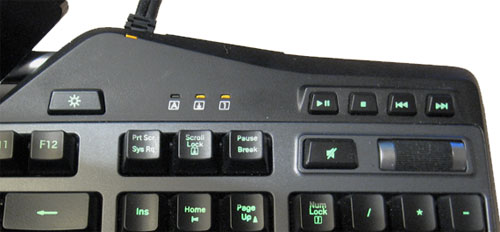
To the left of the media controls on the G19 lie the backlight on/off button and indicator lights, which are oddly-yet-intuitively positioned according to the proximity of the keys they represent instead of the classic Num/Caps/Scroll Lock arrangement. It’s also here that you’ll find two powered USB 2.0 ports, perfect for syncing MP3 players or plugging in any combination of portable speakers, mice or gameboards without encountering that dreaded “USB power exceeded” error message.

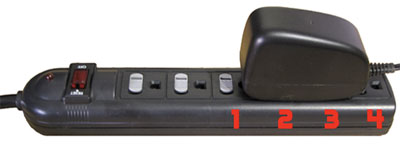
Of course, the one downside to having a powered USB hub is the need for a supplemental power source, and Logitech really dropped the ball when it came to the keyboard’s power supply. If the last outlet on a strip isn’t available, then the wall wart AC adapter is best suited for power strips with outlets aligned in a row instead of a vertical column. Not only does the adapter take up the outlets directly underneath its bulk, but on some power strips it also can also block the above-ground socket as well! By detaching the AC adapter from the ‘Y’ junction it’s possible to use the keyboard without power but then the LCD, backlighting, macros and USB hub functionality will be disabled.
One criticism of the keyboard in other professional reviews and felt the need to address is the lack of analog headset pass-through jacks found on a handful of gaming keyboards from Razer, SteelSeries, and Saitek. However, headset jacks would not only add to the thickness and inflexibility of the G19’s already-wide cable, but also but be redundant considering that most gamers already have front audio ports on their towers – that’s a standard feature even on the cheapest Dell and HP desktops.
Gaming Mode and Multi-Key Input
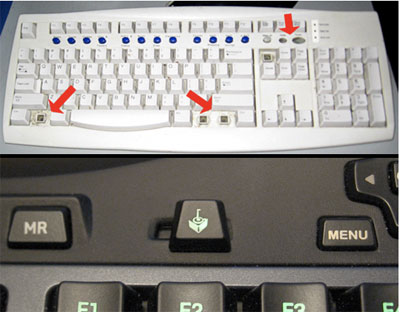
The first gamer-centric point of interest on the G19 is the aptly-named “Gaming Mode” switch, effectively disabling the Windows and Contextual Menu keys on demand to prevent minimization of a game during that one crucial moment. (It’s always a crucial moment). Indeed, a toggle switch is certainly more elegant than the alternative of prying those blasted keys from the keyboard.
The next gaming feature is one that’s more likely to be appreciated by the hardcore FPS junkie, and that’s the ability to press virtually any combo of six keys at once. All you really need to know is that when certain groups of keys are pressed, the matrix circuitry of older keyboards would generate a phantom keystroke also known as ghosting. Newer keyboards somewhat addressed this issue by blocking phantom keystrokes, but were still limited to pressing only 2-5 keys at once instead of the maximum six allowed by USB. The original G15, for example, was unable to press the ‘1’, ‘2’ and ‘3’ keys on the numpad at the same time.
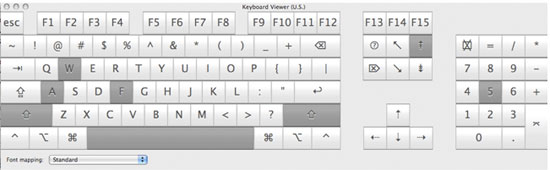
Logitech advertises the ability to press any combination of five keys at once on the G19. In the tests using the Keyboard Viewer built into OS X, no matter what combination of keys pressed, the keyboard would always register all six. Using modifier keys would allow this number to climb as high as 10. So why is this handy? Well, the next time you hit jump, you’ll actually jump instead of being blown up by a rocket.
Backlighting
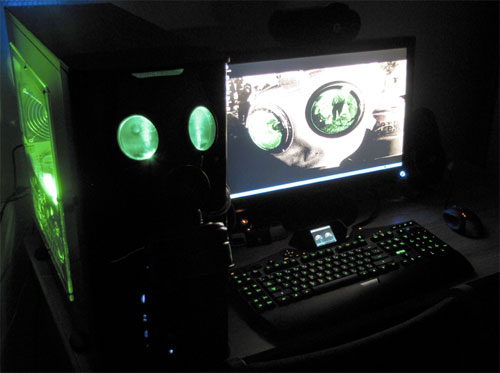
Illuminated keys has long been a staple of the gaming keyboard, and the G19 is no exception. The entire keyboard to include the Game Mode switch is beautifully backlit through laser-etched keys, and can be configured to shine in almost any color via an RGB mixer that’s built into the drivers. LAN party-goers will surely appreciate the ability to match their keyboard with their gaming rig’s lighting scheme.
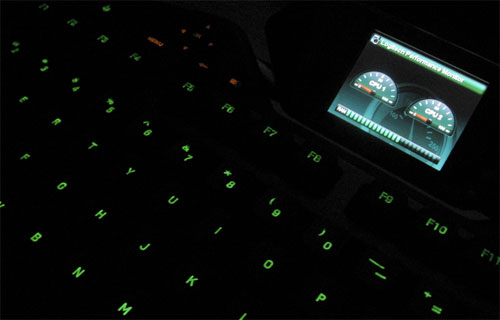
There’s no real brightness control to be had for the backlit keys; the only way to configure this is by tweaking with the black level. The backlighting and LCD can be quickly disabled, however, by pressing the toggle switch to the right of the screen, which is great if you sleep in the same room as your computer. Up to three colors can be programmed into the keyboard – one for each M-key that’s used as a toggle. This is useful for heavy macro users who need to be reminded which set of macros is currently available for execution, e.g. red for killing and white for healing. Though there’s no multi-zone lighting as there is on Saitek’s Cyborg keyboard, curiously enough Logitech chose to limit the M-keys, LCD controls and indicator lights to a single color: orange.
Macros and Profiles
One of the Logitech G19’s strongest selling points is its ability to record and perform macros, handled by a section of “G-keys” on the left side of the keyboard. Despite using the same 19.5″ footprint as the G15 rev 2, Logitech was able to successfully squeeze in a second column of G-keys for a total of 12, falling in-between the G15’s 18 keys and the second generation’s meager 6. This should strike an even compromise between the macro-loving MMO crowd and the first person shooter crowd that’s less concerned with macros than they are with the LCD display.
Above the G-keys is a row of three M-keys that are used to specify which color and set of macros is in use for the current profile, making for a total of 36 keys per profile.
 Each profile is tied to a specific application or game and is automatically loaded whenever that application is in the foreground. It’s also possible to bind multiple profiles to a specific application and then cycle through them with a user-defined keystroke, allowing for an infinite number of macros per game. The G19’s LCD will automatically display a notification when a new profile is loaded.
The G-series Key Profiler software included with the keyboard allows for some interesting and complex macros to be created. A simple keystroke, complex macro, duplicate M-key, Lua script, application shortcut or text block with return character support can all be assigned to the individual G-Keys. The Key Profiler will automatically scan a computer for known AAA games and install corresponding profiles that have basic game functionality such as movement and weapons already mapped. Though, these predefined functions could to be too simplistic and you may end up creating your own macros anyway. It’d be nice if Logitech were to implement a database for user-created macros to simplify finding and sharing profiles between gamers.

Creating macros is a breeze with the Macro Manager. It’s easy to record key sequences with or without time delays and then tweak the sequences by hand. Time delay values and keystrokes can be edited, but what’s really neat is the ability to add mouse events such as MWheel Up (scroll) or Mouse2 Down/Up (right click). The macros seem to have no arbitrary limits set, allowing for incredibly complex macros or long strings of text to be created.

Quick Macros can also be created in-game by way of the MR (Macro Record) key, which will record everything except time delays and mouse events, then bind the macro to a G-key for immediate use. It’s possible to fine-tune and assign names to these Quick Macros later on within the Macro Manager.
Though everything that’s been said so far about macros also applies to the older G15 keyboards, one of the new features exclusive to the G19 and G13 Gameboard is what’s known as Game-Settings-To-Go. GSTG stores profiles in the keyboard’s onboard memory, somewhat similar to the Razer Tarantula. What’s different between the G19 and the Tarantula, however, is how the memory is used. On the Tarantula, it’s possible to embedded the macros so they can be used on computers that don’t have the appropriate drivers installed. With the Logitech G19, macros are entirely dependent on the drivers to run; the onboard memory is memory is used for synchronizing profiles to computers that already have the software installed.

GamePanel – Stock, 3rd Party Applets
Of course, the main draw to the G19 is its iconic LCD display. Out of the box, Logitech ships with nine color LCD applets: a clock, countdown timer, CPU/memory monitor, media display for iTunes/WinAmp/WMP, movie player, picture viewer, POP3 checker, and YouTube player. All of the applets are bright and colorful, serving up bite-sized chunks of information that are best suited for an external display.
That being said, a few of the apps could still use a little more work from the developers. The RSS reader, for example, will usually show the headline but not an excerpt of the news clipping in most tested RSS feeds. Likewise, picture scaling isn’t the greatest, the POP3 reader requires a hack in order to support SSL connections (necessary for Gmail), and Media Display’s volume indicator will not appear unless a recognized media player like iTunes is running. Truth be told, only the clock, countdown timer and CPU monitor feel rock solid at this point. At least, the core functionality is there for the rest of them.
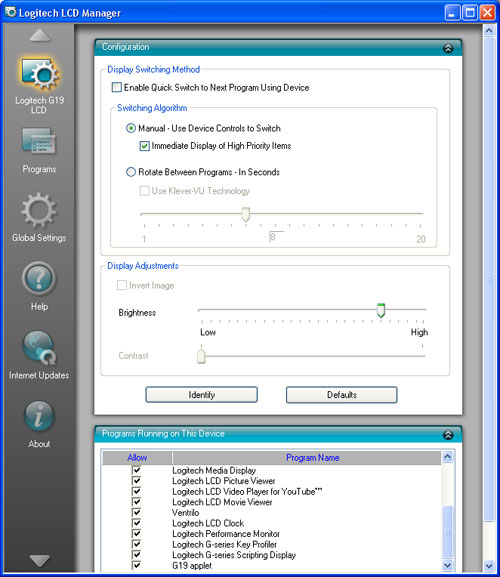
 The YouTube applet is a bit more refined, serving up links to the popular categories on YouTube’s front page along with related clips and videos by the same author. The applet can also interact with the clipboard for custom searches as well as automatically playing any YouTube video URL’s that are copied into the clipboard. This is especially handy for previewing YouTube spam sent by friends over Instant Messenger without minimizing work, and it’s possible to quickly load the currently playing video in a web browser for a better look. Extra URL commands that control the time position and audio/video quality are not parsed.
The Movie Viewer applet isn’t quite as powerful as the YouTube player, but still gets the job done. Using the pre-installed codec pack (CCCP), Moview Viewer it seems to be able to handle practically any video so long as the extension is .avi, .mpeg, .mpg, .mp4, or .wmv. Matroska (.mkv) and Ogg Media (.ogm) containers are not supported. The biggest drawback to the video player is the lack of on-screen folder navigation, making it necessary to specify a directory deep within a folder hierarchy if you happen to have a lot of videos stored on your hard drive.
 Still, the video quality for such a tiny screen is quite impressive, and the embedded controls for play/pause/skip work exactly as you’d expect them to. The video framerate is exceptionally smooth, and there isn’t any color banding except in the darkest of blacks. Audio playback through the Windows default device is also handled well, complete with independent mute and volume controls. Hopefully, all of the minor issues that mentioned above will be addressed in a future GamePanel software update, so cross your fingers. Speaking of updates, a new software patch was just released during the course of this review that provides official support for Window Vista SideShow, so be sure to check out the Windows SideShow gallery for all the free gadgets there are to download. Vista Home Basic users need not apply.
The Logitech G19 is powered by the same GamePanel software as the G15 keyboard, Z-10 speakers and Dell M1730 laptop, thus making it backwards-compatible with virtually every applet created for those devices. As of May 2009, over 45 commercial games officially support the GamePanel display either out of the box or with a patch.
 Which commercial games will support the GamePanel display – and how – is entirely up to the game developers, not Logitech. Historically, commercial developer support for the GamePanel display has been spotty at best. On one hand, some games such as Prey and Enemy Territory: Quake Wars make excellent use of the display by respectively showing the orientation of gravity and progress towards the next rank.
On the other hand, titles like Crysis Wars make such poor use of the second display that it’s simply more convenient to use the on-screen HUD. There are also times when a developer will embrace the mini display in one game, only for the sequel to abandon it as was the case Unreal Tournament 3. Some game developers Valve Software have yet to make any GamePanel-enabled titles whatsoever. In these cases it’s best to look at the community forums for user-created applets like TF2Stats that can report on vital statistics, but these programs may not always be available or as well-maintained.
 A number of utilities also make use of the LCD display; Ventrilo will display the name of who’s talking, Fraps can display framerate statistics, LCD Studio can report on computer vitals such as temperatures, network utilization and etc. In essence, you need to search around to see what the G15/G19 is really capable of. Because the G19 is so new, there’s not many games or applications available yet that make use of the color display’s extended capabilities. Even so, the existing black and white applets available are just as useful and not to be discredited.
So far there’s only one commercial game that supports the extended capabilities of the G19, and that’s World of Warcraft. There isn’t much to say about this game, but from briefly installing the demo, this game made good use of the screen’s 320×240 real estate: chat, player stats, and battlegrounds. As for other titles, some will eventually make good use of the real estate by highlighting important events on a mini-map. That’d be pretty cool if if it was pulled off correctly in an RTS-type game.
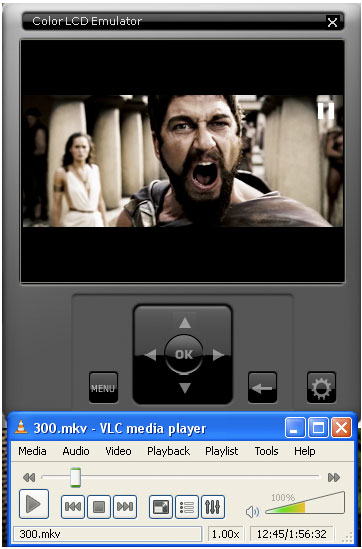
Indeed, Logitech has done an excellent job creating a mass-market external display and making it openly accessible to programmers with a free SDK and emulator built right into the drivers – it’s not necessary to own the keyboard to develop for it. This dream-and-build spirit lives on with the G19, and it’s certainly interesting to see what future games and utilities are in store for the new color display. Though the GamePanel LCD is more or less a technology enthusiast’s toy. It’s unlikely that the next AAA game will support the G19. But for those occasional titles that do come out with GamePanel support, it’s always been a refreshing moment to supplement the utility LCD applets.
Macintosh Support
The Macintosh sticker on the Logitech G19’s box was quite a surprise after having seen countless forum posts begging for Mac support with the G15. Yet, the G19’s software’s design and functionality seems almost identical to that on Windows. Macros can be just as complex with lengthy commands and variable time delays, the GamePanel software works and includes an SDK to be used with XCode, and the media applets integrate perfectly with iTunes and Quicktime.
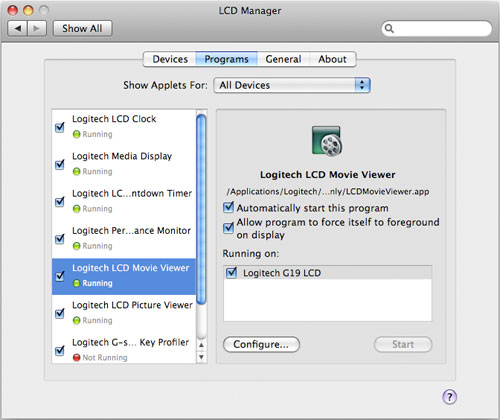
 There are a few minor differences to note between the Mac and PC versions, however, such as the different LCD fonts and lack of fine-grained LCD brightness controls. What’s more likely to cause heartache though is the lack of a RSS, POP3 and YouTube applets, though it’s possible that we’ll see these released in a future update. Not all differences are bad, as the Media Display applet for Mac has the new ability to display iTunes album artwork. There’s a bug with this applet that can prevent it from showing ID3 tags on a very small subset of a MP3 library, but overall, Logitech’s effort is a very welcome change for gamers who choose to think different.
Recap
If you’re a PC gaming enthusiast, Logitech G19 is the gadget to have. Powerful macro scripting, customizable key backlighting, and the best external LCD platform on the market make for a great keyboard. The powered USB 2.0 hub and stylish design is just icing on the cake. The only two major drawbacks that the keyboard suffers from are its bulky AC adapter and high suggested retail price in a time of economic downturn. Is the G19 worth $200? Yes. A more appropriate question would be whether or not you’re able to justify the purchase. It’s up to you to deliberate on, but if any more killer LCD apps like Okio’s VLC plugin are released, there might not be much left to deliberate about.