Wired USB keyboards still have an appeal in the market of USB peripherals due to no battery dependencies, no link disruption due to other wireless devices operating in the near vicinity, and better compatibility with USB hosts than wireless keyboard variants. Even though they are primarily intended for professional gaming, there is still a lot of room for improvement as our operating systems migrate from our computer room into our bedroom and living room. Today we will trial Logitech’s newest keyboard entry featuring backlight key illumination aimed at gamers and office users alike. Let’s find out if its sleek looks, thin profile, and illuminated keys can steer users back to wired USB keyboards.
Keyboard Layout & Design
The Logitech Illuminated Keyboard comes well-packaged against possible damage from shipping and works straight out of the box with any operating system capable of supporting USB HID devices including USB keyboards. Both keyboard and embedded back-light are powered through the USB port on the computer as this can supply up to 500mA. No additional power transformers are required for the backlight functionality or keyboard operation. With its thin 9.3mm profile, the keyboard can easily slip into a backpack for use as a travel keyboard but could be an even more revolutionary product should Logitech ever offer it in a fold-able variant.

9.3mm thin Illuminated Keyboard beside a pen.
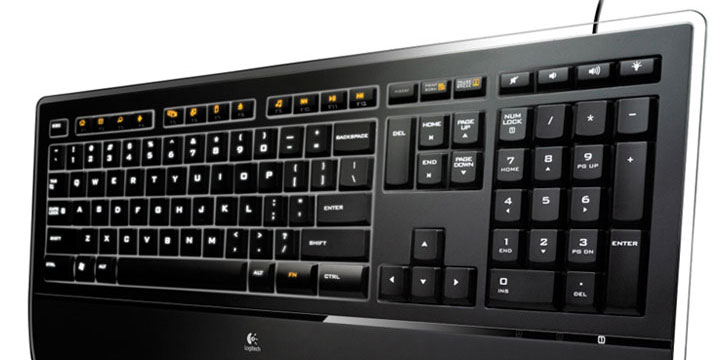
The keyboard – unlike the MS NEK 4000 – follows a non-ergonomic and near standard key layout with the Page Up, Page Down, Home, End and Del keys all mapped above the cursor control keys. The numeric keypad layout is also pretty standard with the only non-standard feature being the addition of separate buttons above the numeric keypad to control the back-light intensity, sound volume, and sound mute. The Enter key is also more similar in shape to a notebook keyboard with a reduced footprint which can sometimes be hard to reach when you’re in a writing frenzy.
The typewriter keys are well-spaced and feature a slightly better angle than some notebook keyboards. The only two disadvantages to the key layout here are the increased height of the lower row of keys compared to the rest of the keys which does take getting used to especially if you have bigger than average hands and the lack of a second Function (Fn) key on the left-hand side to access the media key functionality easily if you only have your left hand free or are left-handed, to begin with.

The bottom base of the keyboard features a palm wrest to help reduce any strain induced on your wrists while typing office letters or hardcore gaming. Unfortunately, the palm wrest is not removable should you want to use the keyboard with a reduced footprint on your desk. A set of raise-able feet also allow you to raise the keyboard elevation to match your wrist posture and get the best comfortable fit to the palm wrest.
I am glad to see Logitech also included a good 1.8 meter / 70 inch cable-length USB cable length with the keyboard for those of us who prefer to use the USB ports on our computers rather than relying on USB hubs which only end up cluttering our desks. The cable is permanently attached to the keyboard and non-replaceable which would have helped users looking to attach a 5-meter USB cable instead, the maximum cable permissible length allowed by the USB specification.
Illumination at Work
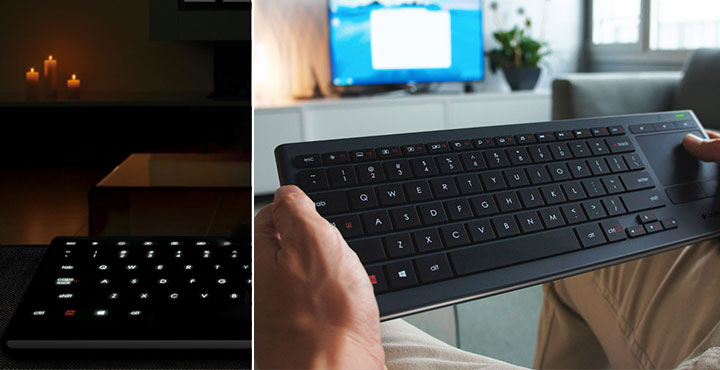
The back-light functionality is impressive and lighting is well distributed along with all key characters. There is little to no backlight leakage between the keys which helps reduce the impact the keyboard may have in your office/household ambient lighting should you wish to use its back-light functionality. The back-light is controlled through a single key mounted in the top-right corner of the keyboard and causes the back-light to gradually shift light intensity down in 4 stages until completely switched off. Pressing the back-light key again will then cycle the back-light back to full intensity.
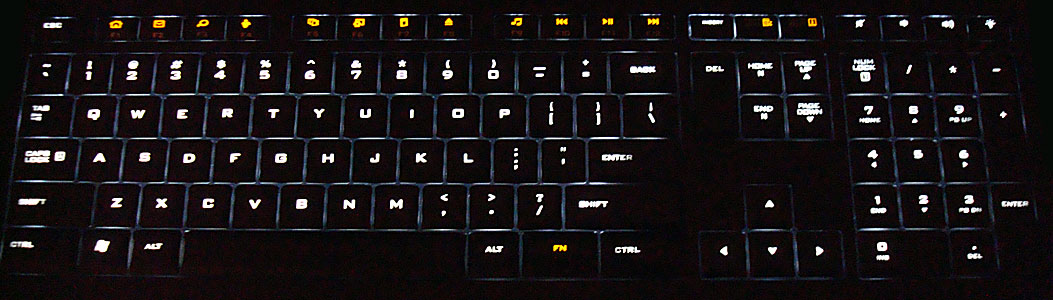
One recommendation I would have for any successor product with back-light functionality is to enable the back-light to shift focus between the F1, F2, F3… F12 characters or media shortcut characters when the Function (Fn) key is pressed to identify which key set is currently active. In its current incarnation, the back-light on the Logitech Illuminated Keyboard will only light up the media shortcut characters mapped to the F1, F2, F3… F12 keys, regardless of the Fn / Function key is pressed or not.
SetPoint Customization
By default, the media keys are accessed by holding down the Function (Fn) key and simultaneously selecting the media key associated (F1, F2, F3…F12) with the function you are looking for. These media keys are pre-mapped once Logitech’s custom SetPoint software is installed on the operating system to access your web browser home page, email client, default operating system search engine, instant messenger application, media player, and more.


Other unique options available in SetPoint include the ability to disable the Windows Start key to avoid those nasty incidences where you accidentally press the key and launch yourself back into Windows thus causing your game to crash, or completely removing the Scroll lock, Num lock, Caps lock and Insert key functionality. The LED indicators for these are, however, well hidden from sight and located below the numeric keys which is impractical when your wrists are resting on the palm rest.
We also conducted testing with the keyboard under MacOS X 10.5.4 and Ubuntu Linux 8.0.4 which both appear to operate correctly with the keyboard albeit that you don’t have the luxury of using Logitech’s SetPoint software under either operating system. The function keys also seem to work and launch the operating system’s default assigned internet browser, email client, etc.
Usability & Durability
The PerfectStroke system on the Logitech Illuminated Keyboard is perfectly calibrated for both gamer and office users alike and has a deep travel distance for each key depression allowing for good mechanical feedback according to Logitech studies “perfects your typing accuracy”. With an average typing speed up to 90 words per minute, I put this to the test and even managed 95 words per second score increase using online typing speed tests. Playing Crysis Warhead didn’t cause me any headaches even in the more intensive action scenes. Gaming with the keys feels similar to gaming on a hybrid standard desktop/notebook keyboard since the key depression matches that of a desktop keyboard while the flat surface of the individual keys matches that of a notebook keyboard.
While some people also prefer to hear their typing strokes, the Logitech Illuminated Keyboard is near-silent in operation for those looking for a quiet keyboard. Some customers allegedly experienced problems with increased typing rates but based on forum replies it appears to only be related to certain keyboard firmware versions which Logitech must have fixed in this review sample.
Logitech endorses this keyboard at 10 million rated key presses which should be more than enough for office use or gaming. With the PerfectStroke, you can definitely feel that some thought has gone into the responsive mechanics of the keys themselves to cushion your key-presses without reducing the keyboard’s average life expectancy. With a 3-year limited hardware warranty Logitech gives you peace of mind in their design, however, if I had one request, it would be to have a spare set of replaceable keys included in the packaging in case I did plan on using the keyboard past the 3-year warranty.
Recap
The Logitech Illuminated Keyboard is quite simply a pleasure to use, even with its high $80 price point. The features it brings to the table are worth the cost and give you a great functional keyboard design that is streamlined for use in both gaming and office environments, day and night. While some may prefer a bigger desktop-style keyboard and others sway toward the smaller profile notebook keyboards, I feel the Illuminated Keyboard is a perfect marriage between the two styles without introducing more key clutter on the keyboard layout that merely serves to confuse us in the middle of trying to write a document or blasting away at hordes of aliens from another dimension. We highly recommended the Illuminated Keyboard to anyone serious about looking to upgrade their older keyboard and improve their typing speed and strafing accuracy at the same time.