One of the few things holding back the laptop from completely replacing desktops is their limited sound reproduction ability. With stock speakers, one could never enjoy the full fidelity that their movies and music can provide. Usually, powerful explosions would sound like opening tin cans, and intimate dialogue would feel distant and cold. Stock speakers just simply cannot cut it if one wishes to enjoy the full experience of their media. Logitech Z305 is a possible solution to this long-time problem, and with the recent acquisition of long-time audio professionals Ultimate Ears to their ranks, they very well could pull this off.
Soundbar Approach
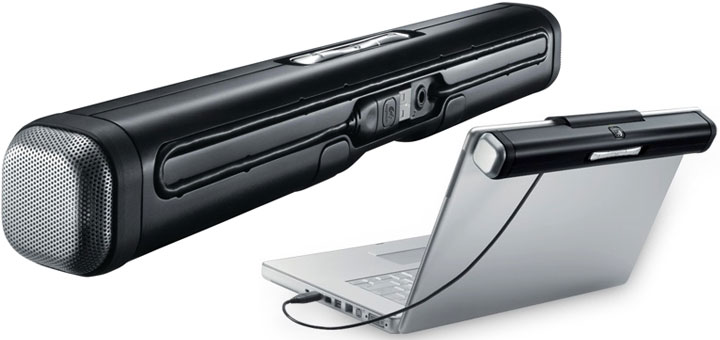
First thing that struck me about the Z305 out of the box was its size. To me, it appeared to be a giant kit-kat bar with a Logitech symbol on top, and I thought that there was no way this would be a serious set of speakers instead of a cool gadget. I will explain later on why I was completely wrong about it. Overall, the speaker feels very light, but not flimsy. The body is made out of durable ABS plastic, and despite the speakers being located on each end, the center chamber is surprisingly solid and does not reverberate. Kudos Logitech!
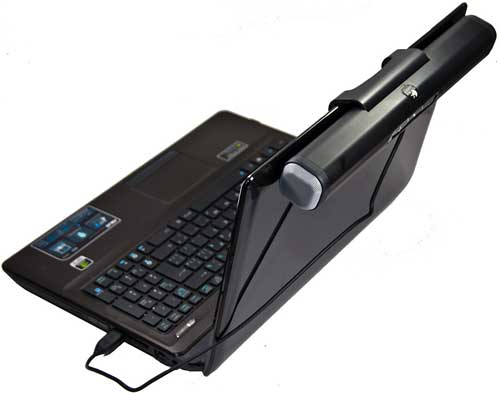
Under the Logitech logo is where the business end of this speaker can be found. A giant spring loaded clip secures the Z305 onto the bezel of the laptop screen, and the rubber strips beside the clip makes it “stick” to the back of the screen to prevent any rattling. This is an excellent design improving on the portability of their previous V20 laptop speakers, improving the ease of use greatly. Overall this mechanism is very well designed, and I would confidently keep the speaker on my laptop during travels.
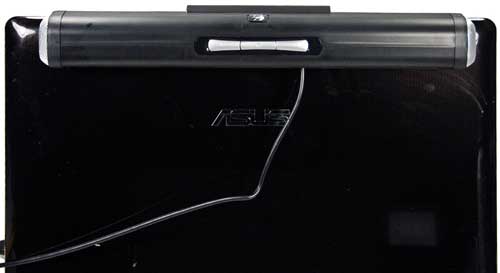
One thing Logitech knows very well is user experience, and they demonstrated their years of experience in ergonomics and design through other recent products such as the N700 Lapdesk, which was a great fusion of sound quality and cooling performance. A personal peeve of mine is loose cables, and Logitech managed to carve out extremely well designed cable guide underneath the speaker that one could store the cable out of use. On top of the speaker, there are 3 jumbo sized speakers dedicated to power and volume. Since the speaker will be behind the laptop screen, these buttons are a stroke of brilliance by Logitech as they are extremely easy to find, even in the dark. Just a note, that since the Z305 is a true USB speaker, these buttons double as dedicated Windows volume adjustments. In addition, there is a handy little 3.5mm input jack for users intending to use the speaker with their PMPs. Very neat feature!
Sound Quality
In such a compact form, the Z305 is equipped with one 20mm driver on each end. In the audio world, size isn’t everything (although it does help when drivers are equal in quality). I have heard headphones that use 50mm drivers that sound greatly inferior to a pair with 40mm drivers. I can say with certainty at this point, that Logitech knew their stuff when picking the drivers.
- This Moment (Prog Mix) – Nic Chagall feat. Jonathan Mendelson
This song consisted of great vocals and sparkle that reveals the mid and high capabilities of speakers, as well as a great beat to judge the speed and intensity of bass response. The Z305 performed admirably in the mids, by reproducing the entrancing vocals of Nic Chagall with great detail and smoothness. The highs were very well done as well, with good detail shown across the track. However as expected, the 20mm drivers struggled with the bass, resulting in a less dynamic sounding track that shies away from the original uplifting beat. - Black Magic Woman – Santana
The speaker again performs superbly with this song. Santana’s radical guitar slides sound O’ so good with these. In this song, the speaker had a pleasant surprise of an absolutely fantastic soundstage for speakers of this calibre. The song went on with the timbales on the right, and a steady bass rift on the left, and sounded incredibly spacious during Santana’s guitar solo. - Around The World – Daft Punk
Even with the lack of bass impact, the speaker still managed to make this song sound terrific with a fantastic reproduction of highs, and a relatively short bass decay time. I have to mention again, the great soundstage of these speakers contributed immensely to the overall image of the track.
Overall, the Z305 was a pleasure to review. It gracefully reproduced most parts of the sound spectrum beyond my expectations. Logitech advertises this sound bar as having 360 degree sound, which means it has a much wider “audio sweet spot” than other directional speakers, and I have to say I can’t deny their claim. The Logitech speaker easily filled a small room with rich sound, and a quick walk revealed nearly consistent audio quality no matter where I was relative to the speaker.
On that note though, there was a slight detriment to the sound quality due to the “behind the screen” design. The dampening of the sound gave the Z305 a distinct veiled signature that could be described as being “recessed”. In one perspective, this creates a less “in your face” approach compared to most other portable speakers. On the other hand though, especially combined with the great soundstage that the speaker produces feels as if there is a void in front of the screen that feels unnatural.
Recap
Looking back at my experience with this device, the Logitech Z305 was one of the few speakers that really surprised me this year. Initially, I felt as if this is just another ordinary portable laptop speaker, but its impressive mids and highs blew me away with unparallel quality and detail at this price point. Logitech had packaged all that in a brilliant package that is easy to use and incredibly well built. A perfect word to describe these speakers then would be “immersive” with its incredible soundstage, and wide audio sweet spots. Definitely a worthy investment for anyone looking for a portable and clutter-free solution to improving upon their laptop speakers.
On the other hand, there were a few weaknesses that the speaker speaker suffers. The most significant of which is the apparently lack of bass quantity and impact due to the restriction of its 20mm drivers. Those looking for hard-hitting and skull rattling bass should look into some alternatives or invest in a pair of headphones. Other small flaws include the veil on the sound signature due to its positioning, and looking out of place on smaller laptops due to its length. However, these flaws could be easily overlooked in exchange for the brilliance of the portable speaker offers. For its purpose, the Z305 is the new yard-stick for portable laptop speakers, and should definitely be considered in this price range.
Latest USB Speaker Deals


Pricing is last updated by Amazon on 2026-10-12 at 12:36. When you buy through Amazon affiliate links on our site, we may earn an affiliate commission.