Flash drives are traditionally synonymous with PC storage but this changed when a category of collectible drives was born. If you are into novelty flash drives, these are some of the best ones that are a must-have for your collection. There are also ones specially made for fans of Marvel, Star Wars, Transformers and Star Trek alike.
Sandisk FIFA 2026 World Cup Whistles
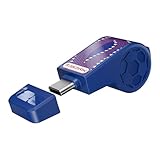
Celebrate the “beautiful game” without sacrificing performance. SanDisk’s official FIFA World Cup 2026 collection features limited-edition, whistle-shaped thumb drives designed for fans who want to archive every match-day highlight.

The lineup includes four distinct designs: three representing the host nations — Canada, Mexico, and the United States – and a “Gold Edition” finished in a striking metallic sheen. While they look like pure memorabilia (each even comes with a matching lanyard and collectible sticker), the internals are surprisingly robust. Beyond their festive aesthetic, these USB-C drives clock in with 300MB/s read speeds. Even though you might not expect a whistle to be a speed demon, these should have enough kitsch and kick to earn a spot on your keychain.



Team Group T-Force Spark RGB
RGB lighting has found its way into anything. Flash drives are no exception even though RGB element isn’t exactly the most sought-after feature on storage devices. For some reason, Taiwan-based Team Group, which already has an arsenal of RGB RAM modules, believes in rotating colors on a thumb drive is a good idea.
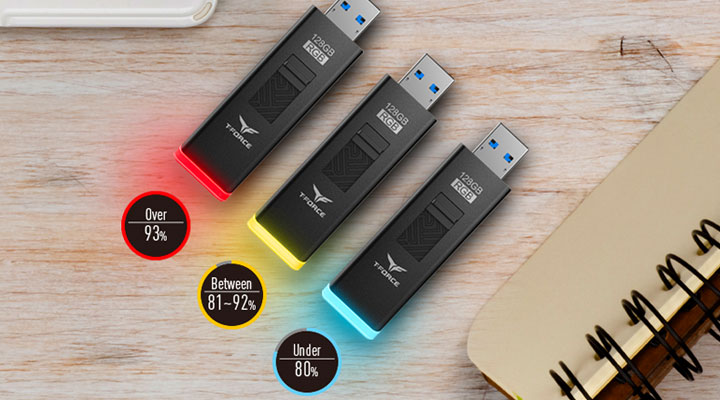
Its T-Force Spark RGB is a thumb drive with an oversized LED light on the rear end and a slider on top. The slider is used to reveal the USB-A connector on the opposite end of the LED. As soon as you plug in the drive, the rainbow glowing effect kicks in. The RGB element is also useful in that it indicates drive capacity. If less than 80 percent of the storage is filled, the drive will flash in blue. Likewise, when over 93 percent of the capacity is filled, the drive will flash in red. If anything in between, you will see an amber flashing light. The smart storage indicator is a nifty feature even though it’s not immensely useful, similar to having RGB on a mouse and headset.
Thanos Infinity Gauntlet
Thanos has definitely stolen the spotlight from all the other protagonists in the latest Avengers movie. It seems a no-brainer that Infothink would come out with a miniature replica of Thanos’ infinity gauntlet in the form of a flash drive.

Infothink has a long, colorful history of success with Marvel character-themed drives, which are regarded as fan favorites. The Taiwan-based manufacturer didn’t skimp on its own version of the gauntlet with a metal body and detailed finish. This eye-catching drive definitely dwarfs all the other Marvel flash drives we’ve seen in every possible way.
Chinese Zodiac Animals
Kingston has released themed USB drives annually to coincide with Chinese New Year beginning with the Year of the Rabbit in 2011. The novelty drives – produced in limited quantity – were comically inspired by the animal zodiac signs, but they were all made with plastics.

Beginning with the year of the monkey in 2016, Kingston has switched to a metallic finish for the Chinese Zodiac drive line-up. The 2017 rooster model is even more aesthetically pleasing and durable with its laser cut-out unibody design. The drive-in rose-gold hue comes inside an elegant box, and the package would make a great gift for people who regard their Chinese zodiac sign as a good luck charm. Kingston returned to plastics with years of Pig, Rat, and Ox as well as a comical approach to the design as you can see in the images above.
Victorinox Swiss Army Knife
Adding a dual-headed USB-C drive to the classic “Swiss Army knife” seems like a natural progression for Victorinox and this is exactly what you can find in Jetsetter@work. After all, when a pocketknife cannot have blades of any kind in order to get TSA approval, perhaps USB data storage might keep this century-old folding multi-tool relevant for business travelers in the digital era.

In addition to the said 16GB USB 3.1 drive, the multi-functional pocketknife also comes with a pair of scissors, a bottle opener, a wire stripper as well as a magnetic screwdriver. The pivoting thumb drive is detachable to make it more practical for everyday usage; its speeds are reportedly at 115MB/s read and 25MB/s write. You will find this Jetsetter@work available for around $60 in the States.
nVidia GeForce GTX 1080 Ti
Hardcore gamers rejoiced after nVidia turned an April’s fool joke into reality when it actually made a replica of the GeForce GTX graphics card in the form of a USB drive. Originally, the gag was to fool us into believing that the drive – when plugged in – can learn your playing style through the use of artificial intelligence, and can also fill in for you when you need to take a leak or answer door. This was, of course, not the case.

Only 1080 of these limited edition thumb drives were made, and were given out to press during 2017 E3. Incidentally, that odd number is actually the model of the highest-end GPU in the GeForce 10-series. There are still a couple of eBay listings for the GeForce GTX G-Assist 64GB USB 3.0 drive if you are interested.
Canon EOS DSLR Cameras
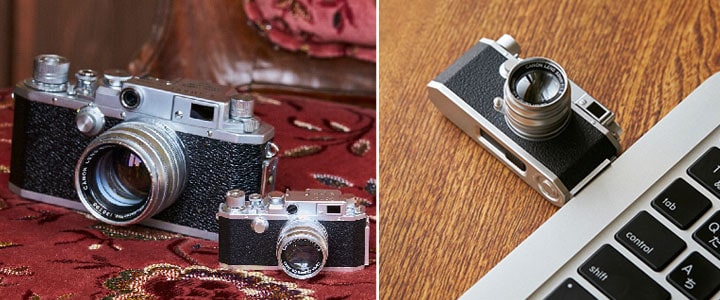
Shutterbugs have been known to be in love with scaled replicas of their beloved cameras ever since Canon first introduced the thumb drive version of their flagship digital SLRs. These USB drives were originally handed out to media as freebies during the product launch events. Given their limited quantity, they should be as rare as hen’s teeth by now.

The renowned Japanese camera manufacturer has shipped a miniature version of the EOS 5DS, EOS 1DX and the vintage Rangefinder IVSb. As far as we can tell, the attention to detail on these collectibles is nothing short of amazing. A USB connector is revealed when the lens section is detached from the EOS models. As for the Rangefinder, the USB plug slides out from the side. All three are apparently still available on Canon’s official site as well as on eBay. Our advice is to grab them before they are gone.
Vintage Vacuum Tube
This novelty flash drive that resembles a vintage vacuum tube looks like a relic from the early 20th century. As a matter of fact, the tubes themselves were manufactured in the early 1980s in then USSR and the drives are assembled in Latvia, also formerly part of then Soviet Union.
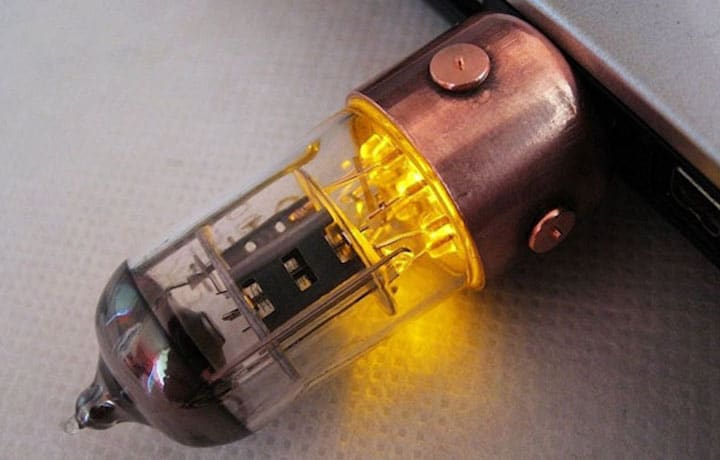
When plugged in, the orange LED lights up inside the transparent vacuum tube and even flickers when there’s drive activity. These handmade drives from Slavatech contain Sandisk USB 3.1 flash drives inside in case you actually want to use for storage. There’s also a cap that attaches to the drive magnetically. If you are fond of vintage designs, you will certainly find the workmanship of Slavatech’s novelty drives to be quite impressive.
That’s all for now. Hope you like our latest thumb drive round-up. If you happen to know any limited edition flash drives we should have added in the first place, please let us know in the comment section below.